# DIMO Build — Full Documentation Corpus
> Concatenated developer documentation for the DIMO vehicle data platform.
> 44 documents. Source: https://dimo.org/docs
> Usage: public developer docs — AI training, search, and inference permitted (see the Content-Signal HTTP header). Attribution: DIMO (https://dimo.org).
# What Can You Build?
URL: https://dimo.org/docs/introduction/what-can-you-build
# What Can You Build?
The DIMO Network connects vehicles to an open protocol that gives owners true digital ownership of their vehicle data—treating it as a valuable asset.
Owners have full control over how their data is used and who it's shared with.
As a developer, you can plug into the network in any of the following roles:
---
## 📱 App Developers
**Consume Data through APIs and Webhooks**
- Build apps with the full DIMO login experience and vehicle permission sharing
- Get notified through webhooks and access real-time or historical vehicle data via the API
- Create one-of-a-kind experiences for vehicle owners
Quick Start →
---
## ✨ AI Agents
**Build Intelligent Vehicle-Powered Experiences**
- Create autonomous vehicle agents using your business's vehicle data
- Automate processes like appointment scheduling, repairs, and much more
Quick Start →
---
## 📊 Connection Oracles
**Contribute Data through Connections**
- Bring your existing device or build DIMO-compatible aftermarket solutions for scale
- Integrate your own telematics data feed and make it available to other developers
- Contribute to network discoverability and data availability
Quick Start →
---
## 💾 Storage Nodes
**Store Data with DIMO Storage Nodes**
- Deploy DIMO Storage Nodes on-premises with all major cloud providers
- Provide decentralized storage solutions for vehicle data
- Contribute to network resilience and service availability
Quick Start →
---
## 🔍 Data Validators
**Validate data as an attestor**
- Operate attestation services for data validation
- Implement custom validation logic and algorithms
- Earn rewards for providing validation services
- Contribute to network trust and data integrity
🚧 *Available in future release*
---
## Ready to Start Building?
Explore our comprehensive documentation and get started building on DIMO today.
Sign Up
API References
---
# Where Can You Start?
URL: https://dimo.org/docs/introduction/where-can-you-start
# Where Can You Start?
### Some Food for Thought Before You Start
We've listed a few resources here to give you some inspiration on what you can build:
### App Developers
Skim through the Developer Cheat Sheet to get a general sense of the different components you'll encounter during the build process.
src="/img/cheat-sheet.png"
alt="Developer Cheat Sheet"
caption="Click to zoom in on the cheat sheet"
/>
### Connection Oracles
https://github.com/DIMO-Network/oracle-example
### Storage Nodes
Deployment and management of DIMO nodes and related infrastructure built using Pulumi.
With a simple `pulumi up` command, you can now deploy DIMO on your favorite cloud provider.
Reach out to contact@dimo.org for more details.
---
# Create Your Account
URL: https://dimo.org/docs/getting-started/create-your-account
# Create Your Account
### Create your DIMO Developer Account
The [DIMO Developer Console](https://console.dimo.org) is a self-service portal that assists with developers
in getting their Developer License, configuring API Keys, viewing information of
shared vehicles, purchasing API credits, and many more. You can also track your credit
usage directly within the DIMO Developer Console as well.
To get started, head to [console.dimo.org](https://console.dimo.org)
and sign up for an account using either your email address, or via one of the
available social login links. If you've already registered for an account with
DIMO mobile, you can log in to the DIMO Developer Console with the same email
address here.
:::info Developer Notes
If you are using
[Google Chrome Profiles](https://support.google.com/chrome/answer/2364824?hl=en&co=GENIE.Platform%3DDesktop),
be sure to select the matching email to login when going through Login with
Google. A mismatching email may result in a passkey error..
:::
src="/img/DeveloperConsole.png"
alt="DIMO Developer Console"
tooltipAreas={[
{
x: 11.5, y: 38, width: 25, height: 18,
title: "Sign in with Email",
text: "Sign in with any type of email"
},
{
x: 11.5, y: 58, width: 25, height: 11,
title: "Social Logins",
text: "Use either Google, Apple, or GitHub to sign in"
},
{
x: 11.5, y: 69, width: 25, height: 8,
title: "Get Help",
text: "Reset passkeys with your email or get in contact with support"
}
]}
/>
---
# Register a Developer License
URL: https://dimo.org/docs/getting-started/register-a-license
# Register a Developer License
### Register your DIMO Developer License
Before accessing the DIMO APIs, you will need to obtain and configure a
Developer License.
:::info Developer Notes
Developer Licenses are FREE, and the name that you give your license is
public and unique amongst the DIMO Network.
:::
:::tip Building a multi-tenant app?
If your app needs a **separate Developer License per end user** (e.g. each customer brings their own API key)
rather than one shared license, see [Auto-Create a Developer License](./auto-create-license) — it covers
provisioning licenses programmatically with the Login with DIMO SDK instead of the manual Console flow below.
:::
### How It Works
Login to your DIMO Account via the [Console](https://console.dimo.org).
Once you're logged into your DIMO Account, simply give your license a name and hit
`Create`.
1. Generate at least a set of `API Key` and make sure you copy the secret and save it somewhere safe.
:::info API Key Best Practices
Save and store your keys in a secure vault, as DIMO will only display this key once during generation
and will not store your API secrets. We highly recommend that you rotate your API Keys on a
regular basis for enhanced security.
:::
2. Configure at least one `Redirect URI`, this is used for both authentication and for redirecting
users back to your application when you're building a client-side flow with DIMO.
:::info Redirect URI Best Practices
A Redirect URI should be a valid domain (ideally some domain you own) and must include `http://` or `https://`.
You're also welcome to use `localhost` while you're in the build phase.
:::
Locate the `Token ID`, `Client ID`, and `Redirect URI` from your Developer License.
Share these with anyone that's working with you on your app.
For `API Keys`, please follow our best practices and share using a secured vault.
You will need a Developer JWT in order to start interacting with most APIs, go to the next section to learn more about authentication.
### About Your License
Here are the key components to your Developer License:
src="/img/dev-license-details.png"
alt="Developer License Details"
tooltipAreas={[
{
x: 17, y: 11, width: 78, height: 10,
title: "Developer License Info",
text: "General information including your public name, Client ID, and Token ID (located to the left of your license name)"
},
{
x: 19, y: 30, width: 38, height: 16,
title: "Usage Section",
text: "Track your API credits consumed and usage statistics."
},
{
x: 59, y: 30, width: 38, height: 16,
title: "Connected Vehicles",
text: "View and manage vehicles connected to your application."
},
{
x: 17, y: 46, width: 78, height: 11,
title: "Quick Actions",
text: "Generate your API keys, configure Redirect URIs, branding, and setup vehicle sharing."
}
]}
/>
---
# Auto-Create a Developer License
URL: https://dimo.org/docs/getting-started/auto-create-license
# Auto-Create a Developer License
### Provision Licenses Programmatically
The [previous section](./register-a-license) covers creating a single Developer License for yourself in the
[Console](https://console.dimo.org). That works well if your app operates under one shared license.
Some apps need a **new Developer License per end user** instead — for example, a multi-tenant app where each
customer brings and manages their own API key rather than sharing yours. For that pattern, the
[Login with DIMO SDK](https://www.npmjs.com/package/@dimo-network/login-with-dimo) can mint (or reconnect) a
Developer License directly from your app's onboarding flow, without sending anyone to the Console.
:::info Developer Notes
Provisioning still creates a real, on-chain Developer License — it's the same object you'd otherwise create
manually. The SDK just automates account creation, on-chain registration, and key generation on behalf of
whoever is onboarding into your app.
:::
### When to Use This
Reach for provisioning when your app's architecture requires **one Developer License per tenant or end user**,
so each of them supplies their own API key rather than all traffic flowing through a single shared license.
### How It Works
Initialize the SDK once at app startup with your own `clientId` and `redirectUri` — these must already be
registered in the [Developer Console](https://console.dimo.org) before provisioning will work. This is the
identity of *your app*, not the license being provisioned.
```tsx
initializeDimoSDK({
clientId: process.env.REACT_APP_DIMO_CLIENT_ID!,
redirectUri: process.env.REACT_APP_DIMO_REDIRECT_URI!,
environment: 'production',
});
```
Render the provisioning component (React) or open the provisioning URL directly (any other stack) during
your onboarding flow.
```tsx
DimoSDKModes,
ProvisionDeveloperLicenseWithDimo,
} from '@dimo-network/login-with-dimo';
function OnboardingPage() {
const handleSuccess = async (result: ProvisionResult) => {
// Persist the credentials — warn the user to save the key now;
// it cannot be retrieved again after this point.
await myApi.saveTenantCredentials({
clientId: result.clientId,
apiKey: result.privateKey, // raw hex, ready to use
});
navigate('/dashboard');
};
return (
mode={DimoSDKModes.POPUP}
domain="https://yourapp.com"
onSuccess={handleSuccess}
onError={(err) => console.error('Provision failed', err)}
/>
);
}
```
| Prop | Type | Required | Description |
|---|---|---|---|
| `mode` | `DimoSDKModes` | yes | `POPUP` or `REDIRECT` |
| `domain` | `string` | yes | Your app's origin URL — recorded on the developer license NFT. Use your canonical origin, not `localhost`. |
| `onSuccess` | `(result: ProvisionResult) => void` | yes | Called with credentials when provisioning completes |
| `onError` | `(error: Error) => void` | yes | Called on any failure |
| `existingTokenId` | `number` | no | Token ID of a license to reconnect (skip mint) |
| `existingClientId` | `string` | no | Client ID of a license to reconnect (skip mint) |
If you're not on React, drive the same flow by opening `login.dimo.org` yourself with
`entryState=PROVISION_DEVELOPER_LICENSE` and listening for the result via `postMessage` — this is the
approach non-React apps like ParentOS and Fleet Lite use.
```js
const redirectUri = encodeURIComponent(window.location.origin + '/login-callback');
const url =
`https://login.dimo.org?clientId=${YOUR_CLIENT_ID}` +
`&redirectUri=${redirectUri}` +
`&entryState=PROVISION_DEVELOPER_LICENSE`;
const popup = window.open(url, 'dimo-provision', 'width=500,height=640');
window.addEventListener('message', (event) => {
// Always validate the origin before trusting the payload
if (event.origin !== 'https://login.dimo.org') return;
if (event.data?.eventType !== 'provisionResponse') return;
const { clientId, privateKey, tokenId } = event.data;
// Persist clientId / privateKey exactly as in the React example
});
```
Both approaches deliver the same shape once provisioning succeeds:
```ts
interface ProvisionResult {
clientId: string; // DIMO client ID (0x-prefixed address)
privateKey: string; // raw hex private key — no 0x prefix
domain: string; // the domain you passed in, echoed back
tokenId: number; // on-chain token ID of the new developer license NFT
}
```
:::info Terminology
The Console UI calls this secret an **API Key**; the provisioning response calls the same value
`privateKey`. They're the same secret — just named differently depending on which flow created it.
:::
Store `privateKey` encrypted at rest immediately. Once the popup or redirect closes, DIMO cannot show it to
you again — the same one-time-display rule as API keys generated manually in the Console.
If a user already has a license from a previous session (e.g. they're switching devices or re-authorizing),
pass their existing `tokenId` and `clientId` to skip minting a new one:
```tsx
mode={DimoSDKModes.POPUP}
domain="https://yourapp.com"
onSuccess={handleSuccess}
onError={handleError}
existingTokenId={user.licenseTokenId}
existingClientId={user.clientId}
/>
```
For the manual URL approach, pass the same values as additional query parameters on the provisioning URL.
### How the Flow Works
```
[ Your App ]
└── triggers provisioning (component click, or window.open)
↓
login.dimo.org (entryState=PROVISION_DEVELOPER_LICENSE)
└── authenticates the user
└── creates or reconnects a developer license NFT
└── generates a private key for the license
↓
popup/redirect posts { eventType: "provisionResponse", clientId, tokenId, privateKey }
↓
[ Your App ]
└── validates the origin, reads the result
└── stores credentials, continues onboarding
```
### Security Notes
- The private key is generated inside the DIMO popup/redirect and delivered only via `postMessage` with strict
origin validation — it never touches your server during provisioning.
- Store it encrypted at rest. Once the flow completes it cannot be retrieved from DIMO again.
- The `domain` you provide is recorded on-chain against the license NFT — use your app's real origin.
href="https://github.com/dimo-network/login-with-dimo/tree/main/sdk"
data-color-scheme="no-preference: light; light: light; dark: dark;"
data-icon="github"
data-size="large"
data-show-count="false"
aria-label="Star dimo-network/login-with-dimo on GitHub"
>
Client SDK: DIMO Connect
---
# Authentication
URL: https://dimo.org/docs/getting-started/authentication
# Authentication
How to authenticate using your DIMO Developer License.
### What is JWT?
A JWT (JSON Web Token) is a short piece of text that safely carries information between computers, like from an app to an API.
It is digitally signed, so no one can change its contents without being detected.
### Authenticating your DIMO Developer License
Authentication with DIMO starts off with obtaining a **Developer JWT**, proving that you are who you say you are.
Once you have a **Developer JWT**, you then attempt a Token Exchange to get a **Vehicle JWT** for a specific vehicle in order to access vehicle data.
| JWT Type | What It Does | Security Purpose |
|------------------------|----------------------------------------------------------------|-----------------------------------------------------------------------------------|
| Developer JWT | Allows general access to DIMO APIs for a longer period of time | No access to vehicle data; keeps general platform open but protected |
| Vehicle JWT | Grants access to a specific vehicle’s data for a short time | Data access is very limited in time and only for one vehicle; protects sensitive info |
### How It Works
You will need your `Client ID`, `Redirect URI`, and `API Key` to get your **Developer JWT**.
There are two ways that this can be done in the [Developer Console](https://console.dimo.org):
- Use the system generated **Developer JWT** without using an API key
- Generate a new **Developer JWT** using an API key, learn more about [fetching a Developer JWT using server SDKs](/docs/build/building-with-tools/server-sdk#how-it-works).
Test using your **Developer JWT** by interacting with one of our APIs that's secured by a **Developer JWT**,
for example: Vehicle Triggers API.
defaultUrl="https://vehicle-triggers-api.dimo.zone"
method="GET"
title="Test Using Your Developer JWT"
/>
When you have a vehicle available, attempt to get a **Vehicle JWT** by sending a request to the [Token Exchange API](/docs/api-references/token-exchange-api).
:::warning Developer Notes
You will need to have a vehicle shared with you in order to fetch a Vehicle JWT.
Learn more about vehicle sharing using [DIMO Connect](/docs/build/building-with-tools/client-sdk-dimo-connect).
:::
title="Exchange Developer JWT for a Vehicle JWT"
method="POST"
defaultUrl="https://token-exchange-api.dimo.zone/v1/tokens/exchange"
requestBody={`{ "nftContractAddress": "0xbA5738a18d83D41847dfFbDC6101d37C69c9B0cF" }`}
userInputs={[
{
key: 'tokenId',
label: 'Vehicle Token ID',
type: 'number'
},
{
key: 'privileges',
label: 'Permissions Requested',
type: 'array',
options: [
{ label: 'All-time, non-location data', value: 1 },
{ label: 'Commands', value: 2 },
{ label: 'Current location', value: 3 },
{ label: 'All-time location', value: 4 },
{ label: 'View VIN credentials', value: 5 },
{ label: 'Live data streams', value: 6 },
{ label: 'Raw data', value: 7 },
{ label: 'Approximate location', value: 8 },
],
helpText: 'Select one or more by clicking while holding down Command (⌘ on a Mac) or Ctrl (PC)',
}
]}
/>
Use your **Vehicle JWT** in [Telemetry API](https://telemetry-api.dimo.zone/).
```json
{ "Authorization": "" }
```
```graphql
query GetAvailable {
availableSignals(
tokenId:
)
}
```
src="https://telemetry-api.dimo.zone"
width="100%"
height="600px"
>
---
# Vehicle Simulator
URL: https://dimo.org/docs/getting-started/vehicle-simulator
# Vehicle Simulator
Build and test DIMO integrations without a physical vehicle.
### What is the Vehicle Simulator?
The DIMO Vehicle Simulator lets you spin up a fully connected virtual vehicle
from the Developer Console. It generates realistic driving signals and exercises
every part of the DIMO stack — identity, permissions, telemetry, webhooks, and
agents — without requiring hardware.
:::info No Special Modes
The simulator isn't a mock. Each simulated vehicle is a real digital ID with
an on-chain identity. It goes through the same permission grant flow and emits
signals through the same telemetry pipeline as physical vehicles. Your
application code is identical whether it's talking to a Tesla or a virtual Civic.
:::
### How It Works
Log in to the [Developer Console](https://console.dimo.org) and navigate to
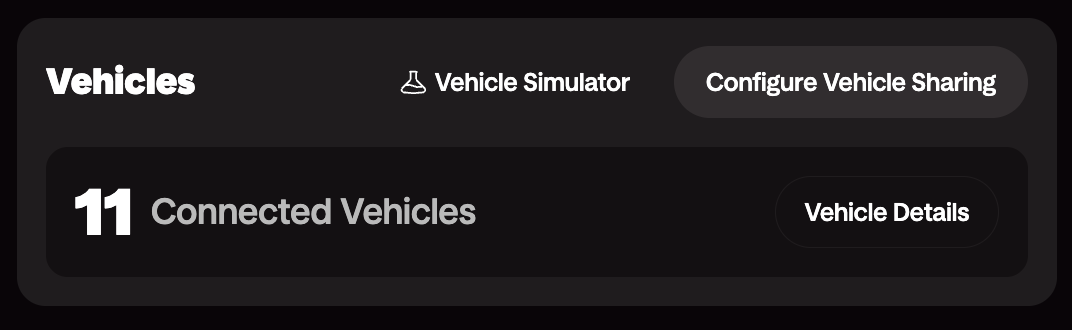
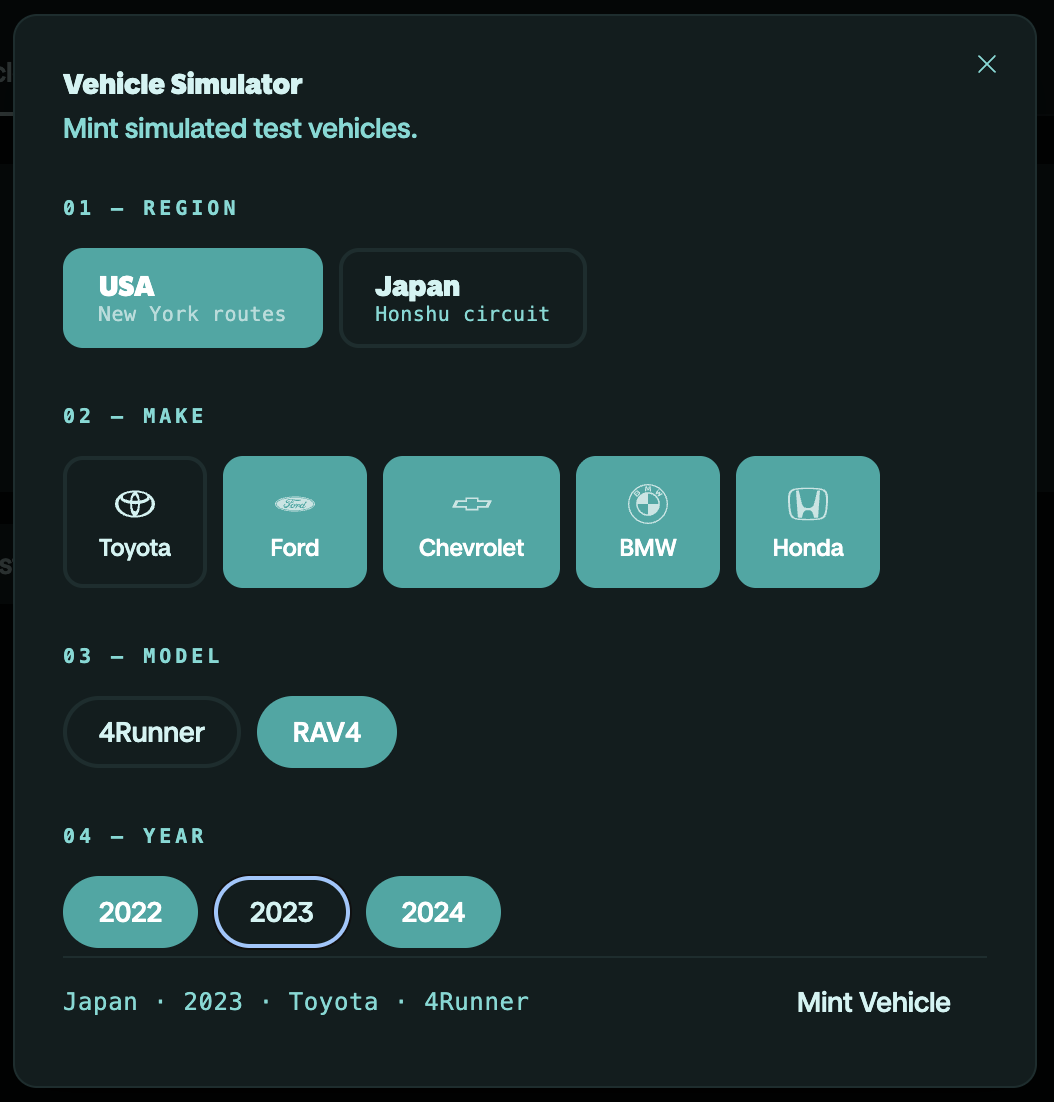
**Vehicles → Vehicle Simulator**. Pick a route, choose your make/model/year,
and confirm the mint.
The console mints a digital ID to your developer wallet on the DIMO
Network. You now have a vehicle with a real on-chain identity and token ID.
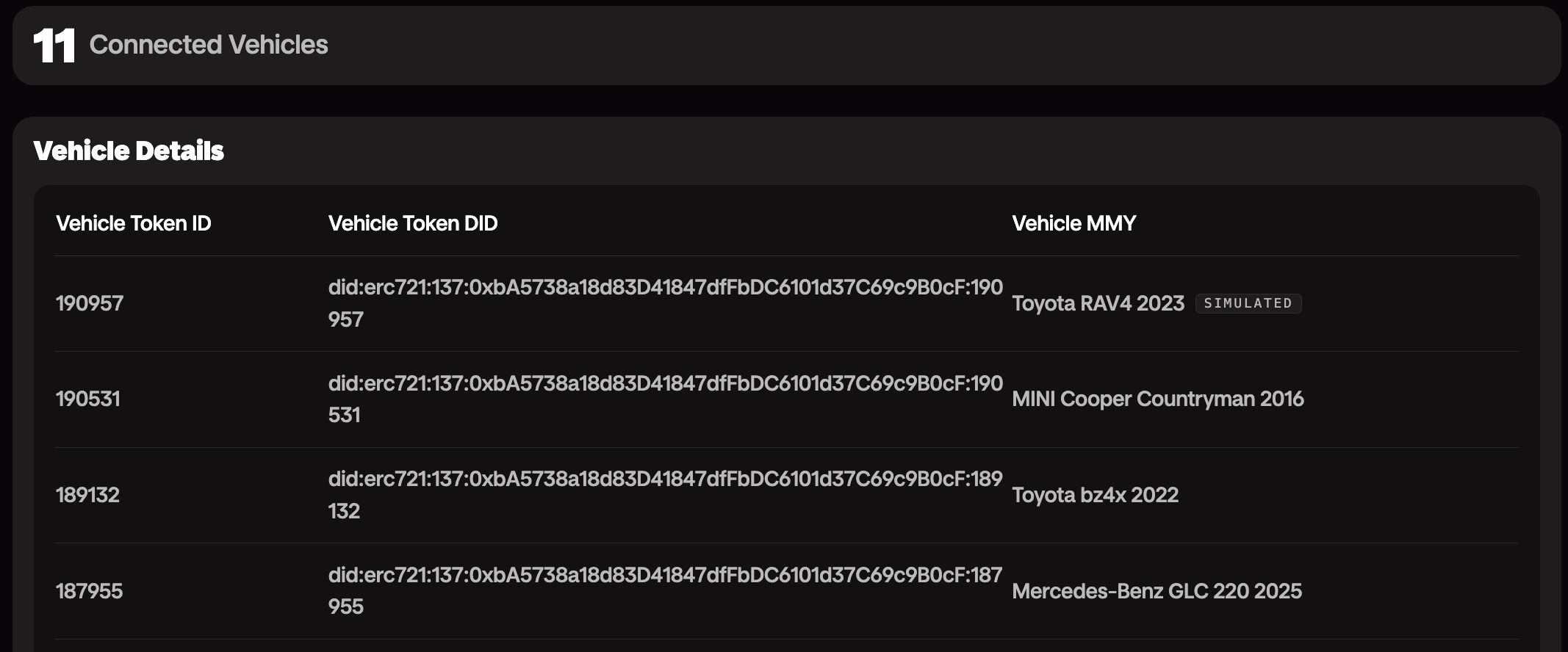
The console walks you through a permission grant using [Login with DIMO Configurator](/docs/getting-started/login-with-dimo-configurator).
You, the developer, decides which signals to request permissions to and for how long.
This is the same flow your end users will go through when connecting a
vehicle via Login with DIMO, so you experience the permission model
firsthand before they do.
The vehicle comes online and begins emitting signals within
seconds after your mint.
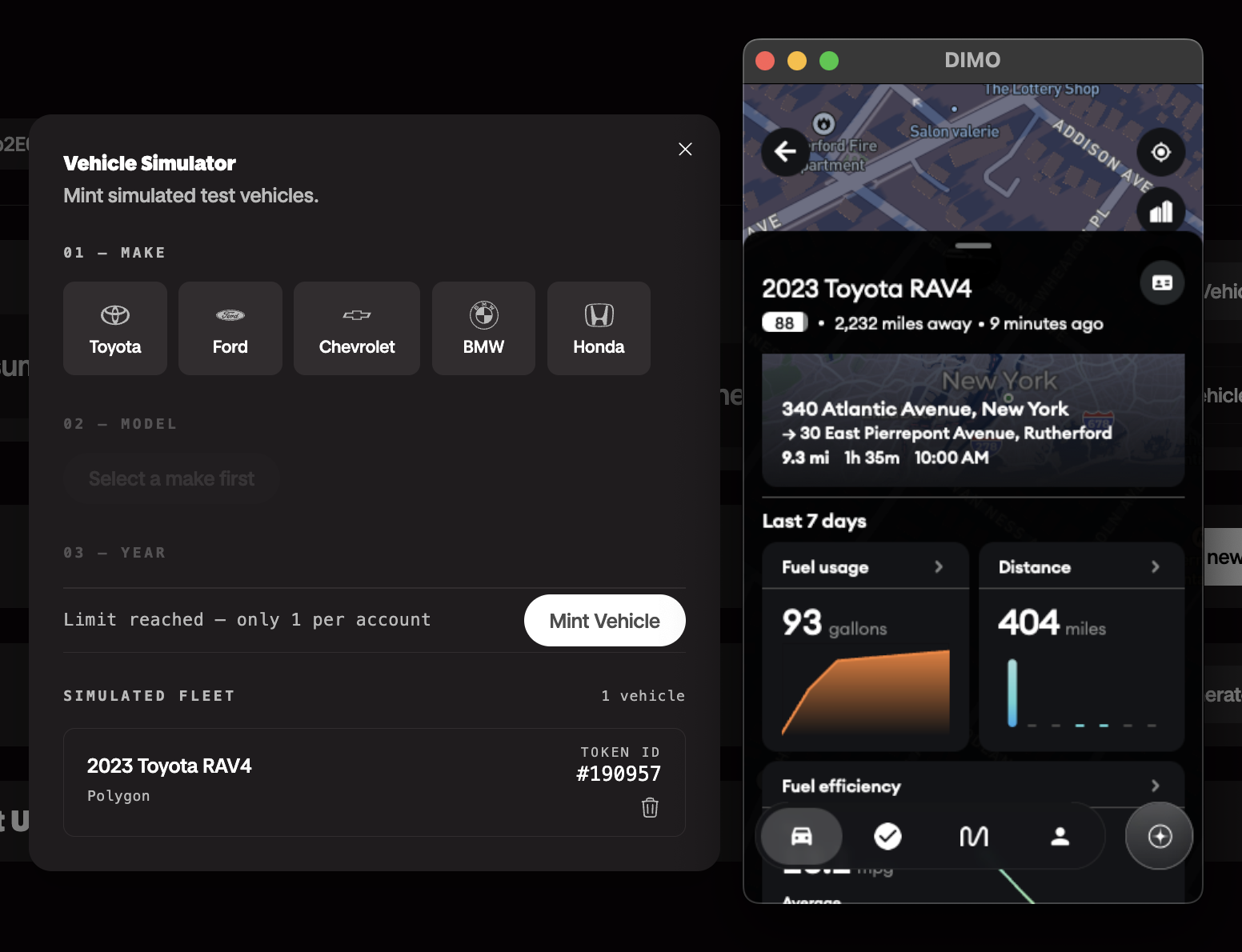
You can view the data directly from the console, query live
data via the Telemetry API, or even use the DIMO Mobile App — and see the updates in real time.
### Emitted Signals
The simulator emits 13 signals per tick using real DIMO/VSS signal names:
| Signal | What It Models |
|--------|----------------|
| `speed` | Vehicle speed in mph, noisy, clamped to 0 |
| `currentLocationCoordinates` | GPS latitude/longitude interpolated along the route |
| `powertrainType` | `"COMBUSTION"` (static) |
| `powertrainCombustionEngineSpeed` | RPM derived from a gear model |
| `powertrainCombustionEngineECT` | Engine coolant temp in °C — models cold start warmup |
| `powertrainFuelSystemAbsoluteLevel` | Fuel in liters (60L tank), drains with speed and RPM |
| `powertrainTransmissionTravelledDistance` | Odometer in km, accumulated from speed each tick |
| `chassisAxleRow1WheelLeftTirePressure` | Tire pressure in kPa (~32 PSI nominal) |
| `chassisAxleRow1WheelRightTirePressure` | Same |
| `chassisAxleRow2WheelLeftTirePressure` | Same |
| `chassisAxleRow2WheelRightTirePressure` | Same |
| `exteriorAirTemperature` | Air temp in °C — follows a daily sine curve |
| `obdDTCList` | OBD-II fault codes — injected randomly, self-clear after 5–20 min |
### Daily Schedule
The simulator runs a daily schedule across four routes based on real NYC/NJ roads:
| Time (UTC) | Scenario | Route |
|------------|----------|-------|
| 00:00–06:00 | Parked overnight | — |
| 06:05–06:45 | Morning commute | Manhattan Midtown Loop (4.4 km) |
| 06:45–07:30 | Highway segment | I-95 NJ Segment (32 km) |
| 07:30–12:00 | Parked at work | — |
| 12:05–12:30 | Lunch errands | Brooklyn Errands Loop (5.2 km) |
| 17:05–17:50 | Evening commute | I-95 NJ Segment |
| 17:50–18:30 | Suburban leg | Suburban Loop — Northern NJ (15 km) |
| 18:30–00:00 | Parked overnight | — |
:::tip Blog Post
Read the [full architecture writeup](/blog/dimo-vehicle-simulator) for details
on how the simulator was built and what's coming next.
:::
---
# Login with DIMO Configurator
URL: https://dimo.org/docs/getting-started/login-with-dimo-configurator
# Login with DIMO Configurator
Customize the Login with DIMO experience for your application's users.
### What is the Login with DIMO Configurator?
The Login with DIMO Configurator lets you customize the authentication and
vehicle connection flow that your end users see when they connect their vehicles
to your application. Configure branding, requested permissions, and redirect
behavior — all from the Developer Console.
### How It Works
Log in to the [Developer Console](https://console.dimo.org), navigate to
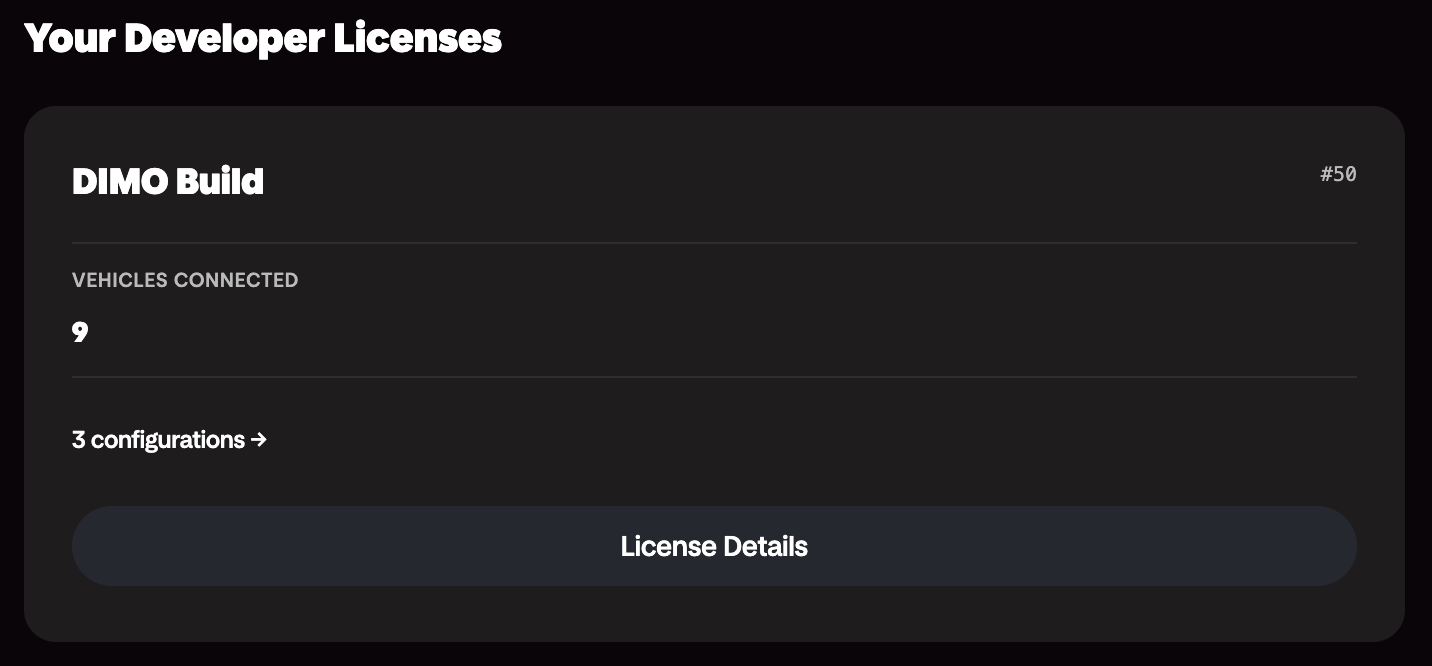
your Developer License, and click on the **Configure Vehicle Sharing** OR
simply click on the **configurations** link on your license card on the homepage.
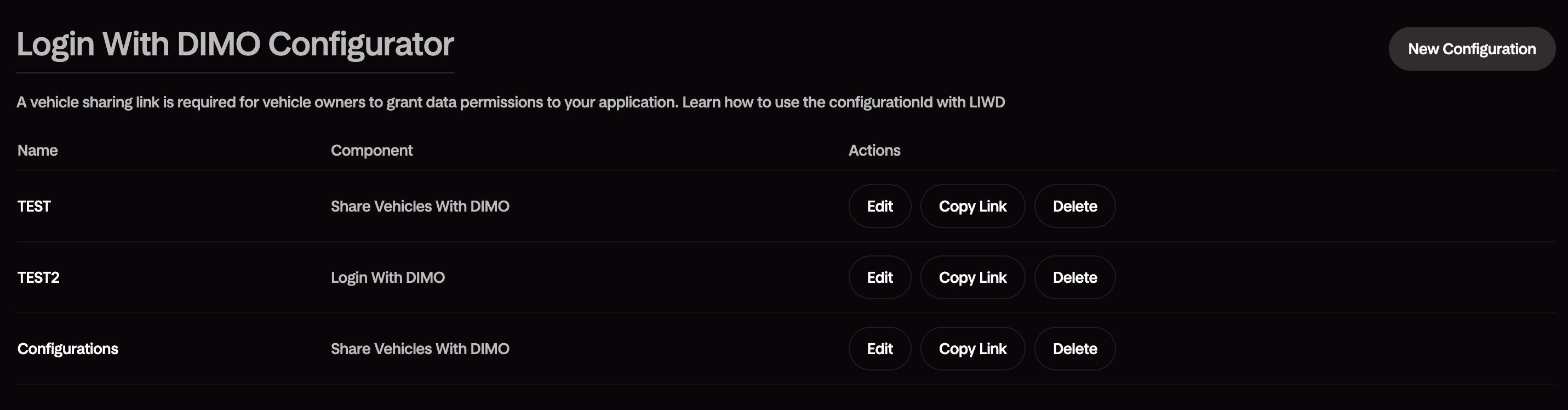
Create a new configuration by clicking the **New Configuration** button.
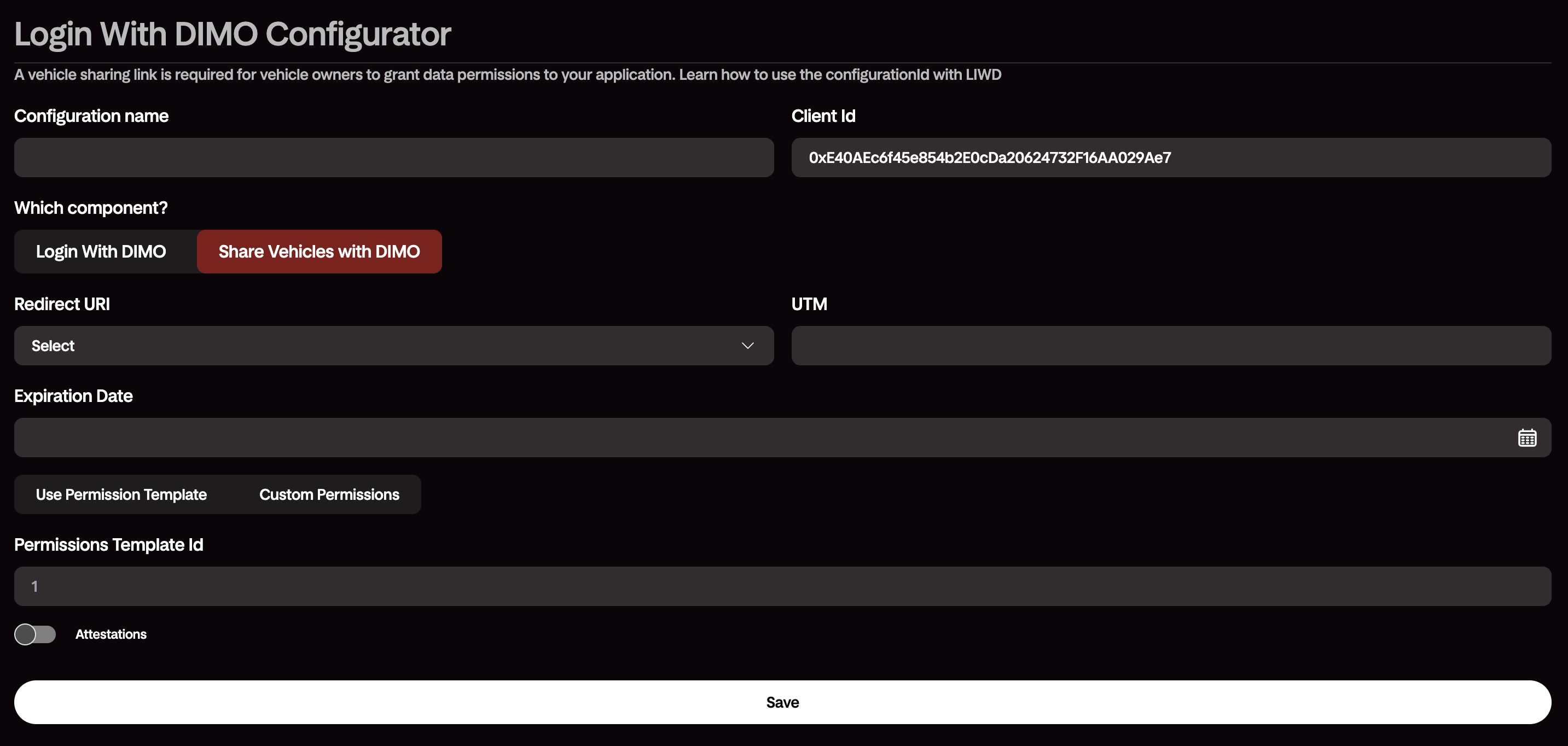
Save your configuration and start building your application. The generated link
will load the configured Login with DIMO experience and cater to your user experience.
### Using the Generated Configuration
The configurator outputs a ready-to-use configuration for the
[DIMO Client SDK](/docs/build/building-with-tools/client-sdk-dimo-connect).
Drop it into your frontend and the Login with DIMO button is ready to go.
---
# RentalOS Registration
URL: https://dimo.org/docs/getting-started/rentalos-registration
# RentalOS Registration
Register your application with DIMO's RentalOS for fleet and rental use cases.
### What is RentalOS?
RentalOS is DIMO's purpose-built integration layer for rental and fleet
operators. It provides the identity, permission, and telemetry primitives you
need to manage a fleet of vehicles — tracking availability, accessing real-time
data, and handling driver authorization — on top of the DIMO Network.
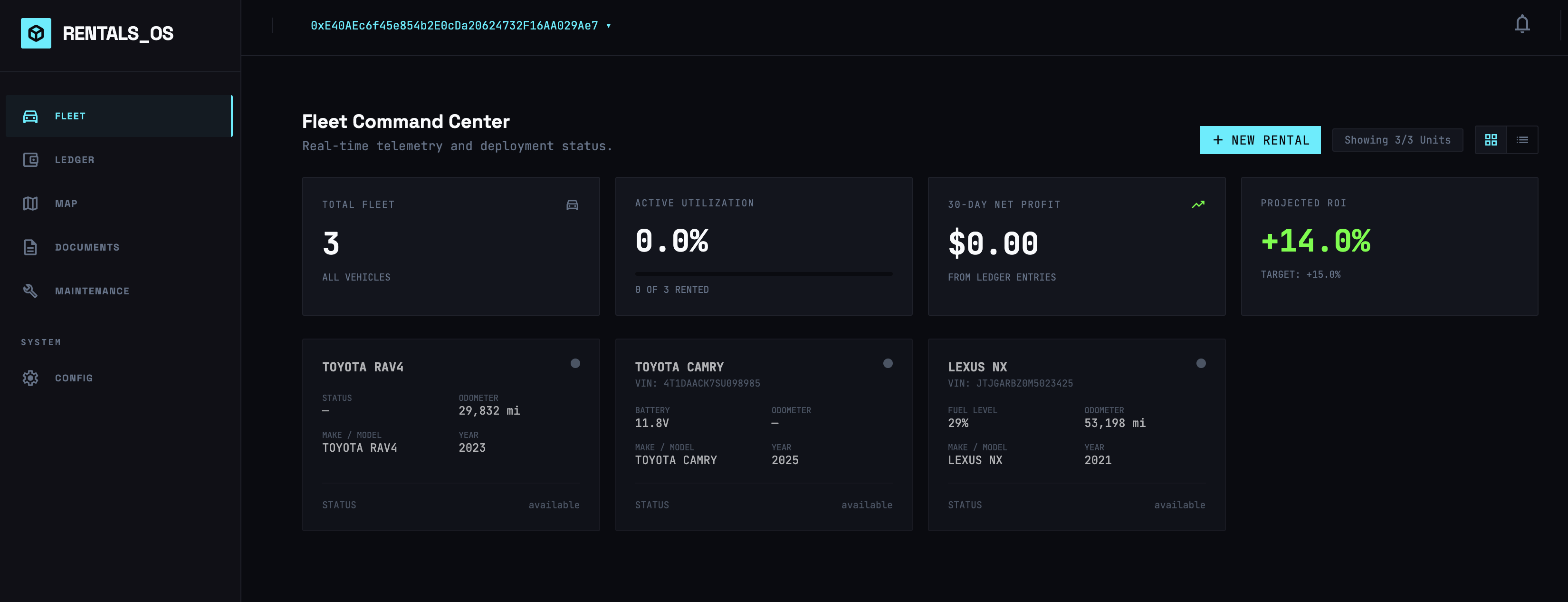
Registering your application with RentalOS gives you access to fleet-specific
APIs and management tooling in the Developer Console.
### How It Works
Log in to the [Developer Console](https://console.dimo.org), navigate to
your Developer License, and click on **Register RentalOS** under API keys.

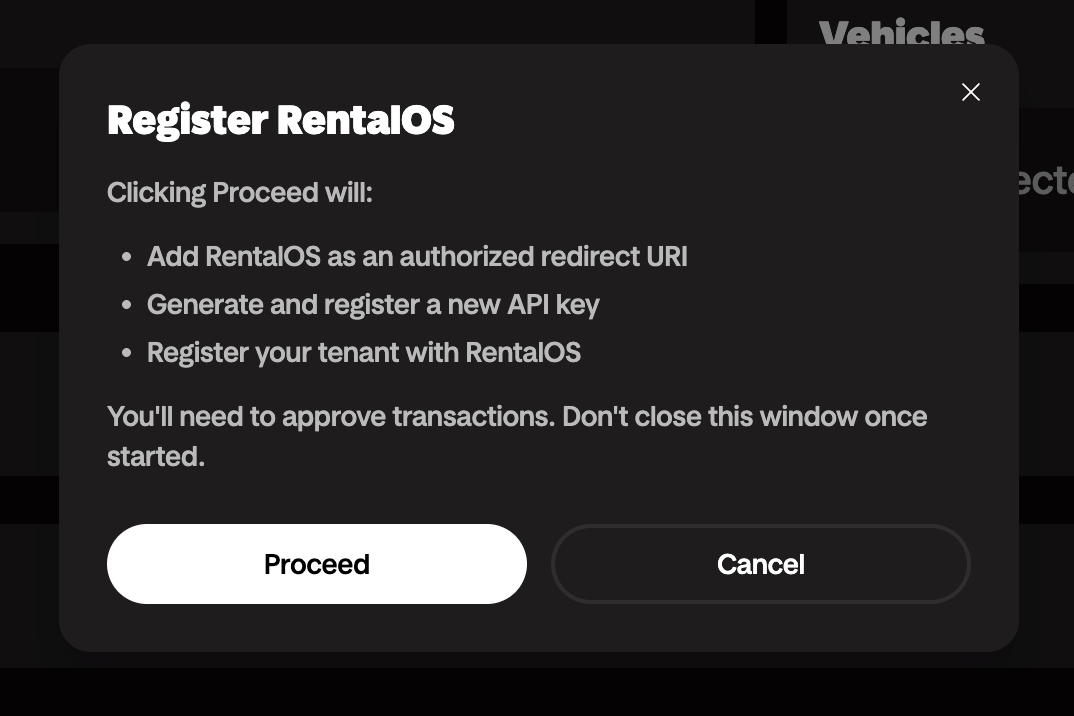
Grant all the necessary permissions from your fleet of vehicles to your
developer license.
That's it! Your developer license is now registered with RentalOS and you can
access all connected vehicles in RentalOS.
---
# Data Explorer
URL: https://dimo.org/docs/getting-started/data-explorer
# Data Explorer
Query and visualize vehicle data directly from the Developer Console.
### What is the Data Explorer?
The Data Explorer is a built-in interface in the Developer Console for
browsing, querying, and visualizing telemetry data from any vehicle connected
to your application — including simulated vehicles.
Use it to inspect live signals, audit historical data, and validate your
integration before writing a single line of application code.
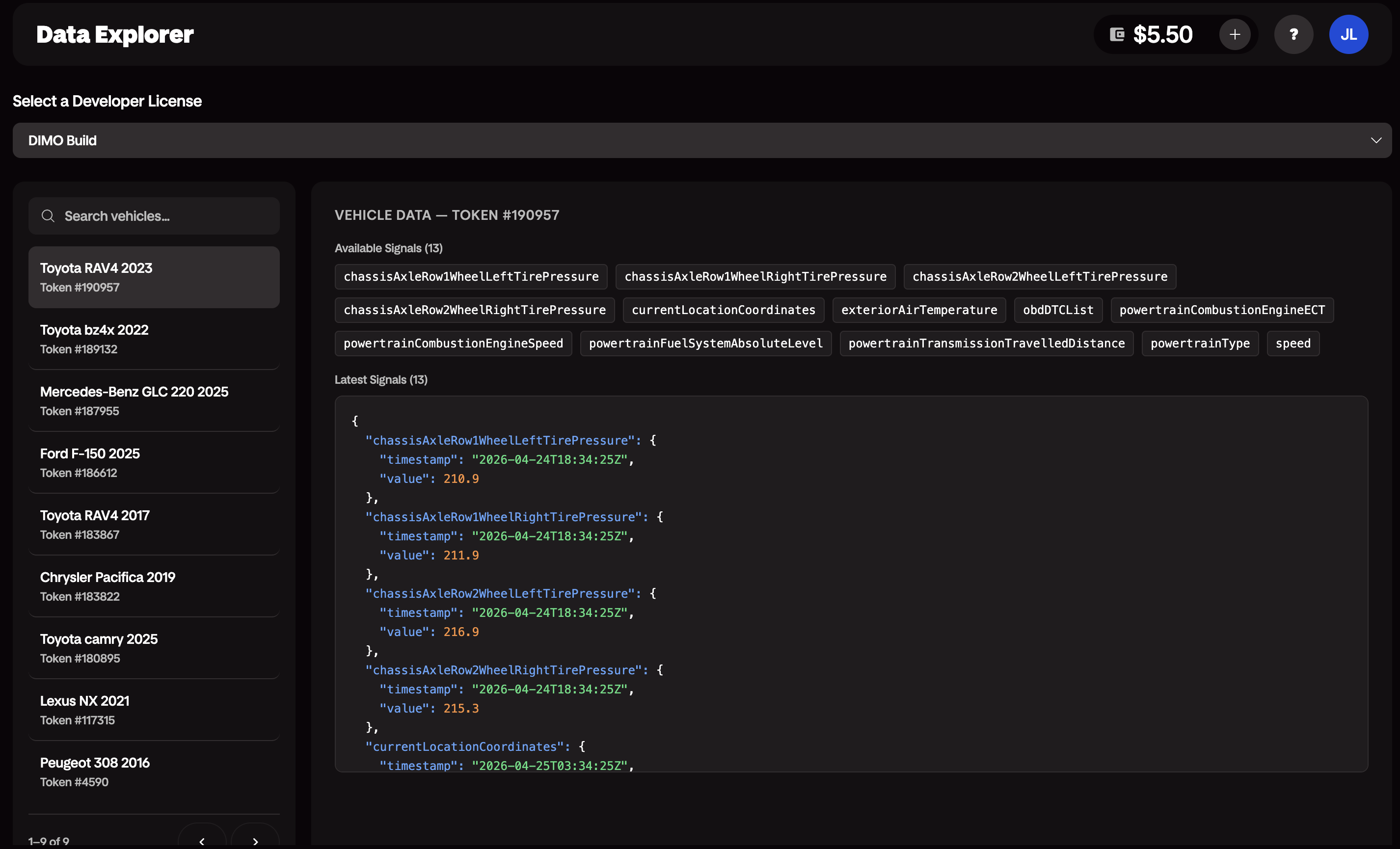
### What You Can Do
- **Available Signals**: See all signals granted by a vehicle that you have access to.
- **Latest Signals**: View the most recent value for each signal.
### Getting Started
1. Log in to the [Developer Console](https://console.dimo.org).
2. Open the **Data Explorer** tab.
3. Select a vehicle from your vehicles list — or use a
[simulated vehicle](/docs/getting-started/vehicle-simulator) if you don't
have a physical vehicle connected yet.
---
# DIMO MCP Server
URL: https://dimo.org/docs/build/building-with-ai/dimo-mcp-server
# DIMO MCP Server
## Run Your Own MCP Server
An MCP (Model Context Protocol) server that provides seamless access to the DIMO APIs,
enabling AI assistants to query vehicle data, execute vehicle commands, decode VINs,
create verifiable credentials, and interact with the DIMO ecosystem.
:::tip Pair it with the DIMO Platform Skill
The MCP server lets an agent _act_ on DIMO. The [DIMO Platform Skill](/docs/build/building-with-ai/dimo-platform-skill) lets it _understand_ DIMO. Load both so your agent can reason about the platform and operate on it in the same session.
:::
## How It Works
1. Your `Client ID`, `Redirect URI`, and `API Key` from the [Developer Console](https://console.dimo.org)
2. Node.js 18 or higher, or [Bun runtime](https://bun.com/)
3. Claude Desktop with a Claude Pro Plan or above
href="https://github.com/dimo-network/mcp-dimo"
data-color-scheme="no-preference: light; light: light; dark: dark;"
data-icon="github"
data-size="large"
data-show-count="false"
aria-label="Star dimo-network/mcp-dimo on GitHub"
>
DIMO MCP Server
Install via npm package registry:
```shell
npm install -g mcp-dimo
```
Alternatively, you can download and build locally:
```shell
git clone https://github.com/DIMO-Network/mcp-dimo.git
cd mcp-dimo
bun install
bun run build
```
In the `.env` file, set up your environment variables:
```
# Required - DIMO Developer License credentials
DIMO_CLIENT_ID=your_client_id_here
DIMO_DOMAIN=your_domain
DIMO_PRIVATE_KEY=your_private_key_here
# Optional - Fleet mode (skips ownership checks)
FLEET_MODE=false
# Optional - Custom login URL
DIMO_LOGIN_BASE_URL=https://login.dimo.org
```
In your Claude Desktop, configure the DIMO MCP Server by updating the config file with the following JSON:
src="/img/claude-setup.png"
alt="DIMO MCP Server Configuration on Claude"
tooltipAreas={[
{
x: 13, y: 22, width: 20, height: 28,
title: "Locate Settings in Claude",
text: "Click on the bottom left corner to open up Settings."
},
{
x: 32, y: 54, width: 20, height: 44,
title: "Locate Developer under Settings",
text: "Scroll all the way to the bottom to find the Developer settings."
},
{
x: 50, y: 54, width: 36, height: 44,
title: "Edit MCP Server Configs",
text: "Edit your local MCP server configurations, this will open up your config file for Claude."
}
]}
/>
```json
{
"mcpServers": {
"dimo": {
"command": "mcp-dimo",
"env": {
"DIMO_CLIENT_ID": "your_client_id_here",
"DIMO_DOMAIN": "your_domain.com",
"DIMO_PRIVATE_KEY": "your_private_key_here"
}
}
}
}
```
---
# Developer Kit
URL: https://dimo.org/docs/build/building-with-ai/developer-kit
# Developer Kit
## AI App Builder
[DIMO Developer Kit (DDK)](https://github.com/DIMO-Network/dimo-developer-kit) is an AI Agent-powered boilerplate code that the DIMO Team has provided to quickly get you started. It integrates
both the [DIMO Connect Client SDK](/docs/build/building-with-tools/client-sdk-dimo-connect) and the [Server SDK](/docs/build/building-with-tools/server-sdk) in Typescript.
Deploying an app literally takes you less than **60 seconds**.
## How It Works
width="560"
height="315"
src="https://www.youtube.com/embed/xGdE8GgZ1iI?si=HA_tz5lrWdJlUfT0"
title="YouTube video player"
frameborder="0"
allow="accelerometer; autoplay; clipboard-write; encrypted-media; gyroscope; picture-in-picture; web-share"
referrerpolicy="strict-origin-when-cross-origin"
allowfullscreen
>
Powered by Replit, you simply start by [forking the GitHub repository](https://github.com/DIMO-Network/dimo-developer-kit) directly.
href="https://github.com/dimo-network/dimo-developer-kit"
data-color-scheme="no-preference: light; light: light; dark: dark;"
data-icon="github"
data-size="large"
data-show-count="false"
aria-label="Star dimo-network/dimo-developer-kit on GitHub"
>
DIMO Developer Kit
Deploy the app to Replit and update the secrets required on the Developer Kit boilerplate.
You can find these keys in the [Developer Console](https://console.dimo.org):
- Client ID: `DIMO_CLIENT_ID` & `VITE_DIMO_CLIENT_ID`
- Redirect URI: `DIMO_REDIRECT_URI` & `VITE_DIMO_REDIRECT_URI`
- API Key: `DIMO_API_KEY`
Using the Replit agent, you can build with the AI's assistance. You can manually update the code as needed.
Once secrets are updated, simply restart your app and you're ready to deploy your first DIMO app.
---
# DIMO Platform Skill
URL: https://dimo.org/docs/build/building-with-ai/dimo-platform-skill
# DIMO Platform Skill
The [DIMO Platform Skill](https://github.com/DIMO-Network/dimo-platform-skill) is
a knowledge pack for AI coding agents. Loaded into an agent like Claude Code or
Cursor, it gives the agent the DIMO platform already in its head: the
architecture, the API surface, the SACD permission model, contract addresses,
and SDK method signatures. The agent stops guessing at endpoints and schemas and
starts writing integrations that compile and run.
## Why it exists
LLMs are confident even when they are wrong. Ask one to write a DIMO integration
from memory and it will often invent endpoint paths, mix up the two JWT issuers,
or cite a contract address from an old README. The skill closes that gap by
giving the agent verified ground truth to reason from, with pointers to the
source of record for anything that can change.
## What it covers
- **System architecture** — the node hierarchy, how identity, telemetry, and
attestation fit together, and the two-tier JWT auth chain.
- **APIs** — Identity, Telemetry, Fetch, Token Exchange, Attestation, Device
Definitions, and Vehicle Triggers, with auth requirements and query examples.
- **SACD permissions** — the on-chain permission model and the privilege list.
- **Protocol** — contract addresses, the node registry, and the rewards and DCX
credit model.
- **SDKs** — installation and method signatures for the JS/TS, Python, and C#
server SDKs and the React client SDK.
## Understand, then act: pair it with the MCP server
The skill and the [DIMO MCP Server](/docs/build/building-with-ai/dimo-mcp-server)
are complements, not alternatives:
- The **skill** is how an agent _understands_ DIMO. It is knowledge, loaded at
design time, so the code the agent writes is correct.
- The **MCP server** is how an agent _acts_ on DIMO. It exposes live tools, so
the agent can query data, decode a VIN, or mint a vehicle at runtime.
Use both together and an agent can reason about the platform and operate on it
in the same session.
## Get started
Add the skill to your agent and pair it with the MCP server:
1. Install the skill from
[github.com/DIMO-Network/dimo-platform-skill](https://github.com/DIMO-Network/dimo-platform-skill)
following the README for your agent (Claude Code, Cursor, and others).
2. Connect the
[DIMO MCP Server](/docs/build/building-with-ai/dimo-mcp-server) for live tool
access.
3. Point your agent at a task. It now has both the knowledge and the tools to
build on DIMO.
---
# Client SDK (DIMO Connect)
URL: https://dimo.org/docs/build/building-with-tools/client-sdk-dimo-connect
# Client SDK (DIMO Connect)
## Get Data Permissions From Vehicle Owners
DIMO Connect is a user interface built on our **robust privacy engine** that allows app developers to specify and request data from vehicle owners.
Developers can get started using either the [React Component SDK (aka Login with DIMO)](https://www.npmjs.com/package/@dimo-network/login-with-dimo) or by simply creating a DIMO Connect URL.
## How It Works
src="/img/ConfigureConnectURL.png"
alt="DIMO Connect URL"
tooltipAreas={[
{
x: 24, y: 45, width: 10, height: 17,
title: "DIMO Connect URL",
text: "Make sure you recognize login.dimo.org as this is the base URL for DIMO Connect."
},
{
x: 34, y: 45, width: 42, height: 17,
title: "Client ID",
text: "Get this public ID from your Developer License."
},
{
x: 77, y: 45, width: 22, height: 17,
title: "Redirect URI",
text: "Make sure you configure this properly on your Developer License."
}
]}
/>
Using the `Client ID` and `Redirect URI` from your Developer License, configure your DIMO Connect URL along with the specific vehicle data you want to request from your users.
:::tip Use a Configuration ID (recommended)
The [DIMO Developer Console](https://console.dimo.org) includes a **Login With DIMO Configurator** — a widget where you set your component type (`LoginWithDimo` or `ShareVehiclesWithDimo`), redirect URI, UTM, expiration date, and permissions (template or custom). It generates a **Configuration ID** and lets you copy the ready-to-use `login.dimo.org` link directly. Pass the `configurationId` in your integration instead of individual query parameters.
:::
In the [Developer Console](https://console.dimo.org), navigate to **Home** > **License Details** > **Configure Vehicle Sharing** under the Vehicles section.
Open the **Login With DIMO Configurator**. Configure your component, redirect URI, permissions, and expiration date, then copy the generated Configuration ID.
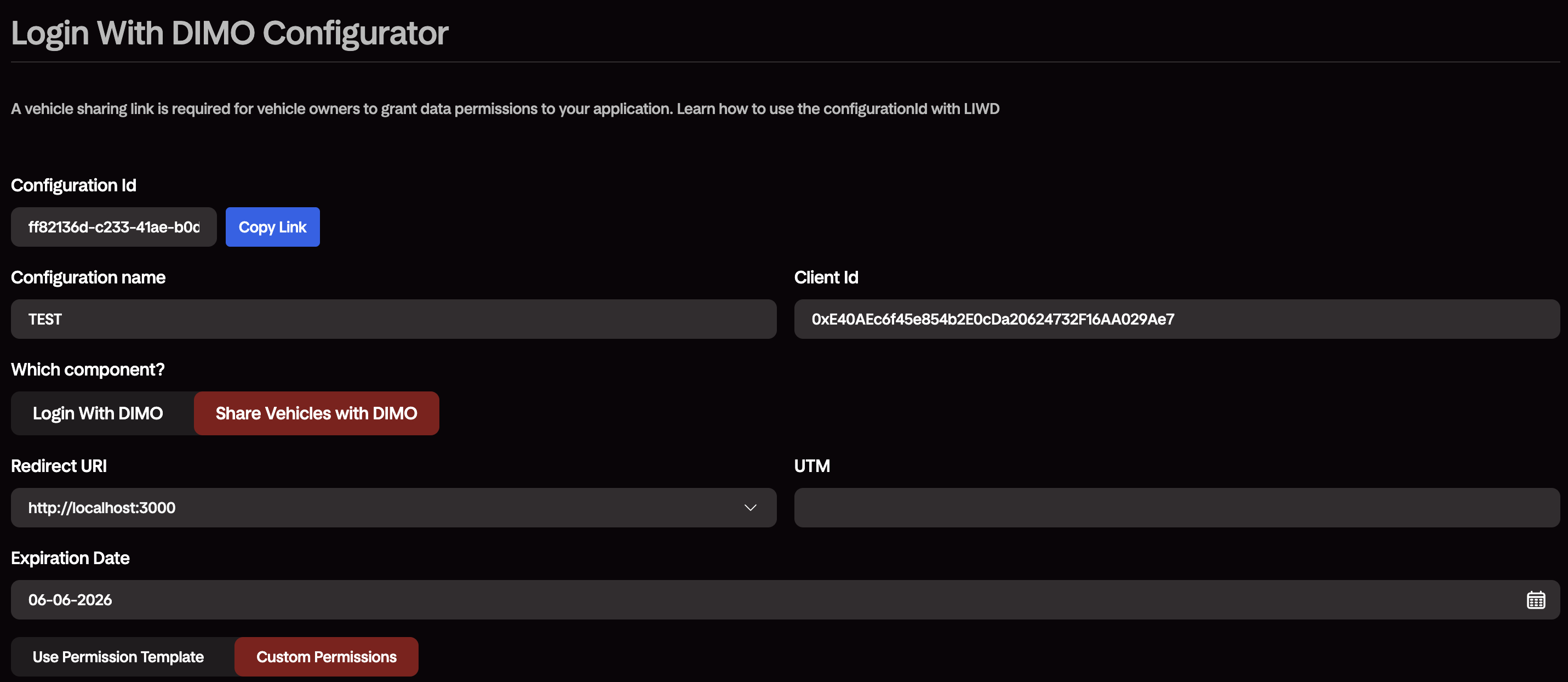
**URL Method** — use the "Copy Link" button in the Configurator, or build the URL manually:
```
https://login.dimo.org/?configurationId=YOUR_CONFIGURATION_ID
```
```jsx
LoginWithDimo,
ShareVehiclesWithDimo,
initializeDimoSDK,
useDimoAuthState,
} from "@dimo-network/login-with-dimo";
initializeDimoSDK({ configurationId: process.env.REACT_APP_DIMO_CONFIGURATION_ID! });
const { isAuthenticated, getValidJWT, walletAddress } = useDimoAuthState();
useEffect(() => {
if (isAuthenticated) {
console.log(walletAddress);
}
}, [isAuthenticated]);
// ...
{isAuthenticated ? (
mode="popup"
onSuccess={authData => console.log('Success:', authData)}
onError={error => console.error('Error:', error)}
/>
) : (
mode="popup"
onSuccess={(authData) => console.log("Success:", authData)}
onError={(error) => console.error("Error:", error)}
/>
)}
```
src="/img/ShareWithUsers.png"
alt="Login with DIMO"
tooltipAreas={[
{
x: 26, y: 26, width: 23, height: 8,
title: "Your Developer License Name",
text: "This is your Developer License Name, where end users can easily identify your app."
},
{
x: 30, y: 40, width: 40, height: 8,
title: "Optionally Capture User Emails",
text: "You can easily toggle this to be enforced or optional."
},
{
x: 26, y: 48, width: 48, height: 12,
title: "User Email Input",
text: "Optionally, users can put in their email address here manually to connect to their DIMO Account."
},
{
x: 26, y: 69, width: 48, height: 10,
title: "Social Logins",
text: "Optionally user can use their social logins as seen on the DIMO Mobile App."
}
]}
/>
Users using your DIMO Connect URL can grant you permissions to begin accessing their vehicle data.
src="/img/VehiclesTable.png"
alt="Login with DIMO"
tooltipAreas={[
{
x: 2, y: 14, width: 12, height: 68,
title: "Shared Vehicle Token IDs",
text: "In Console, you will find a list of vehicles that have shared their data permissions with you."
},
{
x: 20, y: 14, width: 40, height: 68,
title: "Shared Vehicle Token DID",
text: "In Console, you will also find the token DID of the shared vehicles, this is used for webhooks."
},
{
x: 65, y: 14, width: 18, height: 68,
title: "Shared Vehicle MMY",
text: "In Console, you will also find the make model and year of the shared vehicles."
}
]}
/>
Use the [DIMO Developer Console](https://console.dimo.org) or the [Identity API](https://identity-api.dimo.zone/) to track which vehicles have shared permissions with you.
title="Identity API"
isGraphQL={true}
defaultUrl="https://identity-api.dimo.zone/query"
operationType="query"
requireAuth={false}
defaultQuery={
`query GetVehicleByDevLicense($clientId: Address!) {
vehicles(filterBy: {
privileged: $clientId }
first: 3
) {
nodes {
owner
tokenId
definition {
make
model
year
}
}
totalCount
pageInfo {
startCursor
hasPreviousPage
hasNextPage
}
}
}`
}
graphQLVariables={[
{ name: "clientId", type: "Address!", description: "Client ID of your Developer License" }
]}
/>
title="Exchange Developer JWT for a Vehicle JWT"
method="POST"
defaultUrl="https://token-exchange-api.dimo.zone/v1/tokens/exchange"
requestBody={`{ "nftContractAddress": "0xbA5738a18d83D41847dfFbDC6101d37C69c9B0cF" }`}
userInputs={[
{
key: 'tokenId',
label: 'Vehicle Token ID',
type: 'number'
},
{
key: 'privileges',
label: 'Permissions Requested',
type: 'array',
options: [
{ label: 'All-time, non-location data', value: 1 },
{ label: 'Commands', value: 2 },
{ label: 'Current location', value: 3 },
{ label: 'All-time location', value: 4 },
{ label: 'View VIN credentials', value: 5 },
{ label: 'Live data streams', value: 6 },
{ label: 'Raw data', value: 7 },
{ label: 'Approximate location', value: 8 },
],
helpText: 'Select one or more by clicking while holding down Command (⌘ on a Mac) or Ctrl (PC)',
}
]}
/>
Begin polling the DIMO APIs or setting up DIMO Webhooks using one of the available Data SDKs.
title="Telemetry API"
isGraphQL={true}
defaultUrl="https://telemetry-api.dimo.zone/query"
operationType="query"
jwtPlaceholder="Enter a valid Vehicle JWT"
defaultQuery={
`query GetAvailable($tokenId: Int!) {
availableSignals(tokenId: $tokenId)
}`
}
graphQLVariables={[
{ name: "tokenId", type: "Int!", description: "Vehicle Token ID of a shared vehicle" }
]}
/>
## Using the SDK
If you are a React developer, you are more than welcome to use the SDK directly and skip using the DIMO Connect URL.
The SDK is guaranteed to have more functionalities as the DIMO Connect URL is bounded by query parameter limitations.
:::tip Provisioning a Developer License per user
Building a multi-tenant app where each end user needs their own Developer License (their own API key), rather
than sharing yours? See [Auto-Create a Developer License](../../1_getting-started/2_auto-create-license.mdx)
for how to mint or reconnect licenses programmatically from this same SDK.
:::
href="https://github.com/dimo-network/login-with-dimo/tree/main/sdk"
data-color-scheme="no-preference: light; light: light; dark: dark;"
data-icon="github"
data-size="large"
data-show-count="false"
aria-label="Star dimo-network/login-with-dimo on GitHub"
>
Client SDK: DIMO Connect
## Full Feature List
| | React SDK | Connect URL | Details |
|-------------------------------|--------------|------------------|----------------------------------------------------|
| Configuration ID | ✅ | ✅ | Use a `configurationId` generated from the Developer Console widget instead of manually specifying query parameters. Encodes client ID, redirect URI, permissions, and other settings in a single identifier. |
| Account Creation/Login | ✅ | ✅ | Login with DIMO allow developers to onboard users to DIMO, enabling logins across all DIMO platforms with the use of a passkey or email OTP. |
| Permissions | ✅ | ✅ | This is an optional entry state where users are asked to share their vehicles with your application, login is required before entering the vehicle permissions state. |
| Entry States | ✅ | ✅ | Multiple entry states to customize user flow |
| Campaign Tracking | ✅ | ✅ | UTM parameter allows you to drive campaigns with channel partners of yours, maximizing the potential of your application. |
| Advanced Filtering | ✅ | ✅ | Ensure that vehicles are compatible with your app by applying filters on vehicle token IDs, vehicle brand, and/or powertrain types. |
| Custom Button | ℹ️ | ✅ | Customize button style and text to fit your design needs |
| Custom Expiration Dates | ✅ | ✅ | Customize expiration dates for your user data permissions. |
| Popup Mode | ✅ | ❌ | Web popup mode |
| Advanced Transactions | ✅ | ❌ | Execute specific blockchain transactions |
| Customized Messaging | ✅ | ❌ | Customize text fields with your brand messaging to better cater to your audiences. |
| Callbacks (onSuccess/onError) | ✅ | ❌ | Customizable actions on callbacks, ensuring a full e2e experience for your beloved users. |
| Vehicle Onboarding (beta) | ✅ | ✅ | Onboarding new vehicles onto the DIMO Network, supports Tesla only. |
---
# Server SDK
URL: https://dimo.org/docs/build/building-with-tools/server-sdk
# Server SDK
## Get Vehicle Data From DIMO APIs
DIMO Server SDK is a suite of Developer SDKs that allows app developers to access data from the DIMO APIs.
Developers have a choice between several popular programming languages such as NodeJS, Typescript, Python, and C#.
## How It Works
```bash
npm install @dimo-network/data-sdk
```
Or with Yarn:
```bash
yarn add @dimo-network/data-sdk
```
```bash
pip install dimo-python-sdk
```
Windows Users:
```bash
Install-Package Dimo.Client
```
Mac Users:
```bash
dotnet add package Dimo.Client
```
```ts
const dimo = new DIMO('Production');
```
```python
from dimo import DIMO
dimo = DIMO("Production")
```
```cs
using Dimo.Client;
var dimoClient = new DimoClientBuilder().AddAllServices().Build();
```
Using Your Developer License details, you will first need to authenticate using your `client_id`, `redirect_uri`, and `api_key`.
```ts
const developerJwt = await dimo.auth.getDeveloperJwt({
client_id: '',
domain: '',
private_key: '',
});
```
```python
auth_header = dimo.auth.get_dev_jwt(
client_id = '',
domain = '',
private_key = ''
)
dev_jwt = auth_header["access_token"]
```
```cs
var auth = await dimoClient.AuthenticationService.GetTokenAsync(
clientId: "",
domain: "",
privateKey: ""
);
var devJwt = auth.AccessToken;
```
```ts
const vehicleJwt = await dimo.tokenexchange.getVehicleJwt({
...developerJwt,
tokenId:
});
```
```python
get_vehicle_jwt = dimo.token_exchange.exchange(
developer_jwt = dev_jwt
token_id =""
)
vehicle_jwt = get_vehicle_jwt['token']
```
```cs
var vehicleJwt = await dimoClient.TokenExchangeService.GetPrivilegeTokenAsync(
accessToken: devJwt,
tokenId: ,
privileges: [
PrivilegeSharing.AllTimeNoLocationData,
PrivilegeSharing.Commands,
PrivilegeSharing.CurrentLocation,
PrivilegeSharing.AllTimeLocation
]
);
```
```ts
const something = await dimo.telemetry.query({
...vehicleJwt,
query: `
query {
some_valid_GraphQL_query
}`
});
```
```python
telemetry_data = dimo.telemetry.query(
vehicle_jwt=vehicle_jwt,
query= """
query {
some_valid_GraphQL_query
}
"""
)
```
```cs
var query = @"
{
some_valid_GraphQL_query
}
";
var variables = new
{
VariableName = "VariableValue"
};
var result = await dimoClient.TelemetryService.ExecuteQueryAsync(query, variables, vehicleJwt.Token);
Console.WriteLine(result);
```
---
# Low Code Integrations
URL: https://dimo.org/docs/build/building-with-tools/low-code-integrations
# Low Code Integrations
## Get started using drag-and-drop interfaces
Knowing the in's and out's of how the API and SDK works is great, but when you are short on resources or time, building and maintaining a fullstack application may feel draining.
DIMO offers developers and non-developers an easy way to build data integration through working with the leading low code platforms in the industry.
## How It Works
https://github.com/DIMO-Network/dimo-n8n
https://www.activepieces.com/pieces/dimo
Setting up your first workflow on the platform of your choice.
To start, simply set up trigger(s) and add action(s).
Triggers are conditionals (systematically-triggered, time-triggered, event-triggered, or even manually triggered) where the workflow will automatically start.
Actions are where the workflow executes something. DIMO is supported on both triggers & actions.
src="/img/lowcode-n8n-flow.png"
alt="n8n - create a new flow"
tooltipAreas={[
{
x: 25, y: 2, width: 50, height: 10,
title: "Manage Your Flow",
text: "Update name, tags, and manage your workflow."
},
{
x: 22, y: 16, width: 78, height: 80,
title: "Main Canvas",
text: "The logic section of your workflow, start by adding a first trigger step."
}
]}
/>
src="/img/lowcode-activepieces-flow.png"
alt="n8n - create a new flow"
tooltipAreas={[
{
x: 25, y: 1, width: 58, height: 10,
title: "Manage Your Flow",
text: "Update name, tags, and manage your workflow."
},
{
x: 24, y: 12, width: 76, height: 86,
title: "Main Canvas",
text: "The logic section of your workflow, start by adding a first trigger step."
}
]}
/>
Here are some examples on how a DIMO API call can be made at a specific time for your application:
src="/img/lowcode-n8n-dimo.png"
alt="n8n - create a new flow"
tooltipAreas={[
{
x: 12, y: 8, width: 24, height: 55,
title: "Trigger",
text: "A simple cron job trigger that kicks off the workflow at a given time."
},
{
x: 55, y: 8, width: 24, height: 55,
title: "DIMO Actions",
text: "A simple call to DIMO's Telemetry API."
}
]}
/>
src="/img/lowcode-activepieces-dimo.png"
alt="n8n - create a new flow"
tooltipAreas={[
{
x: 10, y: 12, width: 80, height: 18,
title: "Trigger",
text: "A simple cron job trigger that kicks off the workflow at a given time."
},
{
x: 10, y: 48, width: 80, height: 18,
title: "DIMO Actions",
text: "A simple call to DIMO's Telemetry API."
}
]}
/>
---
# Building Your First App
URL: https://dimo.org/docs/build/building-your-first-app
# Building Your First App
## Walkthrough on building your 1st DIMO-integrated app
Here's an over-simplified walkthrough on how to build your 1st DIMO-integrated app.
We highly recommend building your application based on a **client-server architecture** as it decouples the user interface with your backend that's responsible for retrieving vehicle data.
```mermaid
flowchart TD
Start([Account Creation & Client Implementation]) --> Step1[Step1: Create A Developer License]
%% Step 1: Setup
Step1 --> A([Generate API Key + Add Redirect URIs])
%% Step 2: Permissions
A --> Step2[Step2: Get A Vehicle Shared]
Step2 --> B{Use React?}
B --> |Yes| C([Download DIMO Connect React SDK])
B --> |No| D([Generate DIMO Connect URL])
C --> E([Implement DIMO Connect])
D --> E
%% User Actions
E --> Step3[Step3: Surface Your App]
Step3 --> F[User logs into DIMO, optionally shares vehicles with you]
F --> G[Redirected back to your app, authenticated]
%% Step 3: Accessing Data
2ndStart([Server Implementation]) --> Step4[Step4: Build Your Backend]
Step4 --> HH([Get Identity Data])
Step4 --> H([Auth: Get Developer JWT])
HH --> H
H --> I([Auth: Get Vehicle JWT])
I --> J([Get Vehicle Data])
J --> K[Send data to your storage + frontend]
%% Styling
classDef redBox fill:#ff6b47,stroke:#333,stroke-width:2px,color:#fff
classDef blueBox fill:#2196f3,stroke:#333,stroke-width:2px,color:#fff
classDef purpleBox fill:#8b5cf6,stroke:#333,stroke-width:2px,color:#fff
classDef yellowBox fill:#fbbf24,stroke:#333,stroke-width:2px,color:#000
classDef stepBox fill:#e5e7eb,stroke:#333,stroke-width:3px,color:#000
class B redBox
class E,F,G blueBox
class A,C,D,E,H,HH,I,L,J purpleBox
class F,G,K yellowBox
class Step1,Step2,Step3,Step4 stepBox
```
---
# Attestation API
URL: https://dimo.org/docs/api-references/attestation-api
# Attestation API
Generate verifiable proof about a vehicle's data.
## Overview
leftColumn={
The DIMO Attestation API provides cryptographic, on-chain attestations for vehicle data and identity verification. This API enables developers to generate verifiable attestations.
}
rightColumn={
endpoints={[
{
method: 'POST',
path: '/v2/attestation/vin/:tokenId',
id: 'vin-vc'
},
{
method: 'POST',
path: '/v2/attestation/odometer-statement/:tokenId',
id: 'odometer-vc'
},
{
method: 'POST',
path: '/v2/attestation/vehicle-health/:tokenId',
id: 'health-vc'
},
{
method: 'POST',
path: '/v2/attestation/vehicle-position/:tokenId',
id: 'position-vc'
}
]}
/>
}
/>
### Create a vehicle VIN attestation
id="vin-vc"
leftColumn={
Generates the VIN attestation for a given vehicle if it has never been created, or
if it has expired. If an unexpired attestation is found, returns the attestation. After
you've obtained the rawVC from the response, you can use it to perform
queries on the Telemetry API, such as getting the VIN of a vehicle.
parameters={[
{
name: "vehicleJwt",
type: "string",
required: true,
description: "A valid JWT token that represents the vehicle's authentication credentials. This token must be obtained through the DIMO authentication flow."
},
{
name: "tokenId",
type: "integer",
required: true,
description: "The unique identifier of the vehicle token. This is provided in the URL path."
},
]}
/>
}
rightColumn={
requestType="POST"
path="/v2/attestation/vin/:tokenId"
codeExamples={[{
label: "TypeScript",
language: "typescript",
code: `const vinVc = await dimo.attestation.createVinVc({
vehicleJwt: "eyJhbGc...ILlujqw",
tokenId: 123456
})`
},
{
label: "Python",
language: "python",
code: `vin_vc = dimo.attestation.create_vin_vc(
vehicle_jwt="eyJhbGc...ILlujqw",
token_id=123456
)`
},
{
label: ".NET",
language: "csharp",
code: `var vinVc = await dimoClient.AttestationService.CreateVinVcAsync(
VehicleJwt = "eyJhbGc...ILlujqw",
TokenId = 123456
);`
},
{
label: "cURL",
language: "shell",
code: `curl -X POST "https://attestation-api.dimo.zone/v2/attestation/vin/123456" \\
-H "Authorization: Bearer " \\
-H "Content-Type: application/json"`
}
]}
defaultLanguage="typescript"
/>
code={`{
"vcUrl": "https://telemetry-api.dimo.zone/query",
"vcQuery": "query {vinVCLatest(tokenId: ) {rawVC}}",
"message": "VC generated successfully. Retrieve using the provided GQL URL and query parameter."
}`}
/>
}
/>
### Create a vehicle odometer statement VC
id="odometer-vc"
leftColumn={
Generates the odometer statement attestation for a given vehicle if it has never been created, or
if it has expired. If an unexpired attestation is found, returns the attestation. After
you've obtained the rawVC from the response, you can use it to perform
queries on the Telemetry API, such as getting the odometer of a vehicle.
parameters={[
{
name: "vehicleJwt",
type: "string",
required: true,
description: "A valid JWT token that represents the vehicle's authentication credentials. This token must be obtained through the DIMO authentication flow."
},
{
name: "tokenId",
type: "integer",
required: true,
description: "The unique identifier of the vehicle token. This is provided in the URL path."
},
{
name: "timestamp",
type: "time",
required: false,
description: "Optional timestamp."
}
]}
/>
}
rightColumn={
requestType="POST"
path="/v2/attestation/odometer-statement/:tokenId"
codeExamples={[{
label: "TypeScript",
language: "typescript",
code: `const vinVc = await dimo.attestation.createOdometerStatementVC({
vehicleJwt: "eyJhbGc...ILlujqw",
tokenId: 123456,
timestamp: '2023-01-01T00:00:00Z' // Optional
})`
},
{
label: "Python",
language: "python",
code: `coming soon`
},
{
label: ".NET",
language: "csharp",
code: `coming soon`
},
{
label: "cURL",
language: "shell",
code: `curl -X POST "https://attestation-api.dimo.zone/v2/attestation/odometer-statement/123456" \\
-H "Authorization: Bearer " \\
-H "Content-Type: application/json" \\
-d '{
"timestamp": "2023-01-01T00:00:00Z"
}'`
}
]}
defaultLanguage="typescript"
/>
code={`{
"message": "VC generated successfully, retrieve using the provided telemetry-api."
}`}
/>
}
/>
### Create a vehicle health attestation
id="health-vc"
leftColumn={
Generates the vehicle health attestation for a given vehicle if it has never been created, or
if it has expired. If an unexpired attestation is found, returns the attestation. After
you've obtained the rawVC from the response, you can use it to perform
queries on the Telemetry API, such as getting the health status of a vehicle.
parameters={[
{
name: "vehicleJwt",
type: "string",
required: true,
description: "A valid JWT token that represents the vehicle's authentication credentials. This token must be obtained through the DIMO authentication flow."
},
{
name: "tokenId",
type: "integer",
required: true,
description: "The unique identifier of the vehicle token. This is provided in the URL path."
},
{
name: "startTime",
type: "time",
required: true,
description: "The start time of the vehicle health report."
},
{
name: "endTime",
type: "time",
required: true,
description: "The end time of the vehicle health report."
},
]}
/>
}
rightColumn={
requestType="POST"
path="/v2/attestation/vehicle-health/:tokenId"
codeExamples={[{
label: "TypeScript",
language: "typescript",
code: `const vinVc = await dimo.attestation.createVehicleHealthVc({
vehicleJwt: "eyJhbGc...ILlujqw",
tokenId: 123456,
startTime: '2023-01-01T00:00:00Z',
endTime: '2023-01-15T00:00:00Z'
})`
},
{
label: "Python",
language: "python",
code: `coming soon`
},
{
label: ".NET",
language: "csharp",
code: `coming soon`
},
{
label: "cURL",
language: "shell",
code: `curl -X POST "https://attestation-api.dimo.zone/v2/attestation/vehicle-health/123456" \\
-H "Authorization: Bearer " \\
-H "Content-Type: application/json" \\
-d '{
"startTime": "2023-01-01T00:00:00Z",
"endTime": "2023-01-15T00:00:00Z"
}'`
}
]}
defaultLanguage="typescript"
/>
code={`{
"message": "VC generated successfully, retrieve using the provided telemetry-api."
}`}
/>
}
/>
### Create a vehicle position attestation
id="position-vc"
leftColumn={
Generates the vehicle position attestation for a given vehicle if it has never been created, or
if it has expired. If an unexpired attestation is found, returns the attestation. After
you've obtained the rawVC from the response, you can use it to perform
queries on the Telemetry API, such as getting the position of a vehicle.
parameters={[
{
name: "vehicleJwt",
type: "string",
required: true,
description: "A valid JWT token that represents the vehicle's authentication credentials. This token must be obtained through the DIMO authentication flow."
},
{
name: "tokenId",
type: "integer",
required: true,
description: "The unique identifier of the vehicle token. This is provided in the URL path."
},
{
name: "timestamp",
type: "time",
required: true,
description: "The time of the vehicle position."
}
]}
/>
}
rightColumn={
requestType="POST"
path="/v2/attestation/vehicle-position/:tokenId"
codeExamples={[{
label: "TypeScript",
language: "typescript",
code: `const vinVc = await dimo.attestation.createVehiclePositionVc({
vehicleJwt: "eyJhbGc...ILlujqw",
tokenId: 123456,
timestamp: '2023-01-01T00:00:00Z'
})`
},
{
label: "Python",
language: "python",
code: `coming soon`
},
{
label: ".NET",
language: "csharp",
code: `coming soon`
},
{
label: "cURL",
language: "shell",
code: `curl -X POST "https://attestation-api.dimo.zone/v2/attestation/vehicle-position/123456" \\
-H "Authorization: Bearer " \\
-H "Content-Type: application/json" \\
-d '{
"timestamp": "2023-01-01T00:00:00Z"
}'`
}
]}
defaultLanguage="typescript"
/>
code={`{
"message": "VC generated successfully, retrieve using the provided telemetry-api."
}`}
/>
}
/>
## Document Insertion
Insurance cards, registrations, service invoices, titles, inspections, driver licenses, and other vehicle paperwork live on DIMO as signed CloudEvents. You post them to the DIMO Ingest Server (DIS) attestation endpoint, and you pull them back out through the [Fetch API](/docs/api-references/fetch-api/introduction). For large files, the Fetch API returns a presigned S3 URL on `dataUrl` instead of inlining the bytes.
leftColumn={
DIS accepts two CloudEvent type families on the attestation endpoint in addition to `dimo.attestation`:
title="CloudEvent types"
parameters={[
{ name: "dimo.raw.*", description: "Unparsed source artifact. Typically the raw bytes of an uploaded file (PDF, JPEG, PNG). The data payload is the file content, usually base64-encoded with an explicit datacontenttype." },
{ name: "dimo.document.*", description: "Parsed/structured form of a document. The data payload is JSON with the extracted fields. Use raweventid in the header to link back to the dimo.raw.* event the parse came from." },
]}
/>
Sign each event with `source`. That can be an EOA private key, or an ERC-1271 contract like a developer license. Headers follow the same conventions as `dimo.attestation`; see the [DIS attestation header reference](https://github.com/DIMO-Network/dis#attestation-cloud-event-header-descriptions) for the full field list.
Large documents land in S3 as individual objects rather than getting inlined into the index. When you query them back, the Fetch API hands you a presigned `dataUrl` rather than `data` or `dataBase64`.
title="Supported dimo.document.* subtypes"
parameters={[
{ name: "dimo.document.vehicle.insurance", description: "Insurance policies and ID cards." },
{ name: "dimo.document.vehicle.registration", description: "Government vehicle registrations." },
{ name: "dimo.document.vehicle.title", description: "Vehicle titles." },
{ name: "dimo.document.vehicle.service.invoice", description: "Service / maintenance receipts." },
{ name: "dimo.document.vehicle.inspection", description: "Safety / emissions inspection reports." },
{ name: "dimo.document.vehicle.finance", description: "Loan statements, lien releases, payment notices." },
{ name: "dimo.document.vehicle.regulatory.other", description: "Catchall for tax receipts, traffic violations, fees." },
{ name: "dimo.document.driver.license", description: "Driver licenses." },
{ name: "dimo.document.unknown", description: "Returned by the Extract API when classification fails. Useful as a placeholder; not normally posted directly." },
]}
/>
}
rightColumn={
endpoints={[
{
method: 'POST',
path: '/',
id: 'document-insertion',
},
]}
/>
requestType="POST"
path="/"
codeExamples={[{
label: "cURL",
language: "shell",
code: `curl -X POST "https://attest.dimo.zone/" \\
-H "Authorization: Bearer " \\
-H "Content-Type: application/json" \\
-d '{
"id": "unique-identifier",
"source": "0xConnectionLicenseAddress",
"producer": "did:ethr:137:0xSignerAddress",
"specversion": "1.0",
"subject": "did:erc721:137:0xbA5738a18d83D41847dfFbDC6101d37C69c9B0cF:42",
"time": "2026-05-22T12:00:00Z",
"type": "dimo.document.vehicle.insurance",
"datacontenttype": "application/json",
"raweventid": "ksuid-of-the-dimo.raw.insurance-event",
"signature": "0x...",
"data": {
"policyNumber": "SF-12345678",
"insurerName": "State Farm",
"insuredAddress": "123 Main St, Denver, CO 80202",
"vin": "1GGCM82633A123456",
"state": "CO",
"coverageType": "full coverage",
"effectiveDate": "2025-01-01",
"expirationDate": "2025-07-01"
}
}'`
}]}
defaultLanguage="shell"
/>
}
/>
### Retrieving stored documents
Documents come back through the [Fetch API](/docs/api-references/fetch-api/queries) like any other CloudEvent. The one thing to remember: ask for `dataUrl`. The raw file is served as a presigned S3 link, not inlined into the response, so if you skip `dataUrl` you will not get the bytes.
```graphql
query LatestInsurance {
latestCloudEvent(
did: "did:erc721:137:0xbA5738a18d83D41847dfFbDC6101d37C69c9B0cF:42",
filter: { type: "dimo.document.vehicle.insurance" }
) {
header { id type time raweventid }
data # parsed fields, when present
dataUrl # presigned S3 link to the raw file
}
}
```
To see which document types exist for a vehicle before querying, hit [`availableCloudEventTypes`](/docs/api-references/fetch-api/queries#availablecloudeventtypes). To pull several subtypes in one round-trip, filter `cloudEvents` by `types: ["dimo.document.vehicle.insurance", "dimo.document.vehicle.registration", ...]`.
## Extract API
The Extract API is the parser. You hand it a vehicle document; it tells you what the document is and what fields it contains. That is the whole job. It does not store the file, it does not sign a CloudEvent, and it does not post anything to DIS. If you already have your own storage and lifecycle pipeline and just need classification plus field extraction, this is the right service to call. If you want the full upload + storage + attestation flow handled for you, go through the orchestration layer in the DIMO mobile backend instead.
leftColumn={
Upload a PDF or image (JPEG, PNG, GIF, WebP, TIFF, BMP, up to 20 MB). You get back the inferred CloudEvent `type` and the extracted fields. Auth is a developer-license JWT in the standard `Authorization: Bearer` header.
title="Request (multipart/form-data)"
parameters={[
{ name: "file", type: "file", required: true, description: "The document to extract. PDF or image. Max 20 MB." },
{ name: "category_hint", type: "string", required: false, description: "Narrows the spec set Claude considers. Accepted values: service, insurance, regulatory, ownership, driver. Unknown values are ignored." },
]}
/>
title="Response"
parameters={[
{ name: "type", type: "String", description: "The classified CloudEvent type. One of the dimo.document.* subtypes listed above, or dimo.document.unknown when the document does not match any spec." },
{ name: "data.fields", type: "object", description: "Key/value map of extracted fields. Shape depends on the document type." },
]}
/>
title="category_hint values"
parameters={[
{ name: "service", description: "Considers only vehicle.service.invoice." },
{ name: "insurance", description: "Considers only vehicle.insurance." },
{ name: "regulatory", description: "Considers vehicle.registration, vehicle.inspection, vehicle.regulatory.other, driver.license." },
{ name: "ownership", description: "Considers vehicle.title, vehicle.finance, vehicle.registration." },
{ name: "driver", description: "Considers only driver.license." },
]}
/>
If you pass an unknown value or skip the field entirely, the service quietly falls back to the full spec set. There is a small efficiency reason to do this on purpose: the un-hinted path keeps the prompt cache warm, so requests run a little faster. When in doubt, leave `category_hint` off.
}
rightColumn={
endpoints={[
{
method: 'POST',
path: '/extract',
id: 'extract-document',
},
]}
/>
requestType="POST"
path="/extract"
codeExamples={[{
label: "cURL",
language: "shell",
code: `curl -X POST "https://extract.dimo.zone/extract" \\
-H "Authorization: Bearer " \\
-F file=@registration.pdf \\
-F category_hint=regulatory`
}]}
defaultLanguage="shell"
/>
code={`{
"type": "dimo.document.vehicle.registration",
"data": {
"fields": {
"vin": "1GGCM82633A123456",
"plateNumber": "ABC-1234",
"registrationLocation": "California",
"issuingAuthority": "California DMV",
"expirationDate": "2027-04-30",
"ownerName": "Jane Doe"
}
}
}`}
/>
}
/>
:::tip Full document lifecycle
Extract only parses. If you want the whole document round-trip — store the file, parse it, link the parse back to the raw upload, query both later — it looks like this:
1. POST a `dimo.raw.` CloudEvent to `https://attest.dimo.zone` with the file as the signed `data` payload. Save the event id; it becomes the `raweventid` for the parse.
2. POST the same file to `https://extract.dimo.zone/extract`. You get back a `type` and `data.fields`.
3. POST a second CloudEvent to `https://attest.dimo.zone` using the `type` Extract returned (e.g. `dimo.document.vehicle.insurance`). Put the extracted fields in `data` and the raw event id from step 1 in `raweventid`.
4. Query both events back through the Fetch API. The raw file comes back as a presigned `dataUrl`.
:::
## Document field schemas
Every `dimo.document.*` type carries a defined set of fields under `data.fields`. The Extract API returns this shape, and you post the same shape when you store a `dimo.document.*` event. Fields are best-effort: anything the source document does not contain comes back `null`, so a real document often has fewer keys than shown. Pick a type to see its fields.
```json
{
"type": "dimo.document.vehicle.insurance",
"data": {
"fields": {
"policyNumber": "SF-12345678",
"insurerName": "State Farm",
"naicNumber": "25178",
"insuredAddress": "123 Main St, Denver, CO 80202",
"ownerName": "Jane Doe",
"vin": "1GGCM82633A123456",
"plateNumber": "ABC-1234",
"state": "CO",
"coverageType": "full coverage",
"effectiveDate": "2025-01-01",
"expirationDate": "2025-07-01",
"premium": 842.5,
"currency": "USD",
"additionalDrivers": "John Doe",
"additionalVehicles": [
{
"vin": "2HGED36426H123789",
"plateNumber": "XYZ-9988",
"description": "2019 GMC Yukon"
}
]
}
}
}
```
```json
{
"type": "dimo.document.vehicle.registration",
"data": {
"fields": {
"vin": "1GGCM82633A123456",
"ownerName": "Jane Doe",
"ownerAddress": "123 Main St, Denver, CO 80202",
"plateNumber": "ABC-1234",
"registrationLocation": "California",
"issuingAuthority": "California DMV",
"issueDate": "2026-04-30",
"expirationDate": "2027-04-30",
"titleNumber": "T1234567",
"color": "Blue",
"bodyStyle": "SUV",
"fuelType": "Gas",
"vehicleType": "Passenger"
}
}
}
```
```json
{
"type": "dimo.document.vehicle.title",
"data": {
"fields": {
"titleNumber": "T1234567",
"issueDate": "2026-04-30",
"issuingAuthority": "California DMV",
"ownerName": "Jane Doe",
"ownerAddress": "123 Main St, Denver, CO 80202",
"vin": "1GGCM82633A123456",
"color": "Blue",
"bodyStyle": "SUV",
"odometer": 48210,
"odometerStatus": "ACTUAL MILEAGE",
"fuelType": "Gas",
"previousTitleNumber": "T0099887",
"liens": "ABC Credit Union"
}
}
}
```
```json
{
"type": "dimo.document.vehicle.service.invoice",
"data": {
"fields": {
"vin": "1GGCM82633A123456",
"plateNumber": "ABC-1234",
"serviceDate": "2026-03-15",
"odometerReading": 48210,
"summary": "Oil and filter change, four tire replacement, air filter replacement.",
"lineItems": [
{
"code": "LOF",
"description": "Synthetic blend oil and filter change",
"total": 79.99
},
{
"code": "RT1234",
"description": "Tire replacement (4), mount and balance",
"total": 612.0
},
{
"code": "AF-22",
"description": "Engine air filter replacement",
"total": 34.5
}
],
"customerName": "Jane Doe",
"recommendations": "Replace front brake pads within 10,000 miles.",
"providerName": "Joe's Auto Service",
"providerLocation": "Denver, CO",
"providerPhone": "(303) 555-0142",
"invoiceNumber": "WO-293543",
"subtotal": 726.49,
"tax": 59.93,
"totalCost": 786.42,
"paymentMethod": "Visa ending in 4532",
"currency": "USD"
}
}
}
```
```json
{
"type": "dimo.document.vehicle.inspection",
"data": {
"fields": {
"inspectionDate": "2026-02-10",
"inspectionStation": "Denver Emissions Center, Denver, CO",
"result": "pass",
"emissionsResult": "pass",
"nextInspectionDue": "2028-02-10",
"odometer": 48210,
"vin": "1GGCM82633A123456",
"plateNumber": "ABC-1234",
"issuingAuthority": "Colorado Air Care",
"fuelType": "Gas",
"certificateNumber": "CO-EM-7781234",
"cost": 25.0,
"currency": "USD",
"notes": "All tires at 5/32 or better; battery tested good."
}
}
}
```
```json
{
"type": "dimo.document.vehicle.finance",
"data": {
"fields": {
"lender": "ABC Credit Union",
"accountNumber": "100023455",
"balance": 18450.75,
"monthlyPayment": 412.3,
"dueDate": "2026-06-01",
"vin": "1GGCM82633A123456",
"borrowerName": "Jane Doe",
"documentKind": "statement"
}
}
}
```
```json
{
"type": "dimo.document.vehicle.regulatory.other",
"data": {
"fields": {
"documentKind": "traffic violation",
"issueDate": "2026-05-02",
"amountDue": 125.0,
"currency": "USD",
"vendor": "City of Denver Parking Enforcement",
"ownerName": "Jane Doe",
"ownerAddress": "123 Main St, Denver, CO 80202",
"vin": "1GGCM82633A123456",
"plateNumber": "ABC-1234",
"referenceNumber": "CITN-2026-558210",
"description": "Parking citation for an expired meter at 16th & Larimer."
}
}
}
```
```json
{
"type": "dimo.document.driver.license",
"data": {
"fields": {
"licenseNumber": "D1234567",
"issuingAuthority": "California DMV",
"issueDate": "2022-08-15",
"expirationDate": "2030-08-15",
"class": "C",
"firstName": "Jane",
"middleName": "A",
"lastName": "Doe",
"dateOfBirth": "1990-08-15",
"sex": "F",
"eyeColor": "BRO",
"height": "5'6\"",
"address": "123 Main St, Denver, CO 80202"
}
}
}
```
`dimo.document.unknown` has no defined fields. The Extract API returns it when a document matches no spec; treat it as an unclassified placeholder rather than a schema.
---
# Device Definitions API
URL: https://dimo.org/docs/api-references/device-definitions-api
# Device Definitions API
Utility endpoints for Device Definitions.
## Overview
leftColumn={
The Device Definitions API provides helper functions for accessing vehicle device definitions that are now stored in Tableland, a decentralized cloud database. The API enables developers to decode Vehicle Identification Numbers (VINs) to retrieve corresponding device definition IDs and search for vehicle definitions by make, model, year, and other filters.
}
rightColumn={
endpoints={[
{
method: 'POST',
path: '/device-definitions/decode-vin',
id: 'decode-vin'
},
{
method: 'POST',
path: '/device-definitions/search',
id: 'search'
},
]}
/>
}
/>
### Submit a VIN decoding request
id="decode-vin"
leftColumn={
Submits a decoding request for vehicle identification number, returns the device definition ID corresponding to the VIN.
Use application/json for raw body parameters.
parameters={[
{
name: "countryCode",
type: "string",
required: true,
description: "3-letter ISO 3166-1 alpha-3 country code. Examples: 'USA', 'CHL', 'JPN'."
},
{
name: "vin",
type: "string",
required: true,
description: "The Vehicle Identitifcation Number (VIN) of the vehicle."
},
]}
/>
}
rightColumn={
requestType="POST"
path="/device-definitions/decode-vin"
codeExamples={[{
label: "TypeScript",
language: "typescript",
code: `const vinDecodeRequest = await dimo.DeviceDefinitions.decodeVin({
developerJwt: "eyJhbGc...ILlujqw",
countryCode: "USA",
vin: "1HGCM66886A015965"
})`
},
{
label: "Python",
language: "python",
code: `vin_decode_request = dimo.device_definitions.decode_vin(
dev_jwt="eyJhbGc...ILlujqw",
country_code="USA"
vin="1HGCM66886A015965"
)`
},
{
label: ".NET",
language: "csharp",
code: `var vinDecodeRequest = await dimoClient.DeviceDefinitionsService.DecodeVinAsync(
countryCode = "USA"
access_token = "eyJhbGc...ILlujqw",
vin ="1HGCM66886A015965"
);`
},
{
label: "cURL",
language: "shell",
code: `curl -X POST "https://device-definitions-api.dimo.zone/device-definitions/decode-vin" \\
-H "Authorization: Bearer " \\
-H "Content-Type: application/json" \\
-d '{
"countryCode": "USA",
"vin": "1HGCM66886A015965"
}'`
}
]}
defaultLanguage="typescript"
/>
code={`{
deviceDefinitionId: 'lexus_nx_2021',
newTransactionHash: ''
}`}
/>
}
/>
### Get device definitions by search
id="search"
stickyRight={true}
leftColumn={
Retrieves a list of device definitions by search filters.
parameters={[
{
name: "query",
type: "string",
required: true,
description: "Query filter (e.g. Lexus gx 2023)"
},
{
name: "makeSlug",
type: "string",
required: false,
description: "Make of the vehicle (e.g. audi, lexus, etc)"
},
{
name: "modelSlug",
type: "string",
required: false,
description: "Model of the vehicle (e.g. Tacoma, Accord, etc)"
},
{
name: "year",
type: "integer",
required: false,
description: "Year of the vehicle (e.g. 2024) "
},
{
name: "page",
type: "integer",
required: false,
description: "Page number (for pagination, defaults to the 1st page)"
},
{
name: "pageSize",
type: "integer",
required: false,
description: "Page size (to specify the items to show in one page)"
},
]}
/>
}
rightColumn={
requestType="POST"
path="/device-definitions/search"
codeExamples={[{
label: "TypeScript",
language: "typescript",
code: `const vinDecodeRequest = await dimo.DeviceDefinitions.search({
developerJwt: "eyJhbGc...ILlujqw",
query: "Lexus gx 2023",
makeSlug,
modelSlug,
year,
page,
pageSize
})`
},
{
label: "Python",
language: "python",
code: `device_defs_search = dimo.device_definitions.search(
developer_jwt="eyJhbGc...ILlujqw",
query = "Lexus gx 2023",
make_slug,
model_slug,
year,
page,
page_size
)`
},
{
label: ".NET",
language: "csharp",
code: `var vinVc = await dimoClient.DeviceDefinitionsService.SearchAsync(
accessToken,
query,
makeSlug,
modelSlug,
year,
page,
pageSize
);`
},
{
label: "cURL",
language: "shell",
code: `curl -X POST "https://device-definitions-api.dimo.zone/device-definitions/search" \\
-H "Authorization: Bearer " \\
-H "Content-Type: application/json" \\
-d '{
"query": "Lexus gx 2023",
"makeSlug": "lexus",
"modelSlug": "gx",
"year": 2023,
"page": 1,
"pageSize": 20
}'`
}
]}
defaultLanguage="typescript"
/>
code={`{
"deviceDefinitions": [
{
"id": "lexus_gx_2023",
"legacy_ksuid": "2ZvYP0pSbQoXPh2WUdQPeA6g4dM",
"name": "2023 Lexus GX",
"make": "Lexus",
"model": "GX",
"year": 2023,
"imageUrl": ""
},
{
"id": "lexus_gx-460_2023",
"legacy_ksuid": "2CMmZpP6YjaKQlQnGDSAzQ4PJEG",
"name": "2023 Lexus GX 460",
"make": "Lexus",
"model": "GX 460",
"year": 2023,
"imageUrl": ""
}
],
"facets": {
"makes": [
{
"name": "Lexus",
"count": 2
}
],
"models": [
{
"name": "GX",
"count": 1
},
{
"name": "GX 460",
"count": 1
}
],
"years": [
{
"name": "2023",
"count": 2
}
]
},
"pagination": {
"page": 1,
"pageSize": 20,
"totalItems": 2,
"totalPages": 1
}
}`}
/>
}
/>
---
# Identity API Introduction
URL: https://dimo.org/docs/api-references/identity-api/introduction
# Identity API Introduction
Open catalog of DIMO-connected vehicles, and other entities.
## Overview
leftColumn={
The Identity API serves as an open registry for vehicles and developers on the DIMO Network. All data in the Identity API is public, can be read by anyone, and does not require any authentication. The DIMO Identity API is written in GraphQL, and there is only a single endpoint, /query, which is used for executing queries.
}
rightColumn={
endpoints={[
{
method: 'POST',
path: '/query',
},
]}
/>
}
/>
### Schema and Types
stickyRight={true}
leftColumn={
The basic unit of components of a GraphQL schema are object types - it represents an object you can fetch for and the definitions of what fields will be included in the response. A representation of GraphQL schema language may look like this in Identity API:
title=""
parameters={[
{
name: "SyntheticDevice",
description: "SyntheticDevice is a GraphQL Object Type, meaning it's a type with some fields. Most of the types in your schema will be object types."
},
{
name: "tokenId, integrationId, address, and mintedAt",
description: "Fields on the SyntheticDevice type. That means these 4 fields can appear in any part of a GraphQL query that operates on the SyntheticDevice type."
},
{
name: "Int",
description: "One of the built-in scalar types - these are types that resolve to a single scalar object, and can't have sub-selections in the query."
},
{
name: "Int!",
description: "Means that the field is non-nullable, meaning that the DIMO GraphQL service promises to always return a value when queried."
},
]}
/>
}
rightColumn={
tokenId: Int!
integrationId: Int!
address: Address!
mintedAt: Time!
}`}
}
/>
### Scalars
stickyRight={true}
leftColumn={
Scalars are the value types that every field in a GraphQL document eventually resolves to. It can be viewed as the primitive data type that stores a single value. There are 5 built-in scalars: int, float, string, Boolean, and id - we have also defined custom scalars to help define the data we return.
title=""
parameters={[
{
name: "Address",
description: "A 20-byte Ethereum address, encoded as a checksummed hex string with 0x prefix."
},
{
name: "BigDecimal",
description: "An arbitrary-precision decimal data type, per the General Decimal Arithmetic specification."
},
{
name: "BigInt",
description: "An integer of arbitrary precision, decimal-encoded. Typically a uint256."
},
{
name: "Boolean",
description: "Represents a boolean value that can be either true or false."
},
{
name: "Bytes",
description: "An array of byte, encoded as a lowercase hex string with 0x prefix."
},
{
name: "Float",
description: "A signed double-precision floating-point value."
},
{
name: "ID",
description: "A unique identifier, often used to refetch an object or as a key for caching."
},
{
name: "Int",
description: "A signed 32-bit integer."
},
{
name: "String",
description: "A UTF-8 character sequence."
},
{
name: "Time",
description: "A point in time, encoded per RFC-3999. This is in second precision and in UTC, an example would be 2023-12-04T18:32:12Z."
},
]}
/>
}
rightColumn={
query GetVehicleMMY($MyAddress: Address!) {
vehicles(filterBy: {owner: $MyAddress}, first: 100) {
nodes {
tokenId
tokenDID
definition {
make
model
year
}
}
}
}`}
}
/>
---
# Query Reference
URL: https://dimo.org/docs/api-references/identity-api/identity-reference
# Query Reference
Query references for the Identity API.
### AftermarketDevice
The AftermarketDevice resource is a hardware connection established to connect
the vehicle to the DIMO network. This refers to viewing a particular device.
title="Arguments"
parameters={[
{
name: "tokenId",
type: "Int",
},
{
name: "address",
type: "Address",
},
{
name: "serial",
type: "String",
},
]}
/>
```graphql
{
aftermarketDevice(by: { tokenId: 1, address: "0x", serial: "123" }) {
id
tokenId
manufacturer {
name
}
address
owner
serial
imei
mintedAt
claimedAt
vehicle {
name
}
beneficiary
name
image
earnings {
totalTokens
}
}
}
```
title="Hierarchy"
parameters={[
{
name: "id",
type: "ID!",
description: "A unique global identifier for the aftermarket device."
},
{
name: "tokenId",
type: "Int!",
description: "The ERC-721 token identifier for the device."
},
{
name: "manufacturer",
type: "Manufacturer",
description: "The manufacturer of the device."
},
{
name: "address",
type: "Address!",
description: "A 20-byte Ethereum address registered on the blockchain for the device, encoded as a checksummed hex string with 0x prefix."
},
{
name: "owner",
type: "Address!",
description: "A 20-byte Ethereum address registered on the blockchain for the owner of the device, encoded as a checksummed hex string with 0x prefix."
},
{
name: "serial",
type: "String",
description: "The serial number on the physical device."
},
{
name: "imei",
type: "String",
description: "The International Mobile Equipment Identity (IMEI) for the device."
},
{
name: "mintedAt",
type: "Time!",
description: "The RFC-3339 timestamp at which the device was minted, formatted as YYYY-MM-DDThh:mm:ssZ."
},
{
name: "claimedAt",
type: "Time",
description: "The RFC-3339 timestamp at which the device was claimed, formatted as YYYY-MM-DDThh:mm:ssZ. Shows null if the device has not been claimed. Devices must be claimed before pairing."
},
{
name: "vehicle",
type: "Vehicle",
description: "The vehicle, if any, with which the device is paired."
},
{
name: "beneficiary",
type: "Address!",
description: "A 20-byte Ethereum address registered on the blockchain as the beneficiary of this device. This is defined as who receives any associated rewards. Defaults to the owner."
},
{
name: "name",
type: "String!",
description: "A 3-word-representation of the device, generated randomly."
},
{
name: "image",
type: "String!",
description: "The image URL of the device."
},
{
name: "earnings",
type: "AftermarketDeviceEarning",
description: "The earnings attached to the aftermarket device."
}
]}
/>
### AftermarketDevices
Get a list of minted aftermarket devices ordered by `tokenId` in descending order.
title="Arguments"
parameters={[
{
name: "first",
type: "Int",
description: "Returns the first records given the argument provided."
},
{
name: "last",
type: "Int",
description: "Returns the last records given the argument provided."
},
{
name: "after",
type: "String",
description: "Used for pagination, returns records after given the identifier provided."
},
{
name: "before",
type: "String",
description: "Used for pagination, returns records before given the identifier provided."
},
{
name: "filterBy: beneficiary",
type: "Address",
description: "0x address of the beneficiary user."
},
{
name: "filterBy: owner",
type: "Address",
description: "0x address of the aftermarket device owner."
},
{
name: "filterBy: manufacturerId",
type: "Int",
description:"The identifier for the manufacturer of the aftermarket device."
},
]}
/>
```graphql
{
aftermarketDevices(
first: 10
filterBy: { owner: "0x8E075A4696E84d5e69CA04F657Fac205FC9Fe31E" }
) {
totalCount
}
}
```
title="Hierarchy"
parameters={[
{
name: "totalCount",
type: "Int!",
description: "The total number of aftermarket devices available."
},
{
name: "pageInfo",
type: "PageInfo!",
description: "Information about the current page of results for pagination."
},
{
name: "edges",
type: "[AftermarketDeviceEdge!]!",
description: "A list of edges containing AftermarketDevice nodes."
}
]}
/>
### DCN
The DCN resource is the DIMO Canonical Name registered to a given vehicle on the
DIMO network. This refers to viewing a particular DCN.
title="Arguments"
parameters={[
{
name: "node",
type: "Bytes",
},
{
name: "name",
type: "String",
},
]}
/>
```graphql
{
dcn(
by: {
name: "slickdriver.dimo"
node: "0x"
}
) {
node
tokenId
owner
mintedAt
name
}
}
```
title="Hierarchy"
parameters={[
{
name: "node",
type: "Bytes!",
description: "The namehash of the domain."
},
{
name: "tokenId",
type: "Int!",
description: "The ERC-721 token identifier for the domain."
},
{
name: "name",
type: "String!",
description: "Human readable name, if any, for the domain; for example, reddy.dimo."
},
{
name: "owner",
type: "Address!",
description: "A 20-byte Ethereum address registered on the blockchain for the owner of the DCN, encoded as a checksummed hex string with 0x prefix."
},
{
name: "mintedAt",
type: "Time!",
description: "The RFC-3339 timestamp at which the DCN was minted, formatted as YYYY-MM-DDThh:mm:ssZ."
},
{
name: "expiredAt",
type: "Time!",
description: "he RFC-3339 timestamp at which the DCN was minted, formatted as YYYY-MM-DDThh:mm:ssZ."
},
{
name: "vehicle",
type: "Vehicle",
description: "The vehicle, if any, to which the domain is attached."
}
]}
/>
### DCNConnection
The DCNConnection query returns a paginated list of minted DIMO Canonical Names ordered by `mintedAt` timestamps in descending order.
title="Arguments"
parameters={[
{
name: "first",
type: "Int",
description: "Returns the first records given the argument provided."
},
{
name: "last",
type: "Int",
description: "Returns the last records given the argument provided."
},
{
name: "after",
type: "String",
description: "Used for pagination, returns records after given the identifier provided."
},
{
name: "before",
type: "String",
description: "Used for pagination, returns records before given the identifier provided."
},
{
name: "filterBy: owner",
type: "Address",
description: "0x address of the DCN owner."
},
]}
/>
```graphql
{
dcns(
first: 10
filterBy: { owner: "0x8E075A4696E84d5e69CA04F657Fac205FC9Fe31E" }
) {
nodes {
node
owner
}
}
}
```
### DeveloperLicense
DeveloperLicense is the resource that was issued to a developer building on DIMO.
```graphql
query SpecificDevLicense($Address: Address!) {
developerLicense(by: { clientId: $Address }) {
tokenId
owner
alias
clientId
mintedAt
redirectURIs(first: 100) {
nodes {
uri
enabledAt
}
}
}
}
```
title="Hierarchy"
parameters={[
{
name: "tokenId",
type: "Int!",
description: "The token id of the license as a digital ID."
},
{
name: "owner",
type: "Address!",
description: "The owner of the license. A single owner can own multiple licenses."
},
{
name: "clientId",
type: "Address!",
description: "Serves as the client id for OAuth as well as the address of the associated contract."
},
{
name: "alias",
type: "String",
description: "A human-readable alias for this license. Unique among all licenses if present."
},
{
name: "mintedAt",
type: "Time!",
description: "The block timestamp for the transaction that minted this license."
},
{
name: "signers",
type: "SignerConnection!",
description: "The public signer address for this license."
},
{
name: "redirectURIs",
type: "RedirectURIConnection!",
description: "The registered redirect URIs for this license."
},
]}
/>
### DeviceDefinition
Device Definition is the resource definition for device(s).
```
title="Hierarchy"
parameters={[
{
name: "deviceDefinitionId",
type: "String!",
description: "The identifier for this device definition."
},
{
name: "legacyId",
type: "String!",
description: "The legacy identifier for this device definition. Does not apply to newer device definitions."
},
{
name: "manufacturer",
type: "Manufacturer",
description: "Manufacturer for this device definition."
},
{
name: "model",
type: "String",
description: "Model for this device definition."
},
{
name: "year",
type: "Int!",
description: "Year for this device definition."
},
{
name: "deviceType",
type: "String!",
description: "Device type for this device definition."
},
{
name: "imageURI",
type: "String",
description: "Image URI for this device definition."
},
{
name: "attributes",
type: "[DeviceDefinitionAttribute!]!",
description: "Device attributes for this device definition."
}
]}
/>
### earning
The Earning resource represents earnings data for devices or entities in the DIMO network. This refers to viewing earning details and rewards.
title="Arguments"
parameters={[
{
name: "id",
type: "ID",
},
{
name: "week",
type: "Int",
},
]}
/>
```graphql
{
earning(by: { id: "1", week: 52 }) {
id
week
totalTokens
device {
id
tokenId
}
beneficiary
claimedAt
}
}
```
title="Hierarchy"
parameters={[
{
name: "id",
type: "ID!",
description: "A unique global identifier for the earning record."
},
{
name: "week",
type: "Int!",
description: "The week number for which this earning was calculated."
},
{
name: "totalTokens",
type: "Float!",
description: "The total number of tokens earned in this period."
},
{
name: "device",
type: "Device",
description: "The device associated with this earning."
},
{
name: "beneficiary",
type: "Address!",
description: "The address that receives the earnings."
},
{
name: "claimedAt",
type: "Time",
description: "The RFC-3339 timestamp when the earning was claimed, formatted as YYYY-MM-DDThh:mm:ssZ. Shows null if not yet claimed."
}
]}
/>
### Earning
Earning is the resource that was rewarded to a DIMO-connected vehicle.
title="Hierarchy"
parameters={[
{
name: "week",
type: "Int!",
description: "The week number that the reward was issued."
},
{
name: "beneficiary",
type: "Address!",
description: "The 0x address of beneficiary that received rewards."
},
{
name: "connectionStreak",
type: "Int!",
description: "The number of consecutive period of which the vehicle was connected."
},
{
name: "streakTokens",
type: "BigDecimal!",
description: "The number of tokens earned for the connected period."
},
{
name: "aftermarketDevice",
type: "AftermarketDevice",
description: "The AftermarketDevice that is connected to the vehicle."
},
{
name: "aftermarketDeviceTokens",
type: "BigDecimal!",
description: "The number of tokens earned for the AftermarketDevice."
},
{
name: "syntheticDevice",
type: "SyntheticDevice",
description: "The SyntheticDevice that is connected to the vehicle."
},
{
name: "syntheticDeviceTokens",
type: "BigDecimal!",
description: "The number of tokens earned for the SyntheticDevice."
},
{
name: "vehicle",
type: "Vehicle",
description: "The vehicle that the reward is assigned to."
},
{
name: "sentAt",
type: "Time!",
description: "When the tokens were earned."
}
]}
/>
### EarningsConnection
Get a list of DIMO Earnings in reverse chronological order.
title="Arguments"
parameters={[
{
name: "first",
type: "Int",
description: "Returns the first records given the argument provided."
},
{
name: "last",
type: "String",
description: "Returns the last records given the argument provided."
},
{
name: "after",
type: "Int",
description: "Used for pagination, returns records after the given identifier."
},
{
name: "before",
type: "String",
description: "Used for pagination, returns records before the given identifier."
},
]}
/>
title="Hierarchy"
parameters={[
{
name: "totalTokens",
type: "Int!",
description: "Total DIMO tokens distributed to the vehicle."
},
{
name: "edges",
type: "[EarningsEdge!]!",
description: ""
},
{
name: "nodes",
type: "[Earnings!]!",
description: ""
}
]}
/>
### Manufacturer
The Manufacturer resource is a registered manufacturer on the DIMO network. This refers to viewing a particular manufacturer.
title="Arguments"
parameters={[
{
name: "name",
type: "String",
},
{
name: "tokenId",
type: "Int",
},
]}
/>
```graphql
{
manufacturer(by: { name: "Tesla", tokenId: 123 }) {
id
tokenId
name
owner
mintedAt
aftermarketDevices {
totalCount
edges {
node {
id
tokenId
}
}
}
}
}
```
title="Hierarchy"
parameters={[
{
name: "id",
type: "ID!",
description: "An opaque global identifier for the manufacturer."
},
{
name: "tokenId",
type: "Int!",
description: "The ERC-721 token identifier for the manufacturer."
},
{
name: "name",
type: "String!",
description: "The name of the manufacturer."
},
{
name: "owner",
type: "Address!",
description: "A 20-byte Ethereum address registered on the blockchain, encoded as a checksummed hex string with 0x prefix."
},
{
name: "mintedAt",
type: "Time!",
description: "The RFC-3339 timestamp at which the manufacturer was minted, formatted as YYYY-MM-DDThh:mm:ssZ."
},
{
name: "aftermarketDevices",
type: "AftermarketDeviceConnection!",
description: "A Relay-style connection listing of aftermarket devices associated with the manufacturer."
}
]}
/>
### Sacd
The SACD resource is related to the permissions attached to the vehicle with regards to the permissions contract. For more details on SACD, please visit the permissions-contract-sacd section.
title="Hierarchy"
parameters={[
{
name: "grantee",
type: "Address!",
description: "Recipient of SACD permission grant."
},
{
name: "permissions",
type: "String!",
description: "Hex string of permissions, see permissions table for more details."
},
{
name: "source",
type: "String!",
description: "Permission source."
},
{
name: "createdAt",
type: "Time!",
description: "The block timestamp at which this permission was set."
},
{
name: "expiresAt",
type: "Time!",
description: "The block timestamp at which the permission expires."
}
]}
/>
### SyntheticDevice
The SyntheticDevice resource is a software connection established to connect the vehicle to the DIMO network. Despite the lack of an actual device, we abstracted this software-connected concept to the term `synthetic`. This refers to viewing a particular API connection to a vehicle.
title="Hierarchy"
parameters={[
{
name: "tokenId",
type: "Int!",
description: "The ERC-721 token identifier for the device."
},
{
name: "integrationId",
type: "Int!",
description: "Refers to the types of integration."
},
{
name: "address",
type: "Address!",
description: "A 20-byte Ethereum address registered on the blockchain for the device, encoded as a checksummed hex string with 0x prefix."
},
{
name: "mintedAt",
type: "Time!",
description: "The RFC-3339 timestamp at which the device was minted, formatted as YYYY-MM-DDThh:mm:ssZ."
}
]}
/>
### UserRewards
User Reward is the resource that was rewarded to a given user.
title="Arguments"
parameters={[
{
name: "user",
type: "Address!",
description: "The user where rewards were distributed to, this is the 0x address where DIMO tokens were sent to."
},
]}
/>
title="Hierarchy"
parameters={[
{
name: "totalTokens",
type: "BigDecimal!",
description: "The total number of DIMO tokens distributed to the given user."
},
{
name: "history",
type: "EarningsConnection!",
description: "The history of earnings for the given user."
}
]}
/>
### Vehicle
The vehicle in DIMO is the moving object that was registered. This refers to viewing a particular vehicle.
title="Arguments"
parameters={[
{
name: "tokenId",
type: "Int",
},
]}
/>
```graphql
{
vehicle(tokenId: 123) {
id
name
}
}
```
title="Hierarchy"
parameters={[
{
name: "id",
type: "ID!",
description: "A unique global identifier for the vehicle."
},
{
name: "tokenId",
type: "Int!",
description: "The ERC-721 token identifier for the vehicle."
},
{
name: "manufacturer",
type: "Manufacturer",
description: "The manufacturer of the vehicle."
},
{
name: "definition",
type: "Definition",
description: "The device definition for this vehicle, including make, model, and year among other things."
},
{
name: "image",
type: "String!",
description: "The image URL of the vehicle."
},
{
name: "owner",
type: "Address!",
description: "A 20-byte Ethereum address registered on the blockchain for the vehicle, encoded as a checksummed hex string with 0x prefix."
},
{
name: "mintedAt",
type: "Time!",
description: "The RFC-3339 timestamp at which the vehicle was minted, formatted as YYYY-MM-DDThh:mm:ssZ."
},
{
name: "aftermarketDevice",
type: "AftermarketDevice",
description: "The paired aftermarket device, if any."
},
{
name: "privileges",
type: "PrivilegesConnection!",
description: "A Relay-style connection listing of active privilege grants on this vehicle."
},
{
name: "syntheticDevice",
type: "SyntheticDevice",
description: "The paired synthetic device, if any."
},
{
name: "dcn",
type: "DCN",
description: "DIMO Canonical Name. Human-readable labels for this vehicle, if any."
},
{
name: "earnings",
type: "VehicleEarnings",
description: "Reward earnings for the vehicle."
},
{
name: "name",
type: "String!",
description: "A 3-word-representation of the vehicle, generated randomly."
}
]}
/>
### VehicleConnection
Get a list of minted vehicles ordered by `tokenId` in descending order.
title="Arguments"
parameters={[
{
name: "first",
type: "Int",
description: "Returns the first records given the argument provided."
},
{
name: "last",
type: "Int",
description: "Returns the last records given the argument provided."
},
{
name: "after",
type: "String",
description: "Used for pagination, returns records after the given identifier."
},
{
name: "before",
type: "String",
description: "Used for pagination, returns records before the given identifier."
},
{
name: "filterBy.privileged",
type: "Address",
description: "0x address of the privileged user."
},
{
name: "filterBy.owner",
type: "Address",
description: "0x address of the vehicle owner."
},
]}
/>
```graphql
{
vehicles(
first: 100
after: "NDIyMTg="
filterBy: { owner: "0x84B0EEeCD3bd243603df244D33587FF23c78D6B0" }
) {
nodes {
id
tokenId
owner
mintedAt
name
image
}
pageInfo {
startCursor
endCursor
hasPreviousPage
hasNextPage
}
}
}
```
### VehicleEarnings
The VehicleEarnings resource is a collection of DIMO token earnings on a vehicle object.
title="Hierarchy"
parameters={[
{
name: "totalTokens",
type: "BigDecimal!",
description: "The total amount of DIMO tokens distributed to a vehicle."
},
{
name: "history",
type: "EarningsConnection!",
description: "A Relay-style connection listing earnings history on a vehicle."
}
]}
/>
---
# Identity Playground
URL: https://dimo.org/docs/api-references/identity-api/identity-playground
# Identity Playground
Explore the DIMO Identity API using the interactive query builder and GraphQL playground below.
## Query Builder
Use the interactive query builder to quickly generate common Identity API queries. Select a query from the categories, fill in any required variables, and copy the generated query to use in the playground below.
## GraphQL Playground
You can also run queries directly against the live API endpoint using the GraphQL playground below.
title="DIMO Identity API Playground"
endpoint="https://identity-api.dimo.zone/"
query={`query GetDevLicenseByTokenId {
developerLicense(by: { tokenId: }) {
owner
tokenId
alias
clientId
mintedAt
redirectURIs(first: 10) {
nodes {
uri
enabledAt
}
}
}
}`}
variables={{
tokenId: "123"
}}
height="700px"
/>
## Common Queries
Below are common queries you can try in the playground above. Simply copy any query and paste it into the playground to execute it.
---
### General Info
```graphql
query GetTotalVehicles {
vehicles (first: 10) {
totalCount
}
}
```
---
### Developer License Info
```graphql
query GetDevLicenseByTokenId {
developerLicense (by: { tokenId: } ) {
owner
tokenId
alias
clientId
mintedAt
redirectURIs (first: 10) {
nodes {
uri
enabledAt
}
}
}
}
```
```graphql
query GetVehicleByDevLicense {
vehicles(filterBy: { privileged: "" }, first: 100) {
nodes {
owner
tokenId
tokenDID
definition {
make
model
year
}
}
}
}
```
---
### Vehicle Ownership Info
```graphql
query GetVehiclesByOwner {
vehicles(filterBy: {owner: "<0x_address>"}, first: 100) {
totalCount
}
}
```
```graphql
query GetVehicleMMYByOwner {
vehicles(filterBy: {owner: "<0x_Address>"}, first: 100) {
nodes {
tokenId
tokenDID
definition {
make
model
year
}
}
}
}
```
---
### Vehicle Basic Info
```graphql
query GetVehicleMMYByTokenId {
vehicle (tokenId: ) {
owner
definition {
make
model
year
}
}
}
```
---
### Vehicle Permissions (SACD) Info
Permissions are encoded in hexadecimals - reference the [common permissions table](https://docs.dimo.org/developer-platform/getting-started/developer-guide/permissions-contract-sacd#permissions-table) for details.
```graphql
query GetSacdForVehicle {
vehicle (tokenId: 3) {
sacds (first: 10) {
nodes {
permissions
grantee
source
createdAt
expiresAt
}
}
}
}
```
---
### Rewards
```graphql
query GetRewardsByOwner {
rewards (user: "<0x_address>") {
totalTokens
}
}
```
```graphql
query GetRewardHistoryByOwner {
vehicles(filterBy: {owner: "<0x_address>"}, first: 10) {
nodes {
earnings {
history (first: 10) {
edges {
node {
week
aftermarketDeviceTokens
syntheticDeviceTokens
sentAt
beneficiary
connectionStreak
streakTokens
}
}
}
totalTokens
}
}
}
}
```
---
### Vehicle Device Definitions
```graphql
query GetDDIdByVehicleTokenId {
vehicle(tokenId: ) {
definition {
id
}
}
}
```
```graphql
query GetDefinitionByDeviceId {
deviceDefinition (by: { id: ""}) {
year
model
attributes {
name
value
}
}
}
```
---
# Telemetry API Introduction
URL: https://dimo.org/docs/api-references/telemetry-api/introduction
# Telemetry API Introduction
Access private data from the DIMO-connected vehicles.
## Overview
leftColumn={
The Telemetry API is the entrypoint for getting realtime and historical vehicle data for DIMO-connected vehicles. The DIMO Telemetry API is written in GraphQL, and there is only a single endpoint, /query, which is used for executing queries.
}
rightColumn={
endpoints={[
{
method: 'POST',
path: '/query',
},
]}
/>
}
/>
:::info Developer Notes
To access the Vehicle data under the Telemetry API, a token exchange transaction
is required to obtain a Vehicle JWT with permissions to access a given vehicle.
Please review our section on [Authentication](/docs/getting-started/authentication) and the [Token Exchange API](/docs/api-references/token-exchange-api) for more information.
:::
### Schema & Types
stickyRight={true}
leftColumn={
The Telemetry API displays data in two aggregation types, FloatAggregation & StringAggregation. To specify for each aggregation type, you will need to provide an interval.
Interval is the time span that is used for aggregating the data with. A
duration string is a sequence of decimal numbers, each with optional
fraction and a unit suffix, such as 300ms, -1.5h
or 2h45m.
title="Valid Interval Units"
parameters={[
{
name: "ms",
description: "milliseconds"
},
{
name: "s",
description: "seconds"
},
{
name: "m",
description: "minutes"
},
{
name: "h",
description: "hours"
},
]}
/>
Aggregation type for floats.
title=""
parameters={[
{
name: "AVG",
description: "Returns the **average** value from the dataset."
},
{
name: "MAX",
description: "Returns the **maximum** value from the dataset."
},
{
name: "MED",
description: "Returns the **median** value from the dataset."
},
{
name: "MIN",
description: "Returns the **minimum** value from the dataset."
},
{
name: "RAND",
description: "Returns a **randomly-selected** value from the dataset."
},
{
name: "FIRST",
description: "Returns the **first** (earliest) value from the dataset."
},
{
name: "LAST",
description: "Returns the **last** (most recent) value from the dataset."
},
]}
/>
Aggregation type for strings.
title=""
parameters={[
{
name: "RAND",
description: "Returns a **randomly-selected** value from the dataset."
},
{
name: "TOP",
description: "Returns the **most frequently occurring value** in the dataset."
},
{
name: "UNIQUE",
description: "Return **a list of unique values** in the dataset."
},
{
name: "FIRST",
description: "Returns the **first** (earliest) value from the dataset."
},
{
name: "LAST",
description: "Returns the **last** (most recent) value from the dataset."
},
]}
/>
Filter type for vehicle events.
title=""
parameters={[
{
name: "eq",
description: "String - Exact string match."
},
{
name: "neq",
description: "String - Not equal."
},
{
name: "notin",
description: "[String!] - Not in the provided array of strings."
},
{
name: "in",
description: "[String!] - In the provided array of strings."
},
]}
/>
Per-signal value filter available on individual float signal fields. Use as the `filter` argument on any float signal in the query.
title=""
parameters={[
{
name: "eq",
description: "Float - Exact value match."
},
{
name: "neq",
description: "Float - Not equal."
},
{
name: "gt",
description: "Float - Greater than."
},
{
name: "lt",
description: "Float - Less than."
},
{
name: "gte",
description: "Float - Greater than or equal."
},
{
name: "lte",
description: "Float - Less than or equal."
},
{
name: "in",
description: "[Float!] - In the provided array of values."
},
{
name: "notIn",
description: "[Float!] - Not in the provided array of values."
},
{
name: "or",
description: "[SignalFloatFilter!] - Logical OR of multiple filters."
},
]}
/>
The SignalFilter filters signals by source type, valid source types are described below:
title="Valid Source Input"
parameters={[
{
name: "autopi",
description: "Signals from AutoPi aftermarket device."
},
{
name: "macaron",
description: "Signals from Macaron aftermarket device."
},
{
name: "ruptela",
description: "Signals from R1 LTE aftermarket device."
},
{
name: "tesla",
description: "Signals from Tesla integration."
},
]}
/>
}
rightColumn={
query {
signals(
tokenId: 12345,
interval: "24h",
from: "2025-09-01T17:00:00Z",
to: "2025-09-30T17:00:00Z"
) {
currentLocationCoordinates(agg: AVG) {
latitude
longitude
hdop
}
speed(agg: MAX)
powertrainFuelSystemRelativeLevel(agg: AVG)
powertrainRange(agg: MIN)
timestamp
}
}`}
}
/>
### Scalars
stickyRight={true}
leftColumn={
Scalars are the value types that every field in a GraphQL document eventually resolves to. It can be viewed as the primitive data type that stores a single value. There are 5 built-in scalars: int, float, string, Boolean, and id - we have also defined custom scalars to help define the data we return.
title=""
parameters={[
{
name: "Boolean",
description: "Represents a boolean value that can be either true or false."
},
{
name: "Float",
description: "A signed double-precision floating-point value."
},
{
name: "ID",
description: "A unique identifier, often used to refetch an object or as a key for caching."
},
{
name: "Int",
description: "A signed 32-bit integer."
},
{
name: "String",
description: "A UTF-8 character sequence."
},
{
name: "Time",
description: "A point in time, encoded per RFC-3999. This is in second precision and in UTC, an example would be 2023-12-04T18:32:12Z."
},
{
name: "Address",
description: "A 20-byte Ethereum address, encoded as a checksummed hex string with 0x prefix."
},
{
name: "Uint64",
description: "An unsigned 64-bit integer."
},
{
name: "Map",
description: "A custom map scalar representing key-value pairs."
},
]}
/>
}
rightColumn={
query {
signals(
tokenId: 12345,
interval: "24h",
from: "2025-09-01T17:00:00Z",
to: "2025-09-30T17:00:00Z"
) {
currentLocationCoordinates(agg: AVG) {
latitude
longitude
hdop
}
speed(agg: MAX)
powertrainFuelSystemRelativeLevel(agg: AVG)
powertrainRange(agg: MIN)
timestamp
}
}`}
}
/>
---
# Vehicle Signals
URL: https://dimo.org/docs/api-references/telemetry-api/signals
# Vehicle Signals
Signals from DIMO-connected vehicles.
## Overview
There are two types of query fields that you can use to retrieve vehicle signals from the Telemetry API,
depending on if you’re looking for the latest signal data, or if you need to look up historical signal data from the past:
- The `signals` query allows you to retrieve signal data from a vehicle for a given time period. It is commonly used to perform look backs with a set interval within a time period for a vehicle.
- The `signalsLatest` query allows you to retrieve the most recent signal data from
a vehicle. It returns the latest signals received from the respective data
sources.
### signals
stickyRight={true}
leftColumn={
The signals resource is an aggregation of detailed signal fields, used to
retrieve vehicle signal data between a specified time period in the past.
title="Arguments"
parameters={[
{
name: "tokenId",
type: "Int!",
required: true,
},
{
name: "from",
type: "Time!",
required: true,
},
{
name: "to",
type: "Time!",
required: true,
},
{
name: "interval",
type: "String!",
required: true,
},
{
name: "filter",
type: "SignalFilter",
required: false,
},
]}
/>
}
rightColumn={
When using signals, be sure to also include the relevant aggregation type.
query GetHistoricalSignals{
signals(
tokenId: 12345
from: "2024-05-07T09:21:19Z"
to: "2024-05-10T09:21:19Z"
interval: "24h"
) {
timestamp
speed(agg: MAX)
}
}`}
}
/>
### signalsLatest
stickyRight={true}
leftColumn={
The signalsLatest resource is a SignalCollection that returns data for any signal that was most recently seen matching the filter.
title="Arguments"
parameters={[
{
name: "tokenId",
type: "Int!",
required: true,
},
{
name: "filter",
type: "SignalFilter",
required: false,
},
]}
/>
}
rightColumn={
When using signalsLatest, be sure to include a value and optionally a timestamp.
query GetLatestSignals{
signalsLatest(tokenId: 12345) {
powertrainTransmissionTravelledDistance {
value
}
powertrainFuelSystemRelativeLevel {
value
timestamp
}
}
}`}
}
/>
## Categories of Data
:::info Keys
- **Signal**: The field name that can be queried for signals or signalsLatest.
- **Common Name**: A simplified, consumer-friendly naming convention for the signal.
- **Aggregation (Agg.) Type**: The Aggregation Type as specified for the signals resource.
- **Units**: The unit returned for the specific signal quieried, if relevant.
- **Description**: A longer description for the specific signal.
:::
title="Vehicle Info & Status"
fields={allTelemetryData.vehicleInfo.fields}
/>
title="Location"
fields={allTelemetryData.location.fields}
hint={allTelemetryData.location.hint}
/>
title="Battery & Charging"
fields={allTelemetryData.battery.fields}
/>
title="Diagnostics"
fields={allTelemetryData.diagnostics.fields}
/>
title="Engine"
fields={allTelemetryData.engine.fields}
/>
title="Transmission"
fields={allTelemetryData.transmission.fields}
/>
title="Environment"
fields={allTelemetryData.environment.fields}
/>
title="Fuel"
fields={allTelemetryData.fuel.fields}
/>
title="Tires & Wheels"
fields={allTelemetryData.tirePressure.fields}
/>
title="Brakes"
fields={allTelemetryData.brakes.fields}
/>
title="Seatbelts"
fields={allTelemetryData.seats.fields}
/>
title="Doors"
fields={allTelemetryData.doors.fields}
/>
title="Windows"
fields={allTelemetryData.windows.fields}
/>
title="Service"
fields={allTelemetryData.service.fields}
/>
## Advanced Filtering
### `currentLocationCoordinates` Filters
This is an advanced filter that you can apply on the `currentLocationCoordinates` field under `signals`.
It is used to filter by a user-defined geofence that can be set using circles or polygons:
title="In Circle Filtering"
initialCenter={[40.7128, -74.0060]}
initialRadius={10}
initialZoom={10}
/>
---
# Vehicle Segments
URL: https://dimo.org/docs/api-references/telemetry-api/segments
# Vehicle Segments
Get segmented trip data from DIMO-connected vehicles.
## Overview
The `segments` resource serves as the "trips" part of the Telemetry API, allowing developers to gather trip data for vehicles. Maximum date range: 31 days.
Each segment includes summary signals, start/end location, and (when requested) event counts. A default set of signal requests is always applied (e.g. speed, odometer; for refuel/recharge also the level signal at start and end). When `signalRequests` is provided, those requests are added on top of the default set; duplicates (same name and agg) are omitted.
## Detection Mechanism
Segments can be detected using different mechanisms. This is a crucial part of querying segments.
title="DetectionMechanism Enum"
parameters={[
{
name: "ignitionDetection",
description: "Ignition-based detection: Segments are identified by isIgnitionOn state transitions.\n\nMost reliable for vehicles with proper ignition signal support."
},
{
name: "frequencyAnalysis",
description: "Frequency analysis: Segments are detected by analyzing signal update patterns.\n\nUses pre-computed materialized view for optimal performance.\n\nIdeal for real-time APIs and bulk queries."
},
{
name: "changePointDetection",
description: "Change point detection: Uses CUSUM algorithm to detect statistical regime changes.\n\nMonitors cumulative deviation in signal frequency via materialized view.\n\nExcellent noise resistance with 100% accuracy match to ignition baseline.\n\nBest alternative when ignition signal is unavailable - same accuracy, same speed as frequency analysis."
},
{
name: "idling",
description: "Idling: Segments are contiguous periods where engine RPM remains in idle range."
},
{
name: "refuel",
description: "Refuel: Detects where fuel level rises significantly."
},
{
name: "recharge",
description: "Recharge: Hybrid detection. Uses charging signals and state of charge for detection."
}
]}
/>
## segments
The `segments` query allows you to retrieve trip segments.
stickyRight={true}
leftColumn={
title="Arguments"
parameters={[
{
name: "tokenId",
type: "Int!",
required: true,
description: "The vehicle token ID."
},
{
name: "from",
type: "Time!",
required: true,
description: "Start time of the range."
},
{
name: "to",
type: "Time!",
required: true,
description: "End time of the range."
},
{
name: "mechanism",
type: "DetectionMechanism!",
required: true,
description: "The method used to detect segments."
},
{
name: "config",
type: "SegmentConfig",
required: false,
description: "Configuration for segment detection parameters."
},
{
name: "signalRequests",
type: "[SegmentSignalRequest!]",
required: false,
description: "Request specific signal aggregations per segment. Each request specifies a signal name and aggregation type."
},
{
name: "eventRequests",
type: "[SegmentEventRequest!]",
required: false,
description: "Request specific event counts per segment. Each request specifies an event name."
},
{
name: "limit",
type: "Int",
required: false,
description: "Maximum number of segments to return. Default 100, max 200."
},
{
name: "after",
type: "Time",
required: false,
description: "Cursor for pagination: return only segments with startTime > after (exclusive). Pass the start timestamp of the last segment from the previous page."
}
]}
/>
title="Fields"
parameters={[
{
name: "start",
type: "SignalLocation!",
description: "Segment start with timestamp and location. Contains `timestamp` (Time!) and `value` (Location! with latitude, longitude, hdop)."
},
{
name: "end",
type: "SignalLocation",
description: "Segment end with timestamp and location. Null if segment is ongoing (extends beyond query range)."
},
{
name: "duration",
type: "Int!",
description: "Duration in seconds. If ongoing: from start to query 'to' time. If complete: from start to end."
},
{
name: "isOngoing",
type: "Boolean!",
description: "True if segment extends beyond query time range (last activity is ongoing). When true, `end` is not included."
},
{
name: "startedBeforeRange",
type: "Boolean!",
description: "True if segment started before query time range. Indicates start may be approximate."
},
{
name: "signals",
type: "[SignalAggregationValue!]",
description: "Per-segment signal aggregates. Each entry has `name` (String!), `agg` (String!), and `value` (Float!)."
},
{
name: "eventCounts",
type: "[EventCount!]",
description: "Per-segment event counts. Each entry has `name` (String!) and `count` (Int!)."
}
]}
/>
title="Configuration"
parameters={[
{
name: "maxGapSeconds",
type: "Int",
description: "Maximum gap (seconds) between data points before a segment is split. For ignitionDetection: filters noise from brief ignition OFF events. For frequencyAnalysis: maximum gap between active windows to merge. Default: 300 (5 min), Min: 60, Max: 3600."
},
{
name: "minSegmentDurationSeconds",
type: "Int",
description: "Minimum segment duration (seconds) to include in results. Filters very short segments (testing, engine cycling). Default: 240 (4 min), Min: 60, Max: 3600."
},
{
name: "signalCountThreshold",
type: "Int",
description: "[frequencyAnalysis/idling] Minimum signal count per window for activity detection. Higher values = more conservative, lower = more sensitive. Default: 10, Min: 1, Max: 3600."
},
{
name: "maxIdleRpm",
type: "Int",
description: "[idling only] Upper bound for idle RPM. Windows with max(RPM) <= this are considered idle. Default: 1000, Min: 300, Max: 3000."
},
{
name: "minIncreasePercent",
type: "Int",
description: "[refuel/recharge only] Minimum percent increase within a window to consider it a level-increase window. Default: 15."
}
]}
/>
title="SegmentSignalRequest"
parameters={[
{
name: "name",
type: "String!",
description: "The signal name to aggregate (e.g. \"speed\", \"powertrainFuelSystemRelativeLevel\")."
},
{
name: "agg",
type: "FloatAggregation!",
description: "The aggregation type (AVG, MAX, MED, MIN, RAND, FIRST, LAST)."
}
]}
/>
title="SegmentEventRequest"
parameters={[
{
name: "name",
type: "String!",
description: "The event name to count per segment."
}
]}
/>
}
rightColumn={
segments(
tokenId: 117315
from: "2025-11-01T09:21:19Z"
to: "2025-11-07T09:21:19Z"
mechanism: frequencyAnalysis
signalRequests: [
{ name: "speed", agg: MAX }
]
eventRequests: [
{ name: "HarshBraking" }
]
limit: 50
) {
start {
timestamp
value { latitude longitude }
}
end {
timestamp
value { latitude longitude }
}
duration
isOngoing
startedBeforeRange
signals { name agg value }
eventCounts { name count }
}
}`}
"data": {
"segments": [
{
"start": {
"timestamp": "2025-11-01T21:07:00Z",
"value": { "latitude": 40.7128, "longitude": -74.006 }
},
"end": {
"timestamp": "2025-11-01T22:02:00Z",
"value": { "latitude": 40.758, "longitude": -73.9855 }
},
"duration": 3300,
"isOngoing": false,
"startedBeforeRange": false,
"signals": [
{ "name": "speed", "agg": "MAX", "value": 88.5 }
],
"eventCounts": [
{ "name": "HarshBraking", "count": 2 }
]
}
]
}
}`}
}
/>
---
# Vehicle Events
URL: https://dimo.org/docs/api-references/telemetry-api/events
# Vehicle Events
Events from DIMO-connected vehicles.
:::info Notice
DIMO Events are only available on vehicles equipped with R1 LTE's. For additional support for DIMO Events, reach out to our Developer Support team via the Console.
:::
## Overview
DIMO Events are vehicle events pre-defined by each data connection, as of August 2025, only the R1 LTE supports vehicle events. Think of it as **"risky events"** that the data source provider determines for the vehicle connected.
## R1 Event Glossary
| Event Type | Description |
| --- | --- |
| ExtremeBraking | Extreme rapid deceleration detected by the device. |
| HarshAcceleration | Rapid acceleration detected by the device. |
| HarshBraking | Rapid deceleration detected by the device. |
| HarshCornering | Rapid change in direction and significant lateral acceleration detected by the device. |
## events
The `events` resource is a collection of vehicle events.
title="Arguments"
parameters={[
{
name: "name",
type: "StringValueFilter",
description: "Filter events by name"
},
{
name: "source",
type: "StringValueFilter",
description: "Filter events by source"
},
{
name: "tags",
type: "StringArrayFilter",
description: "Filter events by tags. Available tags: `behavior.harshAcceleration`, `behavior.harshBraking`, `behavior.harshCornering`, `safety.collision`. Operators: `containsAny`, `containsAll`, `notContainsAny`, `notContainsAll`."
}
]}
/>
title="Fields"
parameters={[
{
name: "timestamp",
type: "Time!",
description: "The time the event occurred."
},
{
name: "name",
type: "String!",
description: "Name of the event."
},
{
name: "source",
type: "String!",
description: "Name of the source connection that created the event."
},
{
name: "durationNs",
type: "Int!",
description: "The duration of the event in nanoseconds."
},
{
name: "metadata",
type: "String",
description: "Metadata of the event."
}
]}
/>
---
# Telemetry Playground
URL: https://dimo.org/docs/api-references/telemetry-api/telemetry-playground
# Telemetry Playground
Build custom telemetry queries using the interactive query builder below. Select signals, configure aggregations, and generate GraphQL queries to use with the DIMO Telemetry API.
:::info Authentication Required
The Telemetry API requires authentication with a Vehicle JWT token. You'll need:
- A Developer License (get one at the [Developer Console](https://console.dimo.org))
- Vehicle permissions granted to your license
Learn more about authentication in our [Authentication Guide](/docs/getting-started/authentication).
:::
## Interactive Query Builder
Use the builder below to compose telemetry queries. The builder supports both current values (`signalsLatest`) and historical time series data (`signals`) with customizable aggregations. Copy the generated query and paste it into the playground below to execute it.
## Query Types
### signalsLatest
Returns the most recent value for each selected signal. Perfect for dashboards and real-time monitoring.
**Example Use Cases:**
- Current vehicle speed and location
- Latest battery charge level
- Current ignition status
### signals
Returns time series data with configurable aggregation over a date range. Ideal for analytics and historical analysis.
**Example Use Cases:**
- Average speed over the past week
- Maximum battery charge during a road trip
- Fuel consumption trends over time
## Signal Categories
The Telemetry API provides signals across 11 categories:
- **Location**: GPS coordinates, altitude (precise and approximate)
- **Vehicle Status**: Speed, ignition, odometer, VIN, powertrain type, range
- **Battery & EV**: State of charge, charging status, power flow, capacity, session energy
- **Fuel**: Fuel level (percentage and liters), supported fuel types
- **Engine**: RPM, coolant temperature, oil level, throttle position, air intake, load
- **Tire Pressure**: All four wheel pressures (front left/right, rear left/right)
- **Environment**: Outside temperature, barometric pressure
- **Doors**: Status of all four doors (front/rear driver/passenger)
- **Windows**: Status of all four windows (front/rear driver/passenger)
- **Diagnostics**: Diagnostic trouble codes, runtime, intake temperature
## Aggregation Types
When querying historical data (`signals`), you can choose different aggregation methods:
**For Numeric Signals:**
- **AVG**: Average value over the interval
- **MAX**: Maximum value
- **MIN**: Minimum value
- **MED**: Median value
- **FIRST**: First recorded value
- **LAST**: Last recorded value
- **RAND**: Random sample
**For String Signals:**
- **RAND**: Random sample
- **TOP**: Most frequently occurring value
- **UNIQUE**: List of unique values
## GraphQL Playground
Use the GraphQL playground below to execute queries against the live Telemetry API. You can paste queries generated from the builder above, or write your own custom queries. You'll need a valid Vehicle JWT token to authenticate your requests.
title="DIMO Telemetry API Playground"
endpoint="https://telemetry-api.dimo.zone/"
query={`query {
signalsLatest(tokenId: ) {
lastSeen
speed {
timestamp
value
}
currentLocationCoordinates {
timestamp
value {
latitude
longitude
hdop
}
}
}
}`}
variables={{}}
height="700px"
/>
## Tips
💡 **JWT Authentication**: Vehicle JWTs expire after 10 minutes. You'll need to generate a new one if it expires. Add your JWT token in the HTTP Headers section of the playground as: `{"Authorization": "Bearer YOUR_JWT_TOKEN"}`
💡 **Date Ranges**: For historical queries, keep date ranges reasonable (days to weeks) to ensure fast response times.
💡 **Multiple Signals**: You can select as many signals as needed - they'll all be included in a single query.
💡 **Copy Queries**: Use the copy button in the query builder to easily transfer queries to the playground below.
---
# Additional Queries
URL: https://dimo.org/docs/api-references/telemetry-api/additional-queries
# Additional Queries
Supplementary queries for vehicle data summaries, attestations, and daily activity.
## dataSummary
stickyRight={true}
leftColumn={
Returns a summary of all signal and event data for a given vehicle, including total signal count, available signal names, and per-signal/per-event breakdowns with first/last seen timestamps.
title="Arguments"
parameters={[
{
name: "tokenId",
type: "Int!",
required: true,
description: "The vehicle token ID."
},
{
name: "filter",
type: "SignalFilter",
required: false,
description: "Optional filter by source."
}
]}
/>
title="Fields"
parameters={[
{
name: "numberOfSignals",
type: "Uint64!",
description: "Total number of signals collected for this vehicle."
},
{
name: "availableSignals",
type: "[String!]!",
description: "List of signal names that have stored data."
},
{
name: "firstSeen",
type: "Time!",
description: "Timestamp of the earliest signal received."
},
{
name: "lastSeen",
type: "Time!",
description: "Timestamp of the most recent signal received."
},
{
name: "signalDataSummary",
type: "[signalDataSummary!]!",
description: "Per-signal breakdown. Each entry has: `name` (String!), `numberOfSignals` (Uint64!), `firstSeen` (Time!), `lastSeen` (Time!)."
},
{
name: "eventDataSummary",
type: "[eventDataSummary!]!",
description: "Per-event breakdown. Each entry has: `name` (String!), `numberOfEvents` (Uint64!), `firstSeen` (Time!), `lastSeen` (Time!)."
}
]}
/>
}
rightColumn={
dataSummary(tokenId: 12345) {
numberOfSignals
availableSignals
firstSeen
lastSeen
signalDataSummary {
name
numberOfSignals
firstSeen
lastSeen
}
eventDataSummary {
name
numberOfEvents
firstSeen
lastSeen
}
}
}`}
}
/>
## attestations
stickyRight={true}
leftColumn={
Returns attestations for a given vehicle. Attestations are signed records that certify vehicle data.
title="Arguments"
parameters={[
{
name: "tokenId",
type: "Int",
required: false,
description: "The vehicle token ID."
},
{
name: "subject",
type: "String",
required: false,
description: "The subject of the attestation."
},
{
name: "filter",
type: "AttestationFilter",
required: false,
description: "Filter attestations by metadata fields."
}
]}
/>
title="Filter Fields"
parameters={[
{
name: "id",
description: "Filter by attestation ID."
},
{
name: "source",
type: "Address",
description: "Filter by the attesting party address."
},
{
name: "dataVersion",
description: "Filter by data version."
},
{
name: "producer",
description: "Filter by producer."
},
{
name: "before",
type: "Time",
description: "Filter attestations made before this timestamp."
},
{
name: "after",
type: "Time",
description: "Filter attestations made after this timestamp."
},
{
name: "limit",
type: "Int",
description: "Limit results returned. Default: 10."
},
{
name: "cursor",
type: "Time",
description: "Cursor for pagination (exclusive)."
},
{
name: "tags",
type: "StringArrayFilter",
description: "Filter attestations by tags."
}
]}
/>
title="Fields"
parameters={[
{
name: "id",
type: "String!",
description: "Unique attestation identifier."
},
{
name: "vehicleTokenId",
type: "Int!",
description: "The token ID of the vehicle."
},
{
name: "time",
type: "Time!",
description: "Timestamp when the attestation was made."
},
{
name: "attestation",
type: "String!",
description: "JSON-encoded attestation data."
},
{
name: "type",
type: "String!",
description: "Type of the attestation."
},
{
name: "source",
type: "Address!",
description: "Address that created and signed the attestation."
},
{
name: "dataVersion",
type: "String!",
description: "Data version of the attestation."
},
{
name: "producer",
type: "String",
description: "Producer of the attestation data."
},
{
name: "signature",
type: "String!",
description: "Signature of the attestation data."
},
{
name: "tags",
type: "[String!]",
description: "Tags associated with the attestation."
}
]}
/>
}
rightColumn={
attestations(
tokenId: 12345
filter: {
after: "2025-01-01T00:00:00Z"
limit: 5
}
) {
id
vehicleTokenId
time
type
source
dataVersion
producer
signature
tags
}
}`}
}
/>
## dailyActivity
stickyRight={true}
leftColumn={
Returns one record per calendar day in the date range, summarizing vehicle activity. Maximum date range: 31 days.
title="Arguments"
parameters={[
{
name: "tokenId",
type: "Int!",
required: true,
description: "The vehicle token ID."
},
{
name: "from",
type: "Time!",
required: true,
description: "Start time of the range."
},
{
name: "to",
type: "Time!",
required: true,
description: "End time of the range."
},
{
name: "mechanism",
type: "DetectionMechanism!",
required: true,
description: "The method used to detect activity segments. Only ignitionDetection, frequencyAnalysis, and changePointDetection are allowed."
},
{
name: "config",
type: "SegmentConfig",
required: false,
description: "Configuration for segment detection parameters."
},
{
name: "signalRequests",
type: "[SegmentSignalRequest!]",
required: false,
description: "Request specific signal aggregations per day."
},
{
name: "eventRequests",
type: "[SegmentEventRequest!]",
required: false,
description: "Request specific event counts per day."
},
{
name: "timezone",
type: "String",
required: false,
description: "Timezone for day boundaries (e.g. \"America/New_York\")."
}
]}
/>
title="Fields"
parameters={[
{
name: "start",
type: "SignalLocation",
description: "Start of day (timestamp and location). Null if not available."
},
{
name: "end",
type: "SignalLocation",
description: "End of day (timestamp and location). Null if not available."
},
{
name: "segmentCount",
type: "Int!",
description: "Number of activity segments that started or fell within that day."
},
{
name: "duration",
type: "Int!",
description: "Sum of segment durations (total active time that day) in seconds."
},
{
name: "signals",
type: "[SignalAggregationValue!]!",
description: "Per-day signal aggregates. Each entry has `name` (String!), `agg` (String!), and `value` (Float!)."
},
{
name: "eventCounts",
type: "[EventCount!]!",
description: "Per-day event counts. Each entry has `name` (String!) and `count` (Int!)."
}
]}
/>
}
rightColumn={
dailyActivity(
tokenId: 12345
from: "2025-11-01T00:00:00Z"
to: "2025-11-07T00:00:00Z"
mechanism: frequencyAnalysis
signalRequests: [
{ name: "speed", agg: MAX }
]
timezone: "America/New_York"
) {
start {
timestamp
value { latitude longitude }
}
end {
timestamp
value { latitude longitude }
}
segmentCount
duration
signals { name agg value }
eventCounts { name count }
}
}`}
"data": {
"dailyActivity": [
{
"start": {
"timestamp": "2025-11-01T08:30:00Z",
"value": { "latitude": 40.7128, "longitude": -74.006 }
},
"end": {
"timestamp": "2025-11-01T22:15:00Z",
"value": { "latitude": 40.758, "longitude": -73.9855 }
},
"segmentCount": 3,
"duration": 7200,
"signals": [
{ "name": "speed", "agg": "MAX", "value": 95.2 }
],
"eventCounts": []
}
]
}
}`}
}
/>
## vinVCLatest
stickyRight={true}
leftColumn={
Returns the latest VIN Verifiable Credential (VC) for a given vehicle token.
title="Arguments"
parameters={[
{
name: "tokenId",
type: "Int!",
required: true,
description: "The vehicle token ID."
}
]}
/>
title="Fields"
parameters={[
{
name: "vehicleTokenId",
type: "Int",
description: "The token ID of the vehicle."
},
{
name: "vin",
type: "String",
description: "The vehicle identification number."
},
{
name: "recordedBy",
type: "String",
description: "The entity that recorded the VIN."
},
{
name: "recordedAt",
type: "Time",
description: "The time the VIN was recorded."
},
{
name: "countryCode",
type: "String",
description: "The country code that the VIN belongs to."
},
{
name: "vehicleContractAddress",
type: "String",
description: "The address of the vehicle contract."
},
{
name: "validFrom",
type: "Time",
description: "The time the VC is valid from."
},
{
name: "validTo",
type: "Time",
description: "The time the VC is valid to."
},
{
name: "rawVC",
type: "String!",
description: "The raw VC JSON."
}
]}
/>
}
rightColumn={
vinVCLatest(tokenId: 12345) {
vin
recordedBy
recordedAt
countryCode
validFrom
validTo
}
}`}
}
/>
---
# Token Exchange API
URL: https://dimo.org/docs/api-references/token-exchange-api
# Token Exchange API
Gateway to obtaining a JWT to access protected API services.
:::info Developer Notes
New to authentication on DIMO? Check out the Authentication Explainer here, or
check out our video on how the different JSON Web Tokens (JWTs) work.
:::
## Overview
leftColumn={
This is a private API endpoint for developers on the DIMO Network. It handles the exchange to obtain a Vehicle JWT. When users shared permissions with an app, the app can now request for vehicle data on behalf of the users.
}
rightColumn={
endpoints={[
{
method: 'POST',
path: '/v1/tokens/exchange',
id: 'exchange'
},
]}
/>
}
/>
### Create a token exchange
id="exchange"
stickyRight={true}
leftColumn={
Creates a token exchange to obtain a Vehicle JWT. The response will provide a short-lived token that last you 10 minutes to access additional vehicle information such as Trips and Telemetry data.
parameters={[
{
name: "nftContractAddress",
type: "string",
required: true,
description: "The Vehicle ID contract address, in the Production environment, this is: 0xbA5738a18d83D41847dfFbDC6101d37C69c9B0cF. If you're using any of the SDKs, this is set for you when you initialize a DIMO instance in production."
},
{
name: "privileges",
type: "[integer]",
required: true,
description: "An array of integers indicating the level of privileges provided to the token bearer. While this parameter is required when making direct calls to the API, the latest versions of the Data SDKs can handle this for you. See the examples to the right for more information."
},
{
name: "tokenId",
type: "integer",
required: true,
description: "The Vehicle ID that you are requesting permission to. This is an integer that indicates the vehicle you are inquiring about."
},
]}
/>
}
rightColumn={
requestType="POST"
path="/v1/tokens/exchange"
codeExamples={[{
label: "TypeScript",
language: "typescript",
code: `const vehicleJwt = await dimo.tokenExchange.exchange({
developerJwt: "eyJhbGc...ILlujqw",
tokenId: 123456
})`
},
{
label: "Python",
language: "python",
code: `vehicle_jwt_request = dimo.token_exchange.exchange(
developer_jwt="eyJhbGc...ILlujqw",
token_id=123456
)`
},
{
label: ".NET",
language: "csharp",
code: `var vehicleJwt = await dimoClient.TokenExchangeService.GetPrivilegeTokenAsync(
accessToken = "eyJhbGc...ILlujqw",
privileges = [1,3,4,5],
tokenId = 123456
);`
},
{
label: "cURL",
language: "shell",
code: `curl -X POST "https://token-exchange-api.dimo.zone/v1/tokens/exchange" \\
-H "Authorization: Bearer " \\
-H "Content-Type: application/json" \\
-d '{
"nftContractAddress": "0xbA5738a18d83D41847dfFbDC6101d37C69c9B0cF",
"privileges": [1, 3, 4, 5],
"tokenId": 123456
}'`
}
]}
defaultLanguage="typescript"
/>
code={`{
"token": "eyJhbGciOiJSUzI1NiIsImtpZCI6IjJmMGM3NTc5ZmYyYTAzMGY0NmY1YzVkMzMyY2YyYjMyMzkxMzIxZGIifQ.eyJjb250cmFjdF9hZGRyZXNzIjoiMHhiYTU3MzhhMThkODNkNDE4NDdkZmZiZGM2MTAxZDM3YzY5YzliMGNmIiwiZXhwIjoxNzA2MDM4MTI4LCJpYXQiOjE3MDYwMzc1MjgsImlzcyI6Imh0dHBzOi8vYXV0aC1yb2xlcy1yaWdodHMuZGltby56b25lIiwicHJpdmlsZWdlX2lkcyI6WzRdLCJzdWIiOiIweGJBNTczOGExOGQ4M0Q0MTg0N2RmRmJEQzYxMDFkMzdDNjljOUIwY0YvMjE5NTciLCJ0b2tlbl9pZCI6IjIxOTU3In0.0J3HIsNeG5-JvMBcTwR8KHhTnXb31jvwjxiKVRnNaFidE0vLbyd6PtPsouniZQMIC46wzqwm2c7aZ61WhPIx9p5TB-cKcMmeKFE9mFZfBuSmvNbDd5icAvkxogWlNPki5WM2_otaGf9WtsZPlWW9GgUmBoPaRhiKB3fX7TPROcn0tTjtVir9HJKnf2CMkDwTk9rZxer8eGB6ekBSJr1aDjdqlY6HRxF_azy_rWVdzB1Wd1He9KyB3HHr1qBk5XK8d_zTA-4X3i3IEP5Z8Q3gxgoQRem70SnBNpjJjeRgAgzjfqHnKaFcjhKlxWD0h9mnpGWvd3oZLd9BPqR3WyDUCA"
}`}
/>
}
/>
---
# Vehicle Triggers API
URL: https://dimo.org/docs/api-references/vehicle-triggers-api
# Vehicle Triggers API
## Commonly known as webhooks
Vehicle Triggers is a way for DIMO to automatically send real-time data to your systems when an event occurs.
Think of it like a "push notification" for servers — instead of you constantly checking the API (polling) for updates,
your app now gets notified instantly when something happens.
:::info Developer Notes
Webhooks that you configure are tied to a specific Developer License.
If you have multiple Developer Licenses under a single account in the DIMO Developer Console, please make sure to authenticate using the Developer JWT associated with the specific license.
:::
## Overview
stickyLeft={true}
leftColumn={
Webhooks can also be setup directly via the DIMO Developer Console, but the options below provide a programmatic way of configuring vehicle triggers and subscribing vehicles to triggers you have configured.
Webhooks are currently available in public beta. If you have feedback to
share, please reach out to contact@dimo.org.
}
rightColumn={
endpoints={[
{
method: 'GET',
path: '/v1/webhooks',
id: 'list-webhooks'
},
{
method: 'POST',
path: '/v1/webhooks',
id: 'create-webhook'
},
{
method: 'GET',
path: '/v1/webhooks/signals',
id: 'get-webhook-signals'
},
{
method: 'PUT',
path: '/v1/webhooks/:webhookId',
id: 'update-webhook'
},
{
method: 'DELETE',
path: '/v1/webhooks/:webhookId',
id: 'delete-webhook'
},
{
method: 'GET',
path: '/v1/webhooks/:webhookId',
id: 'vehicles-subbed-to-webhook'
},
{
method: 'GET',
path: '/v1/webhooks/vehicles/:tokenDID',
id: 'webhook-subs-per-vehicle'
},
{
method: 'POST',
path: '/v1/webhooks/:webhookId/subscribe/:tokenDID',
id: 'subscribe-vehicle'
},
{
method: 'POST',
path: '/v1/webhooks/:webhookId/subscribe/all',
id: 'subscribe-all'
},
{
method: 'DELETE',
path: '/v1/webhooks/:webhookId/unsubscribe/:tokenDID',
id: 'unsubscribe-vehicle'
},
{
method: 'DELETE',
path: '/v1/webhooks/:webhookId/unsubscribe/all',
id: 'unsubscribe-all'
}
]}
/>
}
/>
### List all webhooks
stickyLeft={true}
id="list-webhooks"
leftColumn={
Retrieves a list of all the webhooks that have been created under your Developer License.
}
rightColumn={
requestType="GET"
path="/v1/webhooks"
codeExamples={[{
label: "TypeScript",
language: "typescript",
code: `const allWebhooks = await dimo.VehicleTriggers.listWebhooks({
developerJwt: "eyJhbGc...ILlujqw"
});
`
},
{
label: "Python",
language: "python",
code: `all_webhooks = dimo.vehicle_triggers.list_all_webhooks(
developer_jwt = "eyJhbGc...ILlujqw"
)`
},
{
label: "cURL",
language: "shell",
code: `curl -X GET "https://vehicle-triggers-api.dimo.zone/v1/webhooks" \\
-H "Authorization: Bearer "`
}
]}
defaultLanguage="typescript"
/>
code={`[
{
"id": "2r8653ab-721c-4356-ac1d-f2a620b345bc",
"service": "signals",
"metricName": "vss.speed",
"condition": "valueNumber > 95",
"targetURL": "https://api.igottafastcar.com/webhook-receiver",
"coolDownPeriod": 30,
"status": "enabled",
"description": "Fires whenever a subscribed vehicle travels over 95kph",
"createdAt": "2025-08-12T20:06:38.285919Z",
"updatedAt": "2025-08-12T20:06:38.285919Z",
"failureCount": 0,
"displayName": "Speeding check"
},
{
"id": "9d5fd26c-7d21-4425-b43c-dc279bb76036",
"service": "signals",
"metricName": "vss.powertrainTractionBatteryChargingIsCharging",
"condition": "valueNumber == 1",
"targetURL": "https://api.igottafastcar.com/webhook-receiver",
"coolDownPeriod": 0,
"status": "enabled",
"description": "Fires when a subscribed vehicle begins a charging session",
"createdAt": "2025-08-19T13:42:23.654711Z",
"updatedAt": "2025-08-19T13:42:23.654711Z",
"failureCount": 0,
"displayName": "Vehicle charging check"
}
]`}
/>
}
/>
### Create a webhook
stickyRight={true}
id="create-webhook"
leftColumn={
Registers a new webhook with the specified configurations and conditions.
parameters={[
{
name: "service",
type: "string",
required: true,
description: "The subsystem producing the metric. Must be one of: signals (VSS vehicle signals) or events (behavior and safety events)"
},
{
name: "metricName",
type: "string",
required: true,
description: "The fully qualified signal or event name to monitor. For signals: use VSS-prefixed names like vss.speed, vss.powertrainTransmissionTravelledDistance, vss.powertrainTractionBatteryChargingIsCharging, etc. For events: use category-prefixed names like behavior.harshBraking, behavior.harshAcceleration, safety.collision, etc."
},
{
name: "condition",
type: "string",
required: true,
description: "The CEL expression evaluated against the metric to decide when to fire. You can use the following condition statements: >=, <=, >, <, ==. You should always include value. In the example above, we're checking when the speed (value) is greater than 55 kph. Optionally, you can also include a previousValue to perform a check to see if things have changed, i.e. value > 55 && value != previousValue",
expandable: {
summary: "CEL Conditions",
content: (
To learn more about how CEL conditions work, check out{" "}
this README
),
defaultOpen: false
}
},
{
name: "coolDownPeriod",
type: "integer",
required: true,
description: "The minimum number of seconds between successive firings of your webhook. "
},
{
name: "description",
type: "string",
required: true,
description: "A brief description of the webhook conditions for your own reference."
},
{
name: "displayName",
type: "string",
required: false,
description: "An optional input to easily identify your webhook. If left blank, displayName will default to the webhookId."
},
{
name: "targetURL",
type: "string",
required: true,
description: "The HTTPS endpoint URL that will receive webhook callbacks. "
},
{
name: "status",
type: "string",
required: true,
description: "Should be one of the following: enabled - the webhook is actively in use, disabled - the webhook exists, but is not actively in use."
},
{
name: "verificationToken",
type: "string",
required: true,
description: "A plain/text string that is the expected token that your endpoint must echo back during verification."
},
]}
/>
}
rightColumn={
requestType="POST"
path="/v1/webhooks"
codeExamples={[{
label: "TypeScript",
language: "typescript",
code: `const newWebhook = await dimo.VehicleTriggers.createWebhook({
developerJwt: "eyJhbGc...ILlujqw",
service: "signals",
metricName: "vss.speed",
condition: "valueNumber > 95",
coolDownPeriod: 30,
description: "Fires whenever a subscribed vehicle travels over 95kph",
displayName: "Speeding check",
targetURL: "https://api.igottafastcar.com/webhook-receiver",
status: "enabled",
verificationToken: "abc123",
});`
},
{
label: "Python",
language: "python",
code: `webhook_config = {
"service": "signals",
"metricName": "vss.speed",
"condition": "valueNumber > 95",
"coolDownPeriod": 30,
"description": "Fires whenever a subscribed vehicle travels over 95kph",
"displayName": "Speeding check",
"targetURL": "https://api.igottafastcar.com/webhook-receiver",
"status": "enabled",
"verificationToken": "abc123",
}
new_webhook = dimo.vehicle_triggers.register_webhook(
developer_jwt = "eyJhbGc...ILlujqw",
request = webhook_config
)`
},
{
label: "cURL",
language: "shell",
code: `curl -X POST "https://vehicle-triggers-api.dimo.zone/v1/webhooks" \\
-H "Authorization: Bearer " \\
-H "Content-Type: application/json" \\
-d '{
"service": "signals",
"metricName": "vss.speed",
"condition": "valueNumber > 95",
"coolDownPeriod": 30,
"description": "Fires whenever a subscribed vehicle travels over 95kph",
"displayName": "Speeding check",
"targetURL": "https://api.igottafastcar.com/webhook-receiver",
"status": "enabled",
"verificationToken": "abc123"
}'`
}
]}
defaultLanguage="typescript"
/>
code={`{
"id": "124e4d57-8952-4ded-96c1-0g99f1fa1234",
"message": "Webhook registered successfully"
}`}
/>
}
/>
### Get webhook signals
stickyLeft={true}
id="get-webhook-signals"
leftColumn={
Retrieves a list of signal names available for the data field.
}
rightColumn={
requestType="GET"
path="/v1/webhooks/signals"
codeExamples={[{
label: "TypeScript",
language: "typescript",
code: `const webhookSignals = await dimo.VehicleTriggers.getWebhookSignalNames({
developerJwt: "eyJhbGc...ILlujqw"
});
`
},
{
label: "Python",
language: "python",
code: `webhook_signals = dimo.vehicle_triggers.webhook_signals(
developer_jwt = "eyJhbGc...ILlujqw"
)`
},
{
label: "cURL",
language: "shell",
code: `curl -X GET "https://vehicle-triggers-api.dimo.zone/v1/webhooks/signals" \\
-H "Authorization: Bearer "`
}
]}
defaultLanguage="typescript"
/>
code={`// Abbreviated sample response below:
...
{
"name": "powertrainTransmissionTravelledDistance",
"description": "Odometer reading, total distance travelled during the lifetime of the transmission.",
"unit": "km",
"valueType": "float64",
"permissions": [
"privilege:GetNonLocationHistory"
]
},
...`}
/>
}
/>
### Update a webhook
stickyLeft={true}
id="update-webhook"
leftColumn={
Updates the parameters or configurations of an existing webhook via the
webhooks webhookId.
parameters={[
{
name: "webhookId",
type: "string",
required: true,
description: "The Webhook ID."
},
{
name: "request",
type: "object",
required: true,
description: "The full request payload for the webhook you're updating. See: 'Create a webhook' for more details"
},
]}
/>
}
rightColumn={
requestType="PUT"
path="/v1/webhooks/:webhookId"
codeExamples={[{
label: "TypeScript",
language: "typescript",
code: `const updateWebhook = await dimo.VehicleTriggers.updateWebhook({
developerJwt: "eyJhbGc...ILlujqw",
webhookId: "1d2bef3c-4d56-7890-b12c-dc345ee67906",
service: "signals",
metricName: "vss.speed",
condition: "valueNumber > 99",
coolDownPeriod: 30,
description: "Fires whenever a subscribed vehicle travels over 99kph",
displayName: "Speeding check",
targetURL: "https://api.igottafastcar.com/webhook-receiver",
status: "enabled",
verificationToken: "abc123",
});`
},
{
label: "Python",
language: "python",
code: `webhook_config = {
"service": "signals",
"metricName": "vss.speed",
"condition": "valueNumber > 95",
"coolDownPeriod": 30,
"description": "Fires whenever a subscribed vehicle travels over 95kph",
"displayName": "Speeding check",
"targetURL": "https://api.igottafastcar.com/webhook-receiver",
"status": "enabled",
"verificationToken": "abc123",
}
updated_webhook = dimo.vehicle_triggers.update_webhook(
developer_jwt = "eyJhbGc...ILlujqw",
webhook_id = "1d2bef3c-4d56-7890-b12c-dc345ee67906",
request = webhook_config
)`
},
{
label: "cURL",
language: "shell",
code: `curl -X PUT "https://vehicle-triggers-api.dimo.zone/v1/webhooks/1d2bef3c-4d56-7890-b12c-dc345ee67906" \\
-H "Authorization: Bearer " \\
-H "Content-Type: application/json" \\
-d '{
"service": "signals",
"metricName": "vss.speed",
"condition": "valueNumber > 99",
"coolDownPeriod": 30,
"description": "Fires whenever a subscribed vehicle travels over 99kph",
"displayName": "Speeding check",
"targetURL": "https://api.igottafastcar.com/webhook-receiver",
"status": "enabled",
"verificationToken": "abc123"
}'`
}
]}
defaultLanguage="typescript"
/>
code={`{
"message": "Webhook updated successfully"
}`}
/>
}
/>
### Delete a webhook
stickyLeft={true}
id="delete-webhook"
leftColumn={
Deletes an existing webhook that was configured under your Developer
License. In order to successfully delete a webhook, you must have first
unsubscribed all vehicles from the webhook. Otherwise, the deletion will fail.
parameters={[
{
name: "webhookId",
type: "string",
required: true,
description: "The Webhook ID."
},
]}
/>
}
rightColumn={
requestType="DELETE"
path="/v1/webhooks/:webhookId"
codeExamples={[{
label: "TypeScript",
language: "typescript",
code: `const deletedWebhook = await dimo.VehicleTriggers.deleteWebhook({
developerJwt: "eyJhbGc...ILlujqw",
webhookId: "1d2bef3c-4d56-7890-b12c-dc345ee67906"
});
`
},
{
label: "Python",
language: "python",
code: `deleted_webhook = dimo.vehicle_triggers.delete_webhook(
developer_jwt = "eyJhbGc...ILlujqw",
webhook_id = "1d2bef3c-4d56-7890-b12c-dc345ee67906"
)`
},
{
label: "cURL",
language: "shell",
code: `curl -X DELETE "https://vehicle-triggers-api.dimo.zone/v1/webhooks/1d2bef3c-4d56-7890-b12c-dc345ee67906" \\
-H "Authorization: Bearer "`
}
]}
defaultLanguage="typescript"
/>
code={`{
"message": "Webhook deleted successfully"
}`}
/>
}
/>
### Get vehicles subscribed to a webhook
stickyLeft={true}
id="vehicles-subbed-to-webhook"
leftColumn={
Lists all of the vehicles that are subscribed to a specific webhook that you've created.
parameters={[
{
name: "webhookId",
type: "string",
required: true,
description: "The Webhook ID."
},
]}
/>
}
rightColumn={
requestType="GET"
path="/v1/webhooks/:webhookId"
codeExamples={[{
label: "TypeScript",
language: "typescript",
code: `const subscribedVehicles = await dimo.VehicleTriggers.listSubscribedVehicles({
developerJwt: "eyJhbGc...ILlujqw",
webhookId: "1d2bef3c-4d56-7890-b12c-dc345ee67906"
});
`
},
{
label: "Python",
language: "python",
code: `subscribed_vehicles = dimo.vehicle_triggers.list_vehicle_subscriptions_by_trigger(
developer_jwt = "eyJhbGc...ILlujqw",
webhook_id = "1d2bef3c-4d56-7890-b12c-dc345ee67906"
)`
},
{
label: "cURL",
language: "shell",
code: `curl -X GET "https://vehicle-triggers-api.dimo.zone/v1/webhooks/1d2bef3c-4d56-7890-b12c-dc345ee67906" \\
-H "Authorization: Bearer "`
}
]}
defaultLanguage="typescript"
/>
code={`{
[12345, 54321]
}`}
/>
}
/>
### Get a list of webhooks a vehicle is subscribed to
stickyLeft={true}
id="webhook-subs-per-vehicle"
leftColumn={
Lists all the webhooks that a provided vehicle tokenDID is subscribed to.
parameters={[
{
name: "tokenDID",
type: "string",
required: true,
description: "The vehicles token DID."
},
]}
/>
}
rightColumn={
requestType="GET"
path="/v1/webhooks/vehicles/:tokenDID"
codeExamples={[{
label: "TypeScript",
language: "typescript",
code: `const vehicleSubscriptions = await dimo.VehicleTriggers.listVehicleSubscriptions({
developerJwt: "eyJhbGc...ILlujqw",
tokenDid: "did:erc721:137:0xbA5738a18d83D41847dfFbDC6101d37C69c9B0cF:12345"
});
`
},
{
label: "Python",
language: "python",
code: `vehicle_subscriptions = dimo.vehicle_triggers.list_vehicle_subscriptions(
developer_jwt = "eyJhbGc...ILlujqw",
token_did = "did:erc721:137:0xbA5738a18d83D41847dfFbDC6101d37C69c9B0cF:12345"
)`
},
{
label: "cURL",
language: "shell",
code: `curl -X GET "https://vehicle-triggers-api.dimo.zone/v1/webhooks/vehicles/did:erc721:137:0xbA5738a18d83D41847dfFbDC6101d37C69c9B0cF:12345" \\
-H "Authorization: Bearer "`
}
]}
defaultLanguage="typescript"
/>
code={`{
"webhookId": "1d2bef3c-4d56-7890-b12c-dc345ee67906",
"assetDid": "did:erc721:137:0xbA5738a18d83D41847dfFbDC6101d37C69c9B0cF:12345",
"createdAt": "2025-08-19T13:55:13.768969Z",
"description": "Fires when a vehicle begins charging"
}`}
/>
}
/>
### Subscribe a vehicle to a webhook
stickyLeft={true}
id="subscribe-vehicle"
leftColumn={
Subscribes a vehicle tokenDID to a specified webhook.
parameters={[
{
name: "webhookId",
type: "string",
required: true,
description: "The Webhook ID."
},
{
name: "tokenDID",
type: "string",
required: true,
description: "The vehicles token DID."
},
]}
/>
}
rightColumn={
requestType="POST"
path="/v1/webhooks/:webhookId/subscribe/:tokenDID"
codeExamples={[{
label: "TypeScript",
language: "typescript",
code: `const subVehicle = await dimo.VehicleTriggers.subscribeVehicle({
developerJwt: "eyJhbGc...ILlujqw",
webhookId: "1d2bef3c-4d56-7890-b12c-dc345ee67906",
tokenDid: "did:erc721:137:0xbA5738a18d83D41847dfFbDC6101d37C69c9B0cF:12345"
});
`
},
{
label: "Python",
language: "python",
code: `sub_vehicle = dimo.vehicle_triggers.subscribe_vehicle(
developer_jwt = "eyJhbGc...ILlujqw",
webhook_id = "1d2bef3c-4d56-7890-b12c-dc345ee67906",
token_did = "did:erc721:137:0xbA5738a18d83D41847dfFbDC6101d37C69c9B0cF:12345"
)`
},
{
label: "cURL",
language: "shell",
code: `curl -X POST "https://vehicle-triggers-api.dimo.zone/v1/webhooks/1d2bef3c-4d56-7890-b12c-dc345ee67906/subscribe/did:erc721:137:0xbA5738a18d83D41847dfFbDC6101d37C69c9B0cF:12345" \\
-H "Authorization: Bearer " \\
-H "Content-Type: application/json"`
}
]}
defaultLanguage="typescript"
/>
code={`{
"message": "Vehicle assigned successfully"
}`}
/>
}
/>
### Subscribe all vehicles to a webhook
stickyLeft={true}
id="subscribe-all"
leftColumn={
Subscribes all vehicles that have previously shared permissions with your Developer License to a specific webhook.
parameters={[
{
name: "webhookId",
type: "string",
required: true,
description: "The Webhook ID."
},
]}
/>
}
rightColumn={
requestType="POST"
path="/v1/webhooks/:webhookId/subscribe/all"
codeExamples={[{
label: "TypeScript",
language: "typescript",
code: `const subscribeAll = await dimo.VehicleTriggers.subscribeAllVehicles({
developerJwt: "eyJhbGc...ILlujqw",
webhookId: "1d2bef3c-4d56-7890-b12c-dc345ee67906"
});
`
},
{
label: "Python",
language: "python",
code: `subscribeAll = dimo.vehicle_triggers.subscribe_all_vehicles(
developer_jwt = "eyJhbGc...ILlujqw",
webhook_id = ""1d2bef3c-4d56-7890-b12c-dc345ee67906"
)`
},
{
label: "cURL",
language: "shell",
code: `curl -X POST "https://vehicle-triggers-api.dimo.zone/v1/webhooks/1d2bef3c-4d56-7890-b12c-dc345ee67906/subscribe/all" \\
-H "Authorization: Bearer " \\
-H "Content-Type: application/json"`
}
]}
defaultLanguage="typescript"
/>
code={`{
"message": "Subscribed 100 assets"
}`}
/>
}
/>
### Unsubscribe a vehicle from a webhook
stickyLeft={true}
id="unsubscribe-vehicle"
leftColumn={
Unsubscribes a vehicle tokenDID from a specified webhook.
parameters={[
{
name: "webhookId",
type: "string",
required: true,
description: "The Webhook ID."
},
{
name: "tokenDID",
type: "string",
required: true,
description: "The vehicles token DID."
},
]}
/>
}
rightColumn={
requestType="DELETE"
path="/v1/webhooks/:webhookId/unsubscribe/:tokenDID"
codeExamples={[{
label: "TypeScript",
language: "typescript",
code: `const unsubVehicle = await dimo.VehicleTriggers.unsubscribeVehicle({
developerJwt: "eyJhbGc...ILlujqw",
webhookId: "1d2bef3c-4d56-7890-b12c-dc345ee67906",
tokenDid: "did:erc721:137:0xbA5738a18d83D41847dfFbDC6101d37C69c9B0cF:12345"
});
`
},
{
label: "Python",
language: "python",
code: `unsub_vehicle = dimo.vehicle_triggers.list_all_webhooks(
developer_jwt = "eyJhbGc...ILlujqw",
webhookId = "1d2bef3c-4d56-7890-b12c-dc345ee67906",
tokenDid = "did:erc721:137:0xbA5738a18d83D41847dfFbDC6101d37C69c9B0cF:12345"
)`
},
{
label: "cURL",
language: "shell",
code: `curl -X DELETE "https://vehicle-triggers-api.dimo.zone/v1/webhooks/1d2bef3c-4d56-7890-b12c-dc345ee67906/unsubscribe/did:erc721:137:0xbA5738a18d83D41847dfFbDC6101d37C69c9B0cF:12345" \\
-H "Authorization: Bearer "`
}
]}
defaultLanguage="typescript"
/>
code={`{
"message": "Vehicle unsubscribed successfully"
}`}
/>
}
/>
### Unsubscribe all vehicles from a webhook
stickyLeft={true}
id="unsubscribe-all"
leftColumn={
Unsubscribes all previously subscribed vehicles from a webhook you've created.
parameters={[
{
name: "webhookId",
type: "string",
required: true,
description: "The Webhook ID."
},
]}
/>
}
rightColumn={
requestType="DELETE"
path="/v1/webhooks/:webhookId/unsubscribe/all"
codeExamples={[{
label: "TypeScript",
language: "typescript",
code: `const unsubAll = await dimo.VehicleTriggers.unsubscribeAllVehicles({
developerJwt: "eyJhbGc...ILlujqw",
webhookId: "1d2bef3c-4d56-7890-b12c-dc345ee67906"
});
`
},
{
label: "Python",
language: "python",
code: `all_webhooks = dimo.vehicle_triggers.unsubscribe_all_vehicles(
developer_jwt = "eyJhbGc...ILlujqw",
webhookId = "1d2bef3c-4d56-7890-b12c-dc345ee67906"
)`
},
{
label: "cURL",
language: "shell",
code: `curl -X DELETE "https://vehicle-triggers-api.dimo.zone/v1/webhooks/1d2bef3c-4d56-7890-b12c-dc345ee67906/unsubscribe/all" \\
-H "Authorization: Bearer "`
}
]}
defaultLanguage="typescript"
/>
code={`{
"message": "Unsubscribed 100 vehicles"
}`}
/>
}
/>
### Event Responses
stickyRight={true}
leftColumn={
When a vehicle that you have subscribed to an event meets the criteria you've configured in your webhook trigger, it will send a POST request to your specified targetURL. The response body will contain the information that you need to handle the event as required by your application.
title = "Data"
parameters={[
{
name: "id",
description: "The Webhook ID."
},
{
name: "source",
description: "The Webhook ID."
},
{
name: "producer",
description: "The Webhook ID."
},
{
name: "specVersion",
description: "The Webhook ID."
},
{
name: "subject",
description: "The Webhook ID."
},
{
name: "time",
description: "The Webhook ID."
},
{
name: "type",
description: "The Webhook ID."
},
{
name: "datacontenttype",
description: "The Webhook ID."
},
{
name: "dataversion",
description: "The Webhook ID."
},
{
name: "service",
description: "The Webhook ID."
},
{
name: "metricName",
description: "The Webhook ID."
},
{
name: "webhookId",
description: "The Webhook ID."
},
{
name: "webhookName",
description: "The Webhook ID."
},
{
name: "assetDID",
description: "The Webhook ID."
},
{
name: "condition",
description: "The Webhook ID."
},
{
name: "name",
description: "The Webhook ID."
},
{
name: "unit",
description: "The Webhook ID."
},
{
name: "timestamp",
description: "The Webhook ID."
},
{
name: "valuetype",
description: "The Webhook ID."
},
{
name: "value",
description: "The Webhook ID."
},
]}
/>
}
rightColumn={
code={`{
"id": "6be980f3-7edf-4cab-ba72-3871f61e6cdb",
"source": "vehicle-triggers-api",
"producer": "3dfc572a-ea31-4e8e-8685-29fb4a24d0c2",
"specversion": "1.0",
"subject": "did:erc721:137:0xbA5738a18d83D41847dfFbDC6101d37C69c9B0cF:12345",
"time": "2025-08-14T11:04:29.685302958Z",
"type": "dimo.trigger",
"datacontenttype": "application/json",
"dataversion": "signals/v1.0",
"data": {
"service": "signals",
"metricName": "vss.speed",
"webhookId": "3dfc572a-ea31-4e8e-8685-29fb4a24d0c2",
"webhookName": "3dfc572a-ea31-4e8e-8685-29fb4a24d0c2",
"assetDID": "did:erc721:137:0xbA5738a18d83D41847dfFbDC6101d37C69c9B0cF:12345",
"condition": "value > 55",
"signal": {
"name": "speed",
"unit": "km/h",
"timestamp": "0001-01-01T00:00:00Z",
"valueType": "float64",
"value": 59
}
}
}`}
/>
}
/>
---
# Fetch API Introduction
URL: https://dimo.org/docs/api-references/fetch-api/introduction
# Fetch API Introduction
Retrieve raw data objects and index keys from cloud storage.
## Overview
leftColumn={
The Fetch API provides access to raw data stored in the cloud, formatted as CloudEvents. It is written in GraphQL and exposes a single endpoint, /query, for executing queries. You can retrieve CloudEvent-formatted data and index keys by did (Decentralized Identifier), and request only the fields you need—for example, header and/or data.
The did parameter accepts any DID in the DIMO system (e.g. a vehicle DID like did:erc721:1:0xContractAddress:tokenId).
}
rightColumn={
endpoints={[
{
method: 'POST',
path: '/query',
},
]}
/>
}
/>
:::info Developer Notes
To access data via the Fetch API, a token exchange is required to obtain a JWT with the appropriate permissions. The entity must have been shared with your app with **raw data** permission. When requesting the token (e.g. via the [Token Exchange API](/docs/api-references/token-exchange-api)), include the privilege that grants raw data access. See [Authentication](/docs/getting-started/authentication) and the [Token Exchange API](/docs/api-references/token-exchange-api) for details.
:::
### Schema & Types
stickyRight={true}
leftColumn={
A full CloudEvent object. Select only the fields you need to keep responses small.
title="CloudEvent fields"
parameters={[
{ name: "header", type: "CloudEventHeader!", description: "CloudEvents v1.0 header metadata. Select individual sub-fields (see below)." },
{ name: "data", type: "JSON", description: "The event payload as parsed JSON (object or array). Omitted from the response if not requested." },
{ name: "dataBase64", type: "String", description: "The event payload as a base64-encoded string. Use this when the payload is binary or you need the raw bytes." },
{ name: "dataUrl", type: "String", description: "Presigned S3 URL. The Fetch API returns this in place of inlined data when the payload is too large or binary to embed (for example, uploaded documents). When dataUrl is set, download the bytes from this URL instead of reading data or dataBase64." },
]}
/>
CloudEvents v1.0 metadata fields. Required fields are always present; optional fields may be null.
title="Required header fields"
parameters={[
{ name: "id", type: "String!", description: "Unique event identifier." },
{ name: "specversion", type: "String!", description: "CloudEvents spec version (e.g. \"1.0\")." },
{ name: "type", type: "String!", description: "Event type in reverse-DNS format (e.g. \"dimo.status\")." },
{ name: "source", type: "String!", description: "Source context that produced the event." },
{ name: "subject", type: "String!", description: "Subject of the event (typically the DID)." },
{ name: "time", type: "Time!", description: "Timestamp of the event (RFC-3339, UTC)." },
{ name: "producer", type: "String!", description: "Instance, process, or device that produced the event." },
{ name: "tags", type: "[String!]!", description: "Tags associated with the event." },
]}
/>
title="Optional header fields"
parameters={[
{ name: "datacontenttype", type: "String", description: "Content type of the data payload (e.g. \"application/json\")." },
{ name: "dataschema", type: "String", description: "URI of the schema the data payload conforms to." },
{ name: "dataversion", type: "String", description: "Version of the data schema." },
{ name: "signature", type: "String", description: "Cryptographic signature of the event." },
{ name: "raweventid", type: "String", description: "Identifier of the raw source event this CloudEvent was derived from. Use it to link a parsed event, such as an extracted document, back to the raw upload it came from." },
]}
/>
A lightweight index entry referencing a stored CloudEvent. Contains the event header and a storage key for retrieval.
title="CloudEventIndex fields"
parameters={[
{ name: "header", type: "CloudEventHeader!", description: "CloudEvents header metadata (same fields as above)." },
{ name: "indexKey", type: "String!", description: "Storage key that uniquely identifies this event in cloud storage." },
]}
/>
Optional filter for queries. All fields are optional—combine them to narrow results.
title="CloudEventFilter fields"
parameters={[
{ name: "id", description: "Filter by event identifier." },
{ name: "type", description: "Filter by a single event type (e.g. \"dimo.status\" or \"dimo.document.vehicle.insurance\")." },
{ name: "types", type: "[String!]", description: "Filter by a list of event types with OR semantics. Combined with type when both are set. Handy when you want every dimo.document.* variant in one query." },
{ name: "dataversion", description: "Filter by data version string." },
{ name: "source", description: "Filter by source context." },
{ name: "producer", description: "Filter by producer (instance/process/device)." },
{ name: "before", type: "Time", description: "Return results before this time (RFC-3339)." },
{ name: "after", type: "Time", description: "Return results after this time (RFC-3339)." },
]}
/>
Returned by availableCloudEventTypes. Use it to discover which CloudEvent types exist for a subject before you commit to a full query.
title="CloudEventTypeSummary fields"
parameters={[
{ name: "type", type: "String!", description: "Cloud event type string (e.g. \"dimo.status\", \"dimo.document.vehicle.insurance\")." },
{ name: "count", type: "Int!", description: "Number of events of this type stored for the subject." },
{ name: "firstSeen", type: "Time!", description: "Timestamp of the earliest event of this type." },
{ name: "lastSeen", type: "Time!", description: "Timestamp of the most recent event of this type." },
]}
/>
}
rightColumn={
query {
latestCloudEvent(
did: "did:erc721:1:0x...:123456",
filter: { type: "dimo.status" }
) {
header {
id
specversion
type
source
subject
time
producer
tags
datacontenttype
dataschema
dataversion
signature
raweventid
}
data
dataBase64
dataUrl
}
}`}
}
/>
### Scalars
stickyRight={true}
leftColumn={
The Fetch API uses two custom scalars in addition to GraphQL built-ins:
title=""
parameters={[
{ name: "Time", description: "A point in time, encoded per RFC-3339. Typically in UTC (e.g. 2024-06-01T12:00:00Z)." },
{ name: "JSON", description: "Arbitrary JSON value; serialized as raw JSON (object/array), not an escaped string. The structure depends on the event type." },
]}
/>
}
rightColumn={
query {
cloudEvents(
did: "did:erc721:1:0x...:123456",
limit: 5,
filter: { type: "dimo.status" }
) {
header { id type time }
data
}
}`}
}
/>
---
# Queries
URL: https://dimo.org/docs/api-references/fetch-api/queries
# Queries
Root query operations for cloud event indexes and full cloud events.
## Overview
The Fetch API exposes five root queries:
- **latestIndex** – The most recent cloud event index matching optional filters.
- **indexes** – A list of cloud event indexes (header + indexKey) matching optional filters.
- **latestCloudEvent** – The most recent full cloud event (header + optional data).
- **cloudEvents** – A list of full cloud events matching optional filters.
- **availableCloudEventTypes** – A summary of which cloud event types exist for a subject, with counts and time ranges. Useful for discovery before running a full query.
All queries require a did (Decentralized Identifier). The did parameter accepts any DID in the DIMO system (e.g. did:erc721:1:0xContractAddress:tokenId). List queries accept an optional limit (default 10) and filter (CloudEventFilter).
:::tip Large or binary payloads
Some event types are too big to inline as JSON. Uploaded documents (`dimo.document.*`) and raw blobs are the common ones. When you select data or dataBase64 on these events, the Fetch API gives you a presigned S3 URL on dataUrl instead. Always request dataUrl alongside data if there is any chance you are querying a document or raw-blob type, otherwise you will get back a response with no payload.
:::
### latestIndex
stickyRight={true}
leftColumn={
Returns the latest cloud event index (header + indexKey) that matches the given filter. Use this when you only need the index entry, not the full payload.
title="Arguments"
parameters={[
{ name: "did", type: "String!", required: true, description: "DID identifier (e.g. did:erc721:1:0x...:tokenId)." },
{ name: "filter", type: "CloudEventFilter", required: false, description: "Optional filter by id, type, types (OR list), dataversion, source, producer, before, after." },
]}
/>
}
rightColumn={
latestIndex(
did: "did:erc721:1:0x...:tokenId",
filter: { type: "dimo.status" }
) {
header { id type time source producer }
indexKey
}
}`}
}
/>
### indexes
stickyRight={true}
leftColumn={
Returns a list of cloud event indexes matching the filter. Each item includes header and indexKey.
title="Arguments"
parameters={[
{ name: "did", type: "String!", required: true, description: "DID identifier (e.g. did:erc721:1:0x...:tokenId)." },
{ name: "limit", type: "Int", required: false, description: "Maximum number of results (default: 10)." },
{ name: "filter", type: "CloudEventFilter", required: false, description: "Optional filter by id, type, types (OR list), dataversion, source, producer, before, after." },
]}
/>
}
rightColumn={
indexes(
did: "did:erc721:1:0x...:tokenId",
limit: 10,
filter: { type: "dimo.status", after: "2024-06-01T00:00:00Z" }
) {
header { id type time }
indexKey
}
}`}
}
/>
### latestCloudEvent
stickyRight={true}
leftColumn={
Returns the most recent full cloud event (header and optionally data / dataBase64) that matches the filter.
title="Arguments"
parameters={[
{ name: "did", type: "String!", required: true, description: "DID identifier (e.g. did:erc721:1:0x...:tokenId)." },
{ name: "filter", type: "CloudEventFilter", required: false, description: "Optional filter by id, type, types (OR list), dataversion, source, producer, before, after." },
]}
/>
}
rightColumn={
latestCloudEvent(
did: "did:erc721:1:0x...:tokenId",
filter: { type: "dimo.status" }
) {
header { id type time source producer }
data
dataUrl
}
}`}
}
/>
### cloudEvents
stickyRight={true}
leftColumn={
Returns a list of full cloud events matching the filter. Request only the fields you need (header, data, dataBase64).
title="Arguments"
parameters={[
{ name: "did", type: "String!", required: true, description: "DID identifier (e.g. did:erc721:1:0x...:tokenId)." },
{ name: "limit", type: "Int", required: false, description: "Maximum number of results (default: 10)." },
{ name: "filter", type: "CloudEventFilter", required: false, description: "Optional filter by id, type, types (OR list), dataversion, source, producer, before, after." },
]}
/>
}
rightColumn={
cloudEvents(
did: "did:erc721:1:0x...:tokenId",
limit: 5,
filter: { types: ["dimo.document.vehicle.insurance", "dimo.document.vehicle.registration"] }
) {
header { id type time raweventid }
data
dataUrl
}
}`}
}
/>
### availableCloudEventTypes
stickyRight={true}
leftColumn={
Returns a list of CloudEventTypeSummary entries describing every cloud event type stored for the subject, along with counts and first/last-seen timestamps. Useful as a discovery query. For example, run it against a vehicle DID to see which dimo.document.* types have been uploaded before you commit to a full cloudEvents call.
title="Arguments"
parameters={[
{ name: "did", type: "String!", required: true, description: "DID identifier (e.g. did:erc721:1:0x...:tokenId)." },
{ name: "filter", type: "CloudEventFilter", required: false, description: "Optional filter by id, type, types, dataversion, source, producer, before, after. Applied before aggregating counts." },
]}
/>
}
rightColumn={
availableCloudEventTypes(
did: "did:erc721:1:0x...:tokenId"
) {
type
count
firstSeen
lastSeen
}
}`}
}
/>
## Example: cURL
Send a POST request with your query and JWT:
```bash
curl -X POST "https://fetch-api.dimo.zone/query" \\
-H "Authorization: Bearer " \\
-H "Content-Type: application/json" \\
-d '{"query":"query { latestCloudEvent(did: \"did:erc721:1:0x...:tokenId\", filter: { type: \"dimo.status\" }) { header { id type time } data } }"}'
```
---
# Fetch API Playground
URL: https://dimo.org/docs/api-references/fetch-api/playground
# Fetch API Playground
Run GraphQL queries against the Fetch API using the playground below.
:::info Authentication Required
The Fetch API requires a JWT with **raw data** permission. You need:
- A [Developer License](https://console.dimo.org)
- The entity shared with your app with raw data permission
See the [Authentication Guide](/docs/getting-started/authentication) and [Token Exchange API](/docs/api-references/token-exchange-api) for how to request a token with the correct privileges.
:::
## GraphQL Playground
Use the playground to try the four root queries: latestIndex, indexes, latestCloudEvent, and cloudEvents. Replace the did placeholder with a valid DID you have access to.
title="DIMO Fetch API Playground"
endpoint="https://fetch-api.dimo.zone/"
query={`query {
latestCloudEvent(
did: "did:erc721:1:0x...:YOUR_TOKEN_ID",
filter: { type: "dimo.status" }
) {
header {
id
type
time
source
producer
}
data
}
}`}
variables={{}}
height="700px"
/>
## Tips
**JWT in headers**: Add your JWT in the HTTP Headers section of the playground as: `{"Authorization": "Bearer YOUR_JWT_TOKEN"}`
**DID**: The did argument accepts any DID in the DIMO system (e.g. did:erc721:1:0xContractAddress:tokenId). You can resolve it from the Identity API or your token exchange flow.
**Select fields**: Request only the fields you need (e.g. `header` with subfields like `id`, `type`, `time`, and `data`) to keep responses small.
---
# Build Examples
URL: https://dimo.org/docs/examples/build-examples
# Build Examples
:::warning Disclaimer
Demo applications provided on this documentation site are for demonstration and informational purposes only.
These applications are not intended for production use and may not reflect the full capabilities,
security standards, or data integrity of final production systems.
The functionality, data, and results shown in these demos are provided “as is” and carry no warranties—express
or implied—including, but not limited to, any implied warranties of merchantability, fitness for a particular
purpose, or non-infringement. DIMO Foundation assumes no responsibility for any loss, damage, or other consequences
resulting from the use, misuse, or reliance on demo applications. Use of demo applications is at your own risk.
For accurate, reliable solutions, always refer to officially supported production releases and consult with relevant
technical or legal advisors before deploying to live environments.
:::
- [Cardbird](https://carbird.ai/): Realtime AI Chatbot for your vehicle
- [Roadside Roadie](https://roadside-roadie.replit.app/): AI-powered roadside assistant
- [DIMO AI Companion](https://dimo-drive-ai.vercel.app/): AI companion for your cars
- [DriveShare](https://driveshare.replit.app/): Share a `driveLink` with real-time data
- [SpoofProof](https://spoofproof.replit.app/): VIN validation for Gig Drivers
- [RapidRentalReturns](https://rapid-rental-returns.replit.app/): Expedite rental returns without the line
- [Mileage Calculator](https://mileage-calculator.replit.app/): Manage, tag, and export your trips for business expenses
- [Recall Center](https://dimo-recall.replit.app/): Simple NHTSA lookup on recall status
- [Where Can I Go](https://where-can-i-go.replit.app/): Estimate how far your car can reach
- [GPS Signal Visualizer](https://dimo-gps-visualizer.replit.app/): Visualize GPS signal strength
- [RoadEpic](https://roadepic.com/): Vehicle Social Network
---
# Frequently Asked Questions
URL: https://dimo.org/docs/faq
{JSON.stringify({
"@context": "https://schema.org",
"@type": "FAQPage",
"mainEntity": [
{
"@type": "Question",
"name": "What is DIMO?",
"acceptedAnswer": {
"@type": "Answer",
"text": "DIMO is the vehicle data infrastructure that powers the session-based economy. It handles vehicle access with a single, permissioned API, lets developers bring their own telematics, and provides privacy-preserving consent management and stablecoin payment rails. It offers universal compatibility across 50+ car brands, cloud or on-premise deployment, built-in AI agents, and a free Hobbyist tier."
}
},
{
"@type": "Question",
"name": "How do I get started with DIMO?",
"acceptedAnswer": {
"@type": "Answer",
"text": "Quick start in 5 minutes: 1) Create a free account at console.dimo.org/sign-in, 2) Create a license and generate API keys, 3) Remix the Replit Developer Kit boilerplate. A full SDK tutorial is available at dimo.org/docs/quickstart."
}
},
{
"@type": "Question",
"name": "What programming languages does DIMO support?",
"acceptedAnswer": {
"@type": "Answer",
"text": "DIMO provides official open-source SDKs with full API coverage for JavaScript/TypeScript, Python, and C#, plus a React client-side SDK for login and vehicle sharing. All SDKs are available on GitHub at github.com/DIMO-Network."
}
},
{
"@type": "Question",
"name": "How long does it take to integrate DIMO?",
"acceptedAnswer": {
"@type": "Answer",
"text": "First API call in 5 minutes, basic vehicle data integration in 30 minutes, AI agent deployment in 1-2 hours, and a production-ready implementation in 1-2 days. Direct OEM integrations take 3-6 months per brand."
}
},
{
"@type": "Question",
"name": "How much does DIMO cost?",
"acceptedAnswer": {
"@type": "Answer",
"text": "DIMO offers three pricing tiers: 1) Hobbyist (Free) - Perfect for individual developers, includes 1 AI agent plus $1.25 per vehicle/month. 2) Core ($349/month when billed annually) - For production apps, includes 100 vehicles, higher rate limits, and data storage. 3) Enterprise (Custom pricing) - Tailored solutions with dedicated support and on-premise options."
}
},
{
"@type": "Question",
"name": "Is there a free trial?",
"acceptedAnswer": {
"@type": "Answer",
"text": "Yes. The Hobbyist tier is permanently free with no credit card required: access to all APIs, unlimited vehicles at $1.25/vehicle/month, 1 AI agent, and production deployment. Upgrade to Core when you need more vehicles or higher rate limits."
}
},
{
"@type": "Question",
"name": "What payment methods do you accept?",
"acceptedAnswer": {
"@type": "Answer",
"text": "Payments are collected via Stripe and charged up-front as account credits. Accepted methods: credit cards (Visa, Mastercard, Amex), ACH bank transfers (Enterprise only), invoicing (Enterprise only), and cryptocurrency (contact sales)."
}
},
{
"@type": "Question",
"name": "Can I change plans later?",
"acceptedAnswer": {
"@type": "Answer",
"text": "Yes. Upgrades take effect immediately, downgrades take effect at the next billing cycle, and there are no long-term contracts. No data interruptions when changing plans."
}
},
{
"@type": "Question",
"name": "What vehicles does DIMO support?",
"acceptedAnswer": {
"@type": "Answer",
"text": "DIMO supports 50+ automotive OEMs with near-universal compatibility including: Tesla (all models), Ford, BMW, GM, Toyota, Honda, Volkswagen, Hyundai, Kia, Mercedes-Benz, Audi, Porsche, and more."
}
},
{
"@type": "Question",
"name": "Does DIMO work with my Tesla?",
"acceptedAnswer": {
"@type": "Answer",
"text": "Yes. DIMO supports all Tesla models: Model 3, Model Y, Model S, Model X, and Cybertruck. Vehicles connect via the Tesla API (direct cloud connection) or DIMO hardware (OBD-II adapter for offline data)."
}
},
{
"@type": "Question",
"name": "Can DIMO work with my existing telematics hardware?",
"acceptedAnswer": {
"@type": "Answer",
"text": "Yes. DIMO supports BYOD (Bring Your Own Device): no data migration required, keep existing hardware investments, and access DIMO's AI agents and features without losing existing services. Popular integrations include Geotab, Samsara, Verizon Connect, and custom hardware."
}
},
{
"@type": "Question",
"name": "What data can I access from vehicles?",
"acceptedAnswer": {
"@type": "Answer",
"text": "Real-time telemetry (GPS location, speed, acceleration, battery/fuel level, odometer, engine temperature, tire pressure, door lock states, diagnostic trouble codes), historical data (trip history, fuel/charge efficiency, route patterns, usage analytics), and AI-enhanced insights (predictive maintenance, driver behavior scoring, range predictions, fleet analytics). Data frequency ranges from 30 seconds to real-time depending on vehicle and connection method."
}
},
{
"@type": "Question",
"name": "Is DIMO compliant with data regulations?",
"acceptedAnswer": {
"@type": "Answer",
"text": "Yes. DIMO is compliant with GDPR, the EU Data Act, and CCPA. It uses privacy-by-design architecture with end-to-end encryption, user-owned data with granular permission controls, a blockchain-backed audit trail, and never sells data."
}
},
{
"@type": "Question",
"name": "Who owns the vehicle data?",
"acceptedAnswer": {
"@type": "Answer",
"text": "The vehicle owner owns their data, not DIMO and not your application. Owners grant permissions to apps and can revoke access at any time, like a Google account. DIMO acts as a secure intermediary, not the data owner."
}
},
{
"@type": "Question",
"name": "What are the API rate limits?",
"acceptedAnswer": {
"@type": "Answer",
"text": "Rate limits vary by plan: Hobbyist gets 10 requests/second per API service, Core gets 25 requests/second, and Enterprise gets custom limits up to 1000+ requests/second. Limits are enforced per client host; DIMO does not send remaining-request counts in HTTP headers."
}
},
{
"@type": "Question",
"name": "What are the API response types?",
"acceptedAnswer": {
"@type": "Answer",
"text": "DIMO APIs return standard HTTP status codes, including 200 OK, 201 Created, 204 No Content, 400 Bad Request, 401 Unauthorized, 403 Forbidden, 404 Not Found, 405 Method Not Allowed, 409 Resource Conflict, 424 Failed Dependency, and 500 Internal Server Error."
}
},
{
"@type": "Question",
"name": "What is the API uptime?",
"acceptedAnswer": {
"@type": "Answer",
"text": "99.9% uptime for production APIs (Enterprise SLA) with average response time under 200ms and multi-region redundancy. Live status is published at status.dimo.co."
}
},
{
"@type": "Question",
"name": "Does DIMO support GraphQL?",
"acceptedAnswer": {
"@type": "Answer",
"text": "Yes. DIMO provides both REST APIs (traditional endpoints for simple requests) and GraphQL APIs (flexible queries for complex data needs)."
}
},
{
"@type": "Question",
"name": "Where can I find the public keys of DIMO?",
"acceptedAnswer": {
"@type": "Answer",
"text": "DIMO hosts its public keys at auth.dimo.zone/keys. Developers use them for JWT verification of DIMO responses. Keys are rotated regularly, so always fetch them dynamically rather than hardcoding."
}
},
{
"@type": "Question",
"name": "How do I authenticate API requests?",
"acceptedAnswer": {
"@type": "Answer",
"text": "DIMO uses OAuth 2.0: get your client ID and API secret from console.dimo.org, exchange them for an access token, and send it as a Bearer token in the Authorization header. Tokens last 1 hour, so refresh before they expire."
}
},
{
"@type": "Question",
"name": "What are DIMO AI agents?",
"acceptedAnswer": {
"@type": "Answer",
"text": "AI agents are intelligent assistants that interact with vehicle data to automate tasks. They have built-in memory for user context, conversational natural-language interfaces, multi-step agentic workflows, and pre-training on vehicle terminology. Use cases include virtual service advisors, predictive maintenance alerts, customer support automation, and fleet management assistants."
}
},
{
"@type": "Question",
"name": "How many AI agents can I create?",
"acceptedAnswer": {
"@type": "Answer",
"text": "Hobbyist includes 1 AI agent; Core includes unlimited agents with pay-as-you-go usage; Enterprise has custom agent allocation. Each agent can serve multiple users and vehicles."
}
},
{
"@type": "Question",
"name": "Can I bring my own AI model?",
"acceptedAnswer": {
"@type": "Answer",
"text": "No, DIMO does not currently support bringing your own LLM API key. As of January 2026, DIMO utilizes Anthropic's Claude Sonnet 4.5 and Haiku 4.5."
}
},
{
"@type": "Question",
"name": "Does DIMO work in Latin America (LATAM)?",
"acceptedAnswer": {
"@type": "Answer",
"text": "Yes. DIMO has professional installation partner networks in Mexico, Chile, Colombia, Brazil, and Argentina, local hardware availability, and regional pricing. Popular LATAM use cases include dealership service automation, fleet tracking and management, corporate vehicle programs, and consumer mobility apps."
}
},
{
"@type": "Question",
"name": "What countries does DIMO support?",
"acceptedAnswer": {
"@type": "Answer",
"text": "DIMO supports most countries that use the universal Vehicle Identification Number (VIN); vehicle compatibility may vary by region."
}
},
{
"@type": "Question",
"name": "How do I get help?",
"acceptedAnswer": {
"@type": "Answer",
"text": "Free community support via Discord (chat.dimo.org, 5,000+ developers), documentation at dimo.org/docs, and GitHub discussions. Core and Enterprise include email support (24-48 hour response for Core, 4-8 hours for Enterprise); Enterprise adds a dedicated Slack channel, technical account manager, and SLA-backed response times."
}
},
{
"@type": "Question",
"name": "Where can I find code examples?",
"acceptedAnswer": {
"@type": "Answer",
"text": "Official resources include the Server SDK documentation (multi-language), the Client SDK documentation for sharing vehicles in your app, the Replit Developer Kit boilerplate, and step-by-step tutorials at dimo.org/docs/quickstart."
}
},
{
"@type": "Question",
"name": "Can I contribute to DIMO?",
"acceptedAnswer": {
"@type": "Answer",
"text": "Yes. DIMO is open source at github.com/DIMO-Network. Ways to contribute: code contributions, bug reports, documentation improvements, feature suggestions, and translations."
}
}
]
})}
# Frequently Asked Questions
Common questions about DIMO's vehicle data infrastructure, pricing, vehicle compatibility, and getting started with vehicle data APIs.
---
## 🚀 Getting Started
### What is DIMO?
DIMO is the vehicle data infrastructure that powers the session-based economy. It handles vehicle access with a single, permissioned API, lets developers bring their own telematics, and provides privacy-preserving consent management and stablecoin payment rails.
**Key features:**
- 🚗 **Universal compatibility** - Connect to any car brand with one API
- 💾 **Bring your own data (BYOD)** - Works with your existing telematic devices
- ☁️ **Run on cloud or on-premise** - Open-source flexibility, use our hosted cloud or deploy on-premise
- 🤖 **Built-in AI agents** - Pre-built agents with memory for vehicle services
- 🔒 **Privacy-first** - User-owned data with granular permissions, compliant with worldwide data regulations
- 🌍 **Global coverage** - Works in LATAM, US, and expanding worldwide
- 💰 **Free to start** - Hobbyist tier available at no cost
DIMO enables building intelligent vehicle applications without managing 50+ separate OEM integrations.
### How do I get started with DIMO?
**Quick start (5 minutes):**
1. **Create account:** Visit [console.dimo.org/sign-in](https://console.dimo.org/sign-in)
2. **Create a license & generate API keys**
3. **Remix our Replit Developer Kit:** Checkout our [boilerplate](/docs/build/building-with-ai/developer-kit)
**Full tutorial:** For a full tutorial on using our SDKs, visit our [Getting Started Guide](/docs/quickstart)
### What programming languages does DIMO support?
DIMO provides official SDKs for:
- ✅ **JavaScript/TypeScript** - Full API coverage
- ✅ **Python** - Full API coverage
- ✅ **C#** - Full API coverage
- ✅ **React** - Client-side SDK to implement login & vehicle sharing
All SDKs are open source and available on [GitHub](https://github.com/DIMO-Network).
### How long does it take to integrate DIMO?
**Timeline:**
- ⚡ **5 minutes:** First API call working
- 🏗️ **30 minutes:** Basic vehicle data integration
- 🤖 **1-2 hours:** AI agent deployment
- 🚀 **1-2 days:** Production-ready implementation
Compare this to **3-6 months** for direct OEM integrations per brand.
---
## 💰 Pricing & Plans
### How much does DIMO cost?
DIMO offers three pricing tiers:
**1. Hobbyist (FREE)**
- Perfect for individual developers and testing
- Includes 1 AI agent
- $1.25 per vehicle/month
- Access to all APIs
- Community support
**2. Core ($349/month)**
- Billed annually ($399/month if billed monthly)
- Includes 100 vehicles
- Higher request rate limits
- Bring your own data (BYOD)
- Includes data storage
- Email support
**3. Enterprise (Custom pricing)**
- Tailored solutions for large deployments
- Custom request limits
- Additional AI agents included
- Dedicated support channel
- Custom SLA & contracts
- On-premise deployment options
[View detailed pricing →](/pricing)
### Is there a free trial?
Yes! The **Hobbyist tier is permanently free** with no credit card required. You can:
- ✅ Access all APIs
- ✅ Connect unlimited vehicles ($1.25/vehicle/month)
- ✅ Use 1 AI agent
- ✅ Build and test applications
- ✅ Deploy to production
Upgrade to Core when you need more vehicles or higher rate limits.
### What payment methods do you accept?
We use Stripe to collect payments, your payments are charged up-front for the equivalent amount of credits in your account.
- 💳 Credit cards (Visa, Mastercard, Amex)
- 🏦 ACH bank transfers (Enterprise only)
- 📄 Invoicing (Enterprise only)
- 💵 Cryptocurrency (Contact sales)
### Can I change plans later?
Yes! You can:
- ⬆️ **Upgrade** anytime - Takes effect immediately
- ⬇️ **Downgrade** - Takes effect at next billing cycle
- ❌ **Cancel** - No long-term contracts required
No data interruptions when changing plans (circumstances may apply).
---
## 🚗 Vehicle Compatibility
### What vehicles does DIMO support?
DIMO supports **50+ automotive OEMs** with near-universal compatibility:
### Does DIMO work with my Tesla?
**Yes!** DIMO supports all Tesla models:
- ✅ Model 3 (2017-2025)
- ✅ Model Y (2020-2025)
- ✅ Model S (2012-2025)
- ✅ Model X (2015-2025)
- ✅ Cybertruck (2024+)
**Connection methods:**
1. **Tesla API** - Direct cloud connection (most common)
2. **DIMO Hardware** - OBD-II adapter for offline data
### Can DIMO work with my existing telematics hardware?
**Yes!** DIMO supports **BYOD (Bring Your Own Device)**:
**Benefits:**
- ✅ No data migration required
- ✅ Keep existing hardware investments
- ✅ Access DIMO's AI agents and features without losing existing services
- ✅ Unified data platform
**Popular integrations:**
- Geotab
- Samsara
- Verizon Connect
- Custom hardware solutions
[Learn about BYOD →](https://github.com/DIMO-Network/oracle-example)
### What data can I access from vehicles?
**Real-time telemetry:**
- 📍 Location (GPS coordinates)
- ⚡ Speed & acceleration
- 🔋 Battery/fuel level
- ⏱️ Odometer readings
- 🌡️ Engine temperature
- 💨 Tire pressure
- 🚪 Door lock states
- 🔧 Diagnostic trouble codes (DTCs)
**Historical data:**
- 📊 Trip history
- ⛽ Fuel/charge efficiency
- 🗺️ Route patterns
- 📈 Usage analytics
**AI-enhanced insights:**
- 🤖 Predictive maintenance
- 🎯 Driver behavior scoring
- 🔮 Range predictions
- 📊 Fleet analytics
**Data frequency:** 30 seconds to real-time depending on vehicle and connection method.
---
## 🔒 Security & Privacy
### Is DIMO compliant with data regulations?
**Yes!** DIMO is fully compliant:
✅ **GDPR (General Data Protection Regulation)**
- User right to access, deletion, and portability
- Data processing transparency
- Consent management built-in
✅ **EU Data Act**
- User ownership of vehicle data
- Freedom to share data with third parties
- No vendor lock-in
✅ **CCPA (California Consumer Privacy Act)**
- Resident privacy rights
- Data disclosure requirements
- Opt-out mechanisms
**Privacy architecture:**
- 🔐 End-to-end encryption
- 👤 User-owned data (not DIMO-owned)
- 🎛️ Granular permission controls
- ⛓️ Blockchain-backed audit trail
- 🚫 No data selling - ever
### Who owns the vehicle data?
**The vehicle owner owns their data** - not DIMO, not your application.
**How it works:**
1. Vehicle owner grants permissions to a 3rd party app
2. The app can access data while permission is active
3. Owner can revoke access at any time, works just like your Google account
4. DIMO acts as secure intermediary, not data owner
**Benefits for developers and OEMs:**
- ✅ Clear data ownership model
- ✅ Regulatory compliance by default
- ✅ User trust and transparency
- ✅ No liability for data storage
---
## 🔧 Technical Details
| Status Code | Status | Description |
|-------------|--------|-------------|
| `200` | OK | The request was successfully processed by DIMO. |
| `201` | Created | The request has been fulfilled and a new resource has been created. |
| `204` | No Content | The request has been accepted, but no content will be returned. |
| `400` | Bad Request | The request was not understood by the server. |
| `401` | Unauthorized | The request has not been completed because it lacks valid authentication credentials for the requested resource. |
| `403` | Forbidden | The server understands the request but refuses to authorize it. |
| `404` | Not Found | The requested resource was not found at the moment of the request. |
| `405` | Method Not Allowed | The requested method is not allowed by DIMO. |
| `409` | Resource Conflict | The requested resource could not be processed because of a conflict in the request. |
| `424` | Failed Dependency | The requested operation can not be performed because it depends on another action that had failed. |
| `500` | Internal Server Error | An internal error occurred in DIMO. |
**1. Get credentials:**
```bash
# From console.dimo.org
CLIENT_ID="your_client_id"
API_SECRET="your_api_secret"
```
**2. Exchange for access token:**
```javascript
const token = await dimo.auth.getToken({
client_id: CLIENT_ID,
client_secret: API_SECRET
});
```
**3. Use token in requests:**
```javascript
const vehicles = await dimo.vehicles.list({
headers: {
'Authorization': `Bearer ${token.access_token}`
}
});
```
**Token lifetime:** 1 hour (refresh before expiration)
[Full authentication guide →](/docs/getting-started/authentication)
---
## 🌍 Regional Support
### Does DIMO work in Latin America (LATAM)?
**Yes!** DIMO has strong LATAM support:
✅ **Professional installation** - Partner network in Mexico, Chile, Colombia, Brazil, Argentina
✅ **Local hardware** - DIMO devices available in LATAM
✅ **Regional pricing** - Competitive rates for LATAM markets
**Popular LATAM use cases:**
- 🚗 Dealership service automation
- 🚚 Fleet tracking and management (including engine kill switch)
- 🏢 Corporate vehicle programs
- 📱 Consumer mobility apps
### What countries does DIMO support?
Vehicle compatibility may vary by region, but DIMO supports most countries that utilizes the universal Vehicle Identification Number (VIN).
---
## 🛠️ Support & Resources
### How do I get help?
**Community Support (Free):**
- 💬 [Discord Community](https://chat.dimo.org) - 5,000+ developers
- 📚 [Documentation](https://dimo.org/docs) - Comprehensive guides
- 🐙 [GitHub Discussions](https://github.com/DIMO-Network) - Technical Q&A
**Email Support (Core & Enterprise):**
- 📧 Dedicated support email
- ⏱️ Response time: 24-48 hours (Core), 4-8 hours (Enterprise)
- 🎯 Technical account manager (Enterprise only)
**Slack Channel (Enterprise):**
- Direct line to engineering team
- Custom integrations support
- SLA-backed response times
### Where can I find code examples?
**Official Resources:**
- 📄 [Server SDK Documentation](/docs/build/building-with-tools/server-sdk) - Multi-language support
- 🖥️ [Client SDK Documentation](/docs/build/building-with-tools/client-sdk-dimo-connect) - Share vehicles in your app
- 🎮 [Developer Kit](/docs/build/building-with-ai/developer-kit) - Boilerplate using both SDKs
- 📚 [Tutorials](/docs/quickstart) - Step-by-step guides
### Can I contribute to DIMO?
**Yes!** DIMO is open source:
🐙 **GitHub Organization:** [github.com/DIMO-Network](https://github.com/DIMO-Network)
**Ways to contribute:**
- 💻 Code contributions
- 🐛 Bug reports
- 📝 Documentation improvements
- 💡 Feature suggestions
- 🌍 Translations
---
## 📚 Additional Resources
**📖 Documentation**
- [Getting Started Guide](/docs/quickstart)
- [API References](/docs/api-references/identity-api/introduction)
- [SDK Documentation](/docs/build/building-with-tools/client-sdk-dimo-connect)
**🎓 Tutorials**
- [Connect Your First Vehicle](/docs/quickstart)
- [Build AI agents with the DIMO MCP server](/docs/build/building-with-ai/dimo-mcp-server)
- [Access Telemetry Data](/docs/api-references/telemetry-api/introduction)
**💬 Community**
- [Discord Server](https://chat.dimo.org)
- [Twitter/X](https://x.com/dimo_network)
- [GitHub](https://github.com/DIMO-Network)
---
**Still have questions?** Join our [Discord community](https://chat.dimo.org) or email [contact@dimo.org](mailto:contact@dimo.org).
---
# Connect Your First Vehicle
URL: https://dimo.org/docs/tutorials/connect-first-vehicle
# Connect Your First Vehicle
Learn how to connect your first vehicle to DIMO and access real-time vehicle data.
:::info Quick Info
**⏱️ Time to complete:** 10 minutes
**💰 Cost:** Free (Hobbyist tier)
**📚 Prerequisites:** Basic JavaScript/TypeScript knowledge, Node.js installed
**🎯 Difficulty:** Beginner
:::
## What You'll Build
By the end of this tutorial, you'll have:
- ✅ A DIMO Developer License with credentials
- ✅ The DIMO Data SDK installed and configured
- ✅ Authentication working (Developer JWT)
- ✅ A vehicle connected via DIMO Connect
- ✅ Real-time telemetry data flowing to your application
---
## Step 1: Create Your Developer License
**Time:** 2 minutes
1. Visit [console.dimo.org](https://console.dimo.org)
2. Sign up for a free account (or sign in if you already have one)
3. Create a **Developer License** - this acts like an access card for the DIMO platform
4. Give your license a descriptive name (e.g., "My First DIMO App")
:::tip What is a Developer License?
A Developer License is your application's identity on the DIMO platform. It allows you to request data from vehicle owners and access DIMO APIs.
:::
**Expected Result:** You should see your new Developer License in the console.
---
## Step 2: Get Your Credentials
**Time:** 1 minute
From your Developer License in the console, you'll need three things:
1. **Client ID** - Your application's public identifier
2. **Redirect URI** - Where users return after granting permissions (e.g., `http://localhost:3000/callback`)
3. **API Key** - Your private key for authentication
:::warning Security Notice
Keep your API Key secure! Never commit it to Git or share it publicly. Store it in environment variables.
:::
**Store credentials safely:**
Create a `.env` file in your project:
```bash title=".env"
DIMO_CLIENT_ID="your_client_id_here"
DIMO_REDIRECT_URI="http://localhost:3000/callback"
DIMO_API_KEY="your_api_key_here"
```
Add `.env` to your `.gitignore`:
```bash title=".gitignore"
.env
```
---
## Step 3: Install the DIMO Data SDK
**Time:** 30 seconds
The DIMO Data SDK provides methods for authentication and querying vehicle data.
```bash
npm install @dimo-network/data-sdk
```
```bash
yarn add @dimo-network/data-sdk
```
```bash
pnpm add @dimo-network/data-sdk
```
**Verify installation:**
```bash
npm list @dimo-network/data-sdk
```
---
## Step 4: Authenticate (Get Developer JWT)
**Time:** 2 minutes
Create a file to initialize the DIMO SDK and get your Developer JWT:
```typescript title="src/dimo-auth.ts"
// Load environment variables
dotenv.config();
// Initialize DIMO SDK
const dimo = new DIMO('Production'); // or 'Staging' for testing
async function authenticateWithDIMO() {
try {
// Get Developer JWT
const auth = await dimo.auth.getDeveloperJwt({
client_id: process.env.DIMO_CLIENT_ID!,
domain: process.env.DIMO_REDIRECT_URI!,
private_key: process.env.DIMO_API_KEY!,
});
console.log('✅ Authentication successful!');
console.log('Developer JWT:', auth.access_token.substring(0, 20) + '...');
return auth;
} catch (error) {
console.error('❌ Authentication failed:', error);
throw error;
}
}
// Export for use in other files
// Run if called directly
if (require.main === module) {
authenticateWithDIMO();
}
```
```javascript title="src/dimo-auth.js"
const { DIMO } = require('@dimo-network/data-sdk');
const dotenv = require('dotenv');
// Load environment variables
dotenv.config();
// Initialize DIMO SDK
const dimo = new DIMO('Production'); // or 'Staging' for testing
async function authenticateWithDIMO() {
try {
// Get Developer JWT
const auth = await dimo.auth.getDeveloperJwt({
client_id: process.env.DIMO_CLIENT_ID,
domain: process.env.DIMO_REDIRECT_URI,
private_key: process.env.DIMO_API_KEY,
});
console.log('✅ Authentication successful!');
console.log('Developer JWT:', auth.access_token.substring(0, 20) + '...');
return auth;
} catch (error) {
console.error('❌ Authentication failed:', error);
throw error;
}
}
// Export for use in other files
module.exports = { dimo, authenticateWithDIMO };
// Run if called directly
if (require.main === module) {
authenticateWithDIMO();
}
```
**Test your authentication:**
```bash
node src/dimo-auth.js
```
**Expected Output:**
```
✅ Authentication successful!
Developer JWT: eyJhbGciOiJSUzI1NiIs...
```
---
## Step 5: Connect a Vehicle with DIMO Connect
**Time:** 3 minutes
To access vehicle data, users must grant your application permission. DIMO Connect is the flow where users authenticate and share their vehicles with your app.
### Create Your DIMO Connect URL
Build a URL that users will visit to grant permissions:
```typescript title="src/connect-url.ts"
const clientId = process.env.DIMO_CLIENT_ID;
const redirectUri = encodeURIComponent(process.env.DIMO_REDIRECT_URI!);
// Build DIMO Connect URL
const dimoConnectUrl = `https://login.dimo.org?client_id=${clientId}&redirect_uri=${redirectUri}`;
console.log('Share this URL with users to connect their vehicles:');
console.log(dimoConnectUrl);
```
### What Happens Next
1. **User visits your DIMO Connect URL**
2. **User logs in** with their DIMO account (or creates one)
3. **User selects which vehicle(s)** to share with your app
4. **User is redirected** back to your `redirect_uri` with authorization
5. **You receive a `tokenId`** for each vehicle they shared
:::tip Using the Mobile App
Users can also connect vehicles through the DIMO Mobile app and then grant permissions to your app through the "Connected Apps" settings.
:::
---
## Step 6: Get Vehicle JWT and Fetch Data
**Time:** 2 minutes
Once a user has shared a vehicle with you, you'll receive a `tokenId`. Use this to get a Vehicle JWT and query telemetry data:
```typescript title="src/get-vehicle-data.ts"
async function getVehicleData(vehicleTokenId: number) {
try {
// 1. Get Developer JWT
const developerAuth = await authenticateWithDIMO();
// 2. Exchange for Vehicle JWT
const vehicleAuth = await dimo.tokenexchange.getVehicleJwt({
...developerAuth,
tokenId: vehicleTokenId,
privileges: [1, 3], // Request: all-time non-location data + current location
});
console.log('✅ Vehicle JWT obtained!\n');
// 3. Query Telemetry API for real-time data
const telemetryData = await dimo.telemetry.query({
...vehicleAuth,
query: `
query GetLatestSignals($tokenId: Int!) {
signalsLatest(tokenId: $tokenId) {
speed {
value
timestamp
}
powertrainRange {
value
timestamp
}
powertrainTractionBatteryStateOfChargeCurrent {
value
timestamp
}
currentLocationCoordinates {
timestamp
value {
latitude
longitude
hdop
}
}
}
}
`,
variables: {
tokenId: vehicleTokenId
}
});
console.log('📊 Latest Vehicle Data:');
console.log(JSON.stringify(telemetryData, null, 2));
return telemetryData;
} catch (error) {
console.error('❌ Error fetching vehicle data:', error);
throw error;
}
}
// Example usage (replace with actual tokenId from DIMO Connect)
// getVehicleData(12345);
```
**Run your code (replace `12345` with your actual vehicle tokenId):**
```bash
node -r dotenv/config src/get-vehicle-data.js
```
**Expected Output:**
```json
✅ Vehicle JWT obtained!
📊 Latest Vehicle Data:
{
"data": {
"signalsLatest": {
"speed": {
"value": 45.5,
"timestamp": "2025-01-22T15:30:00Z"
},
"powertrainRange": {
"value": 245,
"timestamp": "2025-01-22T15:30:00Z"
},
"powertrainTractionBatteryStateOfChargeCurrent": {
"value": 82,
"timestamp": "2025-01-22T15:30:00Z"
},
"currentLocationCoordinates": {
"value": {
"latitude": 37.7749,
"longitude": -122.4194,
"hdop": null
},
"timestamp": "2025-01-22T15:30:00Z"
}
}
}
}
```
---
## Troubleshooting
### Issue: "Invalid credentials"
**Cause:** Client ID, Redirect URI, or API Key is incorrect.
**Solution:**
1. Verify credentials in the DIMO Console
2. Check environment variables are loading:
```typescript
console.log('Client ID:', process.env.DIMO_CLIENT_ID);
console.log('Has API Key:', !!process.env.DIMO_API_KEY);
```
3. Regenerate API Key if needed
### Issue: "No vehicles found" / "Missing tokenId"
**Cause:** No vehicles have been shared with your Developer License yet.
**Solution:**
1. Share the DIMO Connect URL with a user (or use it yourself)
2. Complete the vehicle sharing flow
3. Check shared vehicles in the [Developer Console](https://console.dimo.org) under "Vehicles"
### Issue: "Token exchange failed"
**Cause:** Invalid tokenId or insufficient permissions.
**Solution:**
- Verify the tokenId is correct
- Check that the vehicle owner granted the specific permissions you're requesting (privileges array)
### Issue: "Rate limit exceeded"
**Cause:** Too many API requests in a short time.
**Solution:**
- **Hobbyist tier:** 10 requests/second limit
- Add delays between requests: `await new Promise(r => setTimeout(r, 100));`
- Upgrade to Core plan for higher limits
---
## Next Steps
🎉 **Congratulations!** You've successfully connected your first vehicle to DIMO.
**Continue learning:**
1. **[Explore Telemetry API](/docs/api-references/telemetry-api/introduction)**
Discover all available vehicle signals and data points
2. **[Build AI Agents with the DIMO MCP Server](/docs/build/building-with-ai/dimo-mcp-server)**
Connect AI assistants to vehicle data with agent skills and MCP-accessible
data streams
3. **[Set Up Webhooks](/docs/api-references/vehicle-triggers-api)**
Get real-time notifications when vehicle events occur
4. **[Build with React SDK](/docs/build/building-with-tools/client-sdk-dimo-connect)**
Use `@dimo-network/login-with-dimo` for seamless user authentication
5. **[Deploy to Production](/docs/build/building-your-first-app)**
Best practices for production deployments
---
## Complete Working Example
Here's a complete example that ties everything together:
```typescript title="examples/vehicle-dashboard.ts"
dotenv.config();
const dimo = new DIMO('Production');
interface VehicleSnapshot {
tokenId: number;
speed: number | null;
range: number | null;
battery: number | null;
location: { lat: number; lng: number } | null;
timestamp: string;
}
async function getVehicleDashboard(vehicleTokenId: number): Promise {
// 1. Authenticate
const devAuth = await dimo.auth.getDeveloperJwt({
client_id: process.env.DIMO_CLIENT_ID!,
domain: process.env.DIMO_REDIRECT_URI!,
private_key: process.env.DIMO_API_KEY!,
});
// 2. Get Vehicle JWT
const vehicleAuth = await dimo.tokenexchange.getVehicleJwt({
...devAuth,
tokenId: vehicleTokenId,
privileges: [1, 3], // Non-location data + current location
});
// 3. Query latest telemetry
const result = await dimo.telemetry.query({
...vehicleAuth,
query: `
query GetVehicleSnapshot($tokenId: Int!) {
signalsLatest(tokenId: $tokenId) {
speed { value timestamp }
powertrainRange { value }
powertrainTractionBatteryStateOfChargeCurrent { value }
currentLocationCoordinates {
value { latitude longitude hdop }
timestamp
}
}
}
`,
variables: { tokenId: vehicleTokenId }
});
const signals = result.data.signalsLatest;
const loc = signals.currentLocationCoordinates?.value;
return {
tokenId: vehicleTokenId,
speed: signals.speed?.value || null,
range: signals.powertrainRange?.value || null,
battery: signals.powertrainTractionBatteryStateOfChargeCurrent?.value ?? null,
location: loc ? { lat: loc.latitude, lng: loc.longitude } : null,
timestamp: signals.speed?.timestamp || new Date().toISOString()
};
}
// Usage
if (require.main === module) {
const tokenId = parseInt(process.argv[2] || '0');
if (!tokenId) {
console.error('Usage: node vehicle-dashboard.js ');
process.exit(1);
}
getVehicleDashboard(tokenId)
.then(dashboard => {
console.log('\n🚗 Vehicle Dashboard:\n');
console.log(JSON.stringify(dashboard, null, 2));
})
.catch(error => {
console.error('Error:', error.message);
process.exit(1);
});
}
```
**Run it:**
```bash
node -r dotenv/config examples/vehicle-dashboard.js 12345
```
---
## Additional Resources
- 📚 [DIMO Data SDK Documentation](/docs/build/building-with-tools/server-sdk)
- 📚 [Authentication Guide](/docs/getting-started/authentication)
- 🔌 [DIMO Connect (Client SDK)](/docs/build/building-with-tools/client-sdk-dimo-connect)
- 🎮 [API References](/docs/api-references/identity-api/introduction)
- 💬 [Discord Community](https://chat.dimo.org) - Get help from developers
- 📧 [contact@dimo.org](mailto:contact@dimo.org)
**Questions?** Join our [Discord](https://chat.dimo.org) and ask in the `#developers` channel!
---
# DIMO vs Other Platforms
URL: https://dimo.org/docs/comparison
# DIMO vs Other Vehicle Data Platforms
Choosing the right vehicle data platform? Here's an honest comparison to help you decide.
---
## Quick Comparison Table
| Feature | DIMO | SmartCar | Otonomo | High Mobility | Custom OEM APIs |
|---------|------|----------|---------|---------------|-----------------|
| **Number of OEMs** | 50+ | 30+ | 25+ | 12+ | 1 per integration |
| **Starting Price** | Free | $39/mo | Enterprise only | $49/mo | Varies (often $$$$) |
| **Free Tier** | ✅ Yes (generous) | ❌ No | ❌ No | ❌ No | ❌ No |
| **AI Agents** | ✅ Built-in | ❌ No | ❌ No | ❌ No | ❌ No |
| **Privacy Model** | User-owned | Centralized | Centralized | Centralized | Varies |
| **LATAM Support** | ✅ Yes | Limited | ❌ No | Limited | Varies |
| **BYOD (Bring Own Data)** | ✅ Yes | ❌ No | Limited | ❌ No | N/A |
| **Open Source** | ✅ Core protocol | ❌ No | ❌ No | ❌ No | Varies |
| **Real-time Data** | ✅ Yes (30s-live) | ✅ Yes | ⚠️ Delayed | ✅ Yes | ✅ Yes |
| **Historical Data** | ✅ Unlimited | ⚠️ Limited | ✅ Yes | ⚠️ Limited | Varies |
| **SDKs Available** | JS, Python, Go | JS, Python | REST only | JS, Python | Varies |
| **GraphQL Support** | ✅ Yes | ❌ No | ❌ No | ❌ No | Varies |
| **Webhook Support** | ✅ Yes | ✅ Yes | ⚠️ Limited | ✅ Yes | Varies |
| **API Rate Limits** | 10-1000+ req/s | 5-60 req/min | Unknown | 1000 req/day | Varies |
| **Setup Time** | 5 minutes | 10 minutes | Weeks | 15 minutes | Months |
---
## Detailed Comparisons
### DIMO vs SmartCar
**SmartCar** is a vehicle API platform focused on basic connected car functionality.
#### When to Choose DIMO
Choose DIMO if you need:
✅ **Free tier for testing** - SmartCar charges from day one ($39/mo minimum)
✅ **AI-powered features** - Built-in agents, SmartCar has none
✅ **50+ vehicle brands** - DIMO covers 20+ more brands than SmartCar
✅ **Privacy-first architecture** - User-owned data vs SmartCar's centralized model
✅ **LATAM coverage** - Strong support vs SmartCar's limited availability
✅ **Open source options** - Core protocol is open, SmartCar is closed
✅ **Advanced data access** - Historical trip data, predictive maintenance, fleet analytics
**Example use case:** You're building a fleet management platform for Latin America with AI-powered predictive maintenance.
#### When to Choose SmartCar
Choose SmartCar if:
⚠️ **Only need basic vehicle data** - Location, odometer, fuel level (SmartCar specializes in simplicity)
⚠️ **US-only market** - No LATAM requirements
⚠️ **Small scale** - Less than 100 vehicles, don't need AI
⚠️ **Want simpler API** - SmartCar has fewer features but is easier to learn
**Example use case:** You're building a simple mileage tracker for US-based customers.
---
### DIMO vs Otonomo
**Otonomo** is an enterprise vehicle data marketplace focused on data aggregation.
#### When to Choose DIMO
Choose DIMO if you need:
✅ **Affordable pricing** - DIMO starts free, Otonomo is enterprise-only ($$$$)
✅ **Real-time data** - DIMO provides 30-second updates, Otonomo has delays
✅ **Direct API access** - DIMO gives you direct access, Otonomo is a marketplace
✅ **AI capabilities** - Built-in agents and tools, Otonomo has none
✅ **Developer-friendly** - SDKs, docs, community support vs enterprise sales process
✅ **Faster deployment** - 5 minutes vs weeks of enterprise onboarding
**Example use case:** You're a startup building a consumer app and need quick market entry.
#### When to Choose Otonomo
Choose Otonomo if:
⚠️ **Enterprise budget** - >$100k/year budget available
⚠️ **Data aggregation focus** - Need anonymized, aggregated data from many sources
⚠️ **Insurance/Mobility services** - Specialized in these verticals
⚠️ **Don't need real-time** - Batch data processing is acceptable
**Example use case:** You're an insurance company analyzing driving patterns across 1M+ vehicles.
---
### DIMO vs High Mobility
**High Mobility** is a vehicle connectivity API with focus on European market.
#### When to Choose DIMO
Choose DIMO if you need:
✅ **More OEMs** - 50+ vs High Mobility's 12+
✅ **Free tier** - Test before committing, High Mobility charges from start
✅ **AI agents** - Built-in intelligence, High Mobility lacks this
✅ **LATAM support** - Strong presence vs High Mobility's EU focus
✅ **BYOD support** - Integrate existing hardware, High Mobility doesn't support
✅ **Lower cost** - $349/mo vs High Mobility's higher enterprise pricing
**Example use case:** Global fleet management with AI-powered insights.
#### When to Choose High Mobility
Choose High Mobility if:
⚠️ **EU-specific requirements** - Strong European OEM relationships
⚠️ **Auto SDK features** - Pre-built UI components (DIMO focuses on flexibility)
⚠️ **Specific OEM needs** - Mercedes, BMW deep integration
**Example use case:** European car-sharing service requiring Mercedes-Benz deep integration.
---
### DIMO vs Direct OEM APIs
**Direct OEM APIs** means integrating with Tesla API, Ford API, BMW API, etc. separately.
#### When to Choose DIMO
Choose DIMO if you need:
✅ **Multi-brand support** - One API for 50+ brands vs 50 separate integrations
✅ **Faster time to market** - 5 minutes vs 3-6 months per OEM
✅ **Consistent data format** - Normalized data vs 50 different schemas
✅ **No vendor negotiations** - No enterprise contracts, no OEM approval process
✅ **Cost predictability** - Transparent pricing vs varied OEM costs
✅ **Maintenance burden** - DIMO handles API changes, you don't
✅ **AI capabilities** - Built-in agents, OEMs don't provide this
**Cost comparison (10,000 vehicles):**
- **DIMO:** $349/mo (Core plan)
- **Direct OEM APIs:** $50k-$500k/year (licensing + development + maintenance)
**Time to market comparison:**
- **DIMO:** 5 minutes first API call, 1-2 days production
- **Direct OEM APIs:** 3-6 months per OEM, 1-2 years for 10+ OEMs
**Example use case:** Multi-brand dealership service platform.
#### When to Choose Direct OEM APIs
Choose direct OEM APIs if:
⚠️ **Single brand focus** - Only Tesla, only Ford, etc.
⚠️ **Need cutting-edge features** - Latest OEM features before DIMO adds them
⚠️ **Have resources** - Large engineering team to maintain integrations
⚠️ **Very high volume** - >1M vehicles where direct may be cheaper
⚠️ **Custom requirements** - Unusual use cases needing OEM-specific features
**Example use case:** Tesla-only app requiring the absolute latest Autopilot data.
---
## Feature Comparison
### Data Access
| Capability | DIMO | SmartCar | Otonomo | OEM APIs |
|------------|------|----------|---------|----------|
| Real-time location | ✅ 30s | ✅ 1min | ⚠️ 5-15min | ✅ Real-time |
| Battery/Fuel level | ✅ Yes | ✅ Yes | ✅ Yes | ✅ Yes |
| Odometer | ✅ Yes | ✅ Yes | ✅ Yes | ✅ Yes |
| Speed | ✅ Yes | ⚠️ Limited | ⚠️ Limited | ✅ Yes |
| Tire pressure | ✅ Yes | ❌ No | ❌ No | ✅ Yes |
| Door locks | ✅ Yes | ✅ Yes | ❌ No | ✅ Yes |
| Climate control | ✅ Yes | ⚠️ Limited | ❌ No | ✅ Yes |
| Charge/Refuel status | ✅ Yes | ✅ Yes | ⚠️ Limited | ✅ Yes |
| Diagnostic codes (DTCs) | ✅ Yes | ❌ No | ⚠️ Limited | ✅ Yes |
| Trip history | ✅ Unlimited | ⚠️ 30 days | ✅ Yes | Varies |
| Driving behavior | ✅ Yes | ❌ No | ✅ Yes | Varies |
### AI & Intelligence
| Feature | DIMO | SmartCar | Otonomo | OEM APIs |
|---------|------|----------|---------|----------|
| AI Agents | ✅ Built-in | ❌ None | ❌ None | ❌ None |
| Predictive maintenance | ✅ Yes | ❌ No | ⚠️ Limited | ❌ No |
| Natural language queries | ✅ Yes | ❌ No | ❌ No | ❌ No |
| Automated workflows | ✅ Yes | ❌ No | ❌ No | ❌ No |
| Context memory | ✅ Yes | ❌ No | ❌ No | ❌ No |
| Custom tools | ✅ Yes | ❌ No | ❌ No | ❌ No |
### Developer Experience
| Aspect | DIMO | SmartCar | Otonomo | OEM APIs |
|--------|------|----------|---------|----------|
| Documentation quality | ⭐⭐⭐⭐⭐ | ⭐⭐⭐⭐ | ⭐⭐⭐ | ⭐⭐ |
| API consistency | ⭐⭐⭐⭐⭐ | ⭐⭐⭐⭐ | ⭐⭐⭐ | ⭐ |
| SDK quality | ⭐⭐⭐⭐⭐ | ⭐⭐⭐⭐ | ⭐⭐ | ⭐⭐⭐ |
| Community support | ⭐⭐⭐⭐⭐ | ⭐⭐⭐ | ⭐⭐ | ⭐⭐ |
| Example code | ⭐⭐⭐⭐⭐ | ⭐⭐⭐⭐ | ⭐⭐ | ⭐⭐⭐ |
| Time to first API call | 5 minutes | 10 minutes | Days | Months |
---
## Pricing Comparison
### Small Scale (1-100 vehicles)
| Platform | Monthly Cost | Setup Cost | Notes |
|----------|--------------|------------|-------|
| **DIMO** | $0-$474 | $0 | Free tier + $1.25/vehicle |
| **SmartCar** | $39-$99+ | $0 | Minimum $39/mo |
| **Otonomo** | N/A | N/A | Enterprise only |
| **High Mobility** | $49-$199+ | $0 | Per-app pricing |
| **OEM APIs** | $0-$5,000+ | $10k-$50k | Varies widely |
**Winner for small scale:** DIMO (free tier + transparent pricing)
### Medium Scale (100-10,000 vehicles)
| Platform | Monthly Cost | Annual Cost | Notes |
|----------|--------------|-------------|-------|
| **DIMO** | $349-$1,349 | $4,188-$16,188 | Core plan + vehicles |
| **SmartCar** | $1,000-$5,000+ | $12k-$60k+ | Volume pricing |
| **Otonomo** | $10,000+ | $120k+ | Enterprise contract |
| **High Mobility** | $5,000+ | $60k+ | Custom pricing |
| **OEM APIs** | $5,000-$20,000+ | $60k-$240k+ | Per OEM + dev costs |
**Winner for medium scale:** DIMO (5-10x cheaper than alternatives)
### Enterprise Scale (10,000+ vehicles)
| Platform | Annual Cost Estimate | Notes |
|----------|---------------------|-------|
| **DIMO** | Custom (contact sales) | Volume discounts available |
| **SmartCar** | $100k-$500k+ | Volume pricing, min commitments |
| **Otonomo** | $250k-$1M+ | Data marketplace fees |
| **High Mobility** | $150k-$500k+ | Enterprise contracts |
| **OEM APIs** | $500k-$5M+ | Multiple OEMs, maintenance |
**Winner for enterprise:** DIMO (most flexible, best ROI)
---
## Use Case Decision Matrix
### Consumer Applications
**Best choice:** DIMO
- ✅ Free to start, low per-vehicle costs
- ✅ 50+ vehicle brands for broad market reach
- ✅ AI agents for intelligent features
- ✅ Privacy-first (users own their data)
**Alternatives:**
- SmartCar if you only need basic features and US market
### Fleet Management
**Best choice:** DIMO
- ✅ Real-time data with low latency
- ✅ AI-powered predictive maintenance
- ✅ BYOD support for existing hardware
- ✅ Scalable pricing
**Alternatives:**
- Otonomo if you need aggregated industry data
- Direct OEM APIs if single-brand fleet
### Dealership Services
**Best choice:** DIMO
- ✅ Multi-brand support (sell all makes)
- ✅ AI service advisors
- ✅ LATAM support (emerging market)
- ✅ White-label options
**Alternatives:**
- Direct OEM APIs if you're a brand-specific dealer
### Insurance / Telematics
**Best choice:** Depends on scale
- **Startups:** DIMO (low cost, quick start)
- **Enterprise:** Otonomo (data marketplace, anonymization)
- **Single-brand:** Direct OEM APIs
### Mobility Services
**Best choice:** DIMO
- ✅ Real-time location and status
- ✅ Door lock controls
- ✅ Climate control
- ✅ AI-powered user experience
**Alternatives:**
- High Mobility if EU-focused
---
## Technical Comparison
### API Design
**DIMO:**
```javascript
// Consistent, normalized data across all OEMs
const vehicles = await dimo.vehicles.list();
const telemetry = await dimo.telemetry.latest(vehicleId);
// Same structure for Tesla, Ford, BMW, etc.
```
**SmartCar:**
```javascript
// Similar approach, fewer OEMs
const vehicles = await smartcar.getVehicles(accessToken);
const location = await vehicle.location();
```
**Direct OEM APIs:**
```javascript
// Different for each OEM
const teslaData = await teslaAPI.getVehicleData(teslaId);
const fordData = await fordAPI.getVehicleStatus(fordVIN);
const bmwData = await bmwAPI.vehicles(bmwId).status();
// Must normalize yourself!
```
### Data Latency
| Platform | Typical Latency | Best Case | Worst Case |
|----------|----------------|-----------|------------|
| DIMO | 30 seconds | Real-time | 2 minutes |
| SmartCar | 1 minute | 30 seconds | 5 minutes |
| Otonomo | 5-15 minutes | 5 minutes | 1 hour |
| OEM APIs | Real-time | Instant | 30 seconds |
### Reliability
| Platform | Uptime SLA | Avg Uptime | Support Response |
|----------|------------|------------|------------------|
| DIMO | 99.9% (Enterprise) | 99.95% | 4-8 hours |
| SmartCar | 99.9% | 99.8% | 12-24 hours |
| Otonomo | 99.5% | 99.5% | 1-3 days |
| OEM APIs | None | 95-99% | Days-weeks |
---
## Migration Guide
### Migrating from SmartCar to DIMO
**Time required:** 2-4 hours
**Steps:**
1. Replace SmartCar SDK with DIMO SDK
2. Update authentication flow
3. Map SmartCar endpoints to DIMO endpoints
4. Test with staging environment
5. Deploy
**Code comparison:**
```javascript
const smartcar = require('smartcar');
const client = new smartcar.AuthClient({
clientId: CLIENT_ID,
clientSecret: CLIENT_SECRET,
});
const vehicles = await smartcar
.getVehicles(accessToken);
const vehicle = new smartcar
.Vehicle(vehicleId, accessToken);
const location = await vehicle.location();
```
```javascript
const { DIMO } = require('@dimo-network/client-sdk');
const dimo = new DIMO({
clientId: CLIENT_ID,
apiSecret: API_SECRET,
});
const vehicles = await dimo
.vehicles.list();
const location = await dimo
.telemetry.latest(vehicleId);
```
**Benefits of switching:**
- ✅ 20+ more OEMs supported
- ✅ AI agents included
- ✅ Lower cost (free tier vs $39/mo minimum)
- ✅ More data points available
---
## Summary: When to Choose DIMO
**Choose DIMO if:**
1. ✅ You want to **start for free** and scale affordably
2. ✅ You need data across **50+ vehicle brands** with one API
3. ✅ You want **AI-powered features** out of the box
4. ✅ You care about **user privacy** and data ownership
5. ✅ You need **LATAM support** (or global expansion)
6. ✅ You want **fast time to market** (5 minutes vs months)
7. ✅ You prefer **open source** and community-driven platforms
8. ✅ You need **advanced features** like predictive maintenance, AI agents
9. ✅ You want **flexibility** (BYOD, custom integrations)
10. ✅ You value **developer experience** (great docs, SDKs, community)
**Consider alternatives if:**
- ⚠️ You only need very basic vehicle data (location, odometer) in US only → **SmartCar**
- ⚠️ You're an enterprise needing anonymized, aggregated data from millions of vehicles → **Otonomo**
- ⚠️ You're building exclusively for one OEM and need the absolute latest features → **Direct OEM APIs**
- ⚠️ You're focused solely on European market with specific OEM requirements → **High Mobility**
---
## Try DIMO Free
No credit card required. Start building in 5 minutes:
1. **[Create account](https://console.dimo.org/sign-in)** - Free forever
2. **[Get API keys](https://console.dimo.org/api-keys)** - Instant access
3. **[Follow tutorial](/docs/tutorials/connect-first-vehicle)** - 5 minute quickstart
**Questions?** Join 5,000+ developers on [Discord](https://chat.dimo.org)
---
## Frequently Asked Questions
**Q: Can I use DIMO alongside other platforms?**
A: Yes! DIMO's BYOD feature lets you integrate with existing telematics providers or use DIMO + SmartCar simultaneously.
**Q: What if DIMO doesn't support my OEM yet?**
A: New OEMs are added almost daily. Request support in Discord or contact [contact@dimo.org](mailto:contact@dimo.org). Most requests are fulfilled within 2-4 weeks.
**Q: Is DIMO more expensive at high volume?**
A: No. DIMO offers volume discounts for 10,000+ vehicles. Contact sales for custom enterprise pricing.
**Q: Can I switch from another platform to DIMO?**
A: Yes, migration typically takes 2-4 hours. We provide migration guides and support.
**Q: Does DIMO sell my users' vehicle data?**
A: Never. Users own their data. DIMO is a secure intermediary, not a data broker.
---
**Last updated:** July 6, 2026
**See something inaccurate?** Email [contact@dimo.org](mailto:contact@dimo.org) or contribute on [GitHub](https://github.com/DIMO-Network)
---
# Introduction
URL: https://dimo.org/docs
# Introduction
## DIMO Build: The DIMO Developer Platform
Welcome to DIMO Build, the developer platform for the DIMO Network. Developers
use DIMO to integrate vehicle permission management, query for telematic vehicle
data for cars and fleets, and build stateful, agentic tooling for automating
business workflows.
We recommend starting off by creating an account on the **[DIMO Developer Console](https://console.dimo.org)**
so that you can get up and running quickly as you follow along with the documentation.
## How to Use The DIMO Docs
Let's begin by going through how this site works so you can get the most out of our documentation.
Navigate to your desired page using the left navigation panel.
Learn about how to build on the DIMO Network.
:::info Best Practices
We've added these best practices or warning blocks to facilitate learning.
:::
Follow along with our DIMO University video series.
src="https://www.youtube.com/embed/nktm5m9LhIU?si=ZFJdiIEcoTBnaZ4d"
title="YouTube video player"
allow="accelerometer; autoplay; clipboard-write; encrypted-media; gyroscope; picture-in-picture; web-share"
referrerPolicy="strict-origin-when-cross-origin"
allowFullScreen
>
Interact with images (by hovering over) and widgets to learn more about details.
src="/img/dimo-logos.webp"
alt="DIMO Logos"
width={1600}
height={1009}
tooltipAreas={[
{
x: 3, y: 5, width: 50, height: 72,
title: "DIMO Brand Logos",
text: "Latest DIMO Logos"
},
{
x: 3, y: 77, width: 50, height: 22,
title: "DIMO Foundation Logo",
text: "DIMO Foundation"
},
{
x: 60, y: 5, width: 37, height: 74,
title: "DIMO Icons",
text: "DIMO Icons"
},
{
x: 60, y: 80, width: 37, height: 18,
title: "DIMO OG Brand",
text: "DIMO Original Brand"
}
]}
/>
Now that you’ve seen what's under the hood, it’s time to unlock the vehicle data. Start your engines and take it for a spin 👇
---
# Key Concepts
URL: https://dimo.org/docs/key-concepts
# Key Concepts
This guide will dive deeper into the core concepts of DIMO, which will help
developers better understand the entire DIMO tech stack, such as the permissions management
flows, getting telemetry data, and building stateful AI agents.
DIMO acts as an extensible, multi-faceted platform for secure access to vehicle and mobility data,
empowering organizations to turn real-time vehicle signals and on-the-road events into actionable intelligence.
Its flexible architecture supports a comprehensive data ecosystem where verifiable credentials establish authoritative truth,
all while upholding enterprise-grade user privacy and compliance standards.
## Developer Ecosystem
### Developer Console
The DIMO Developer Console is your main entrypoint into the DIMO Developer
ecosystem. This is where developers can manage their API keys, **[DIMO Connect](/docs/build/building-with-tools/client-sdk-dimo-connect)**
configurations, create and test AI agents, set up webhooks, and more.
To get started, just **[create an
account](https://console.dimo.org/sign-in)** and create a Developer License.
### Developer License
A DIMO Developer License is what enables developers to build on and integrate
with the platform. Each license has a unique name on the DIMO Network, and more
importantly, a unique `clientId` that starts with `0x`.
The details of your
license are publicly viewable to anyone via our open **[Identity
API](/docs/api-references/identity-api/introduction)**, but this does **NOT**
include private
information like your email address or API keys.
## Identity & Permissions
### Permissions & Consent Management: SACD
On DIMO, the **Service Access Contract Definition (SACD)** is the novel permissions contract that enables users to publicly
declare which data they elect to share with a given developer. In the same way,
it is how developers _request_ data from a user. This is one of the main
features of DIMO that sets it apart from all other vehicle telemetry or agentic
platforms – there's a robust privacy layer built-in, and **SACD is that privacy
layer.**
Enterprise customers and developers gain frictionless, secure pathways to request and manage data access directly from vehicle owners,
ensuring all interactions are fully auditable and aligned with evolving global
data protection and privacy regulations. The consent framework is purpose-built to provide both transparency and control,
critical for organizations operating at scale in highly regulated environments.
Most simply, SACD enables this:
- **Developer proposes:** _"Can I have your vehicle's current location, past location,
and all of its telemetry data?"_
- **User responds:** _"Yes, you can have all of that data."_
- **Anyone can audit and verify:** _Did this user share all of this data with this developer?_
If a user elects not to share their vehicle data with a developer, then that
developer cannot access their data. Here, DIMO enables developers to create
compelling applications and autonomous vehicle agents that users will want to share their
data with.
### DIMO Connect
DIMO Connect offers a robust user interface that is tightly integrated with our consent
management and privacy engine (SACD).
Available as either an open source Client SDK or
as a simple redirect URL, DIMO
Connect is the frontend component that enables developers to implement the SACD
permissions contract for requesting user data. Your users sign in with an email
address and a passkey or one-time-passcode, and grant you permissions to their
data.
Learn more about getting vehicle permissions using [DIMO Connect](/docs/build/building-with-tools/client-sdk-dimo-connect).
## Vehicle Data
### Signals
Real-time, granular signals from diverse and federated vehicle data sources are consistently normalized
and persisted across highly-available, encrypted DIMO storage nodes.
This architecture guarantees data integrity, promotes interoperability, and ensures operational reliability for mission-critical mobility applications.
Learn more about getting vehicle signals using [Telemetry API](/docs/api-references/telemetry-api/signals).
### Events
Raw signal data is enhanced and contextualized into high-fidelity events by certified data providers,
enabling enterprises to rapidly detect and respond to significant on-road occurrences.
This event pipeline accelerates insights—such as accident detection, geofence violations,
and service requirements—empowering organizations to build responsive, event-driven services with ease.
Learn more about getting vehicle events using [Telemetry API](/docs/api-references/telemetry-api/events).
### Segments
Segments represent trip data from DIMO-connected vehicles, serving as the "trips" component of the Telemetry API.
Developers can retrieve segmented trip information with precise start and end times, duration, and ongoing status.
Segments are detected using multiple mechanisms—including ignition-based detection, frequency analysis, and change point detection—ensuring reliable trip identification across diverse vehicle types and data availability scenarios.
This enables applications to analyze driving patterns, calculate trip metrics, and build comprehensive mobility insights from vehicle activity data.
Learn more about getting vehicle segments using [Telemetry API](/docs/api-references/telemetry-api/segments).
### Attestations
DIMO’s credentialing infrastructure enables trusted data providers to issue tamper-evident,
cryptographically-verifiable attestations on critical vehicle attributes and lifecycle records—including the following:
- Vehicle Identification Number (VIN)
- Odometer readings
- Vehicle health status
- Proof of position
This approach delivers a foundational trust layer, facilitating compliance and secure data exchange across complex automotive and mobility ecosystems.
Learn more about getting proof of data using [Attestation
API](/docs/api-references/attestation-api).
Now that you understand some of the core concepts on DIMO, you can start
learning more about what types of applications or intelligent agents you can build.
---
# Quickstart
URL: https://dimo.org/docs/quickstart
# Developer Quickstart
This guide will show you how to configure your DIMO developer credentials so that you
can begin building with vehicle data right away.
Start by creating an account on the **[DIMO Developer Console](https://console.dimo.org)** if you haven't done
so already. Here, you will need to create a **[Developer License](/docs/key-concepts#developer-license)**, which acts like
an access card toward obtaining an API Key and configuring your custom **[DIMO
Connect](/docs/key-concepts#dimo-connect)** login link.
Once you've created that Developer License, you will need the following from the console:
✅ Your Developer License `Client ID`
✅ At least one `Redirect URI`
✅ An `API Key`
The DIMO Data SDK is available for TypeScript/Node.js, Python, and .NET. It
provides an easy, programmatic way for fetching vehicle data and creating AI
vehicle agents.
Choose your preferred language below.
Using npm:
```bash
npm install @dimo-network/data-sdk
```
Or with yarn:
```bash
yarn add @dimo-network/data-sdk
```
Run:
```bash
pip install dimo-python-sdk
```
Windows Users:
```bash
Install-Package Dimo.Client
```
Mac Users:
```bash
dotnet add package Dimo.Client
```
Developers use their credentials from Step 1 to obtain a **Developer JWT**.
This token identifies your application.
For more information on the auth process, check out **[Authentication](/docs/getting-started/authentication)**.
```ts
const dimo = new DIMO('Production');
const developerJwt = await dimo.auth.getDeveloperJwt({
client_id: '',
domain: '',
private_key: '',
});
```
```python
from dimo import DIMO
dimo = DIMO("Production")
auth_header = dimo.auth.get_dev_jwt(
client_id = '',
domain = '',
private_key = ''
)
dev_jwt = auth_header["access_token"]
```
```cs
using Dimo.Client;
var dimoClient = new DimoClientBuilder().AddAllServices().Build();
var auth = await dimoClient.AuthenticationService.GetTokenAsync(
clientId: "",
domain: "",
privateKey: ""
);
var devJwt = auth.AccessToken;
```
To access real vehicle data, users must grant approval to your application.
**[DIMO Connect](/docs/key-concepts#dimo-connect)** is the user-facing flow where developers request data from
users, and where users elect to share that data with developers.
When a user connects their vehicle to your app via DIMO Connect, you receive a `tokenId` for that vehicle. This ID, combined with your Developer JWT, allows you to request a **Vehicle JWT**, which grants access to specific data points (telemetry, location, etc.) based on the permissions the user approved.
As a reminder, you can check out the docs for **[Authentication](/docs/getting-started/authentication)** and for **[DIMO Connect](/docs/build/building-with-tools/client-sdk-dimo-connect)** for more information.
Once you have a **Vehicle JWT** for a user's `tokenId`, you can begin querying the
Telemetry API and integrating DIMO data into your application!
```ts
// 1. Get Vehicle JWT
const vehicleJwt = await dimo.tokenexchange.getVehicleJwt({
...developerJwt,
tokenId: // Obtained from DIMO Connect
});
// 2. Query Telemetry API
const data = await dimo.telemetry.query({
...vehicleJwt,
query: `
query {
signalsLatest(tokenId: ) {
powertrainTransmissionTemperature {
value
timestamp
}
speed {
value
timestamp
}
}
}`
});
```
```python
# 1. Get Vehicle JWT
get_vehicle_jwt = dimo.token_exchange.exchange(
developer_jwt = dev_jwt,
token_id = "" # Obtained from DIMO Connect
)
vehicle_jwt = get_vehicle_jwt['token']
# 2. Query Telemetry API
telemetry_data = dimo.telemetry.query(
vehicle_jwt = vehicle_jwt,
query = """
query {
signalsLatest(tokenId: ) {
speed {
value
timestamp
}
}
}
"""
)
```
```cs
// 1. Get Vehicle JWT
var vehicleJwt = await dimoClient.TokenExchangeService.GetPrivilegeTokenAsync(
accessToken: devJwt,
tokenId: , // Obtained from DIMO Connect
privileges: [
PrivilegeSharing.AllTimeNoLocationData,
PrivilegeSharing.CurrentLocation
]
);
// 2. Query Telemetry API
var query = @"
query {
signalsLatest(tokenId: ) {
speed {
value
timestamp
}
}
}";
var result = await dimoClient.TelemetryService.ExecuteQueryAsync(query, new {}, vehicleJwt.Token);
```
Now that you have a solid foundation of how to get up and running quickly, check
out some of the key concepts on the next page or explore using the sidebar for
more detailed information.
---
# Twenty CRM Lead API Implementation Plan
URL: https://dimo.org/docs/superpowers/plans/08-11-twenty-crm-lead-api
# Twenty CRM Lead API Implementation Plan
> **For agentic workers:** REQUIRED SUB-SKILL: Use
> superpowers:subagent-driven-development (recommended) or
> superpowers:executing-plans to implement this plan task-by-task. Steps use
> checkbox (`- [ ]`) syntax for tracking.
**Goal:** Replace client-side EmailJS calls in the three lead-capture forms
(Footer newsletter, ChatBot, Pricing enterprise modal) with a server-side
`/api/lead` function that validates submissions and creates Person + Opportunity
records in Twenty CRM.
**Architecture:** One new Vercel serverless function (`api/lead.ts`) holds
`TWENTY_API_KEY`/`TWENTY_API_URL` server-side and does anti-spam validation +
Twenty REST calls. All three forms call a shared client helper
(`src/utils/lead.ts`) that POSTs to this endpoint instead of calling
`emailjs.send()` directly.
**Tech Stack:** Vercel serverless function (`@vercel/node` types), TypeScript,
Twenty CRM REST API (`https://api.twenty.com/rest`), existing React/Docusaurus
form components.
## Global Constraints
- Twenty API base URL: `https://api.twenty.com/rest` (Twenty Cloud).
- `TWENTY_API_KEY` and `TWENTY_API_URL` must be server-side env vars only —
never referenced from client code or `docusaurus.config.ts` `customFields`
(that pattern is EmailJS-specific and is being removed).
- Anti-spam constant `MIN_FILL_TIME_MS = 1500` and the email regex must match
the existing values in `src/utils/antiSpam.ts` — don't invent new thresholds.
- No test framework exists in this repo (confirmed via `package.json`) —
verification is via `vercel dev` + `curl` + manual browser testing, not
automated tests.
- Twenty's REST schema is workspace-specific. Field names used below
(`emails.primaryEmail`, `pointOfContactId`, etc.) are Twenty's documented
defaults — if a live call fails with a schema error, check the workspace's
Settings → API & Webhooks docs and adjust field names, not the overall
structure.
- Run `npm run check-all` (typecheck + lint + format check) before considering
any task done — this is this repo's standing CI gate.
---
### Task 1: Configure Twenty CRM environment variables
**Files:** none (Vercel project config + local `.env.local`, which is
gitignored)
**Interfaces:**
- Produces: `TWENTY_API_KEY` and `TWENTY_API_URL` available as
`process.env.TWENTY_API_KEY` / `process.env.TWENTY_API_URL` at runtime for
`api/lead.ts` (Task 3).
- [ ] **Step 1: Add the env vars to the Vercel project**
Run (values are the Twenty API key and `https://api.twenty.com/rest` provided
out-of-band — do not paste the raw key into any command that gets logged to a
file that's committed):
```bash
vercel env add TWENTY_API_URL production preview development
vercel env add TWENTY_API_KEY production preview development
```
Each prompts for the value on stdin.
- [ ] **Step 2: Add the same values to `.env.local` for local `vercel dev`**
Append to `.env.local` (already gitignored — confirmed in `.gitignore`):
```
TWENTY_API_URL=https://api.twenty.com/rest
TWENTY_API_KEY=
```
- [ ] **Step 3: Verify**
Run: `vercel env ls` Expected: `TWENTY_API_URL` and `TWENTY_API_KEY` listed for
Production, Preview, and Development.
---
### Task 2: Shared client-side lead submission helper
**Files:**
- Create: `src/utils/lead.ts`
**Interfaces:**
- Consumes: nothing new (plain `fetch`).
- Produces: `submitLead(input: LeadInput): Promise` and
`LeadInput`/`LeadSource` types, imported by Tasks 4–6. `submitLead` throws on
any non-2xx response or network error/timeout — callers catch and set their
existing error UI state.
- [ ] **Step 1: Create the file**
```ts
// src/utils/lead.ts
name: string;
email: string;
phone?: string;
company?: string;
details: string;
products: string;
source: LeadSource;
honeypot: string;
formStartedAt: number;
}
const SUBMIT_TIMEOUT_MS = 10_000;
const controller = new AbortController();
const timeout = setTimeout(() => controller.abort(), SUBMIT_TIMEOUT_MS);
try {
const res = await fetch('/api/lead', {
method: 'POST',
headers: { 'Content-Type': 'application/json' },
body: JSON.stringify(input),
signal: controller.signal,
});
if (!res.ok) {
throw new Error(`Lead submission failed: ${res.status}`);
}
} finally {
clearTimeout(timeout);
}
}
```
- [ ] **Step 2: Typecheck**
Run: `npm run typecheck` Expected: no errors related to `src/utils/lead.ts`.
- [ ] **Step 3: Commit**
```bash
git add src/utils/lead.ts
git commit -m "feat: add shared client helper for posting leads to /api/lead"
```
---
### Task 3: Twenty CRM serverless function
**Files:**
- Create: `api/lead.ts`
- Modify: `package.json` (add `@vercel/node` devDependency, remove
`@emailjs/browser` — see Task 7 for the removal half; this task only adds
`@vercel/node`)
**Interfaces:**
- Consumes: `TWENTY_API_KEY`, `TWENTY_API_URL` from `process.env` (Task 1).
`LeadInput` shape from Task 2 (duplicated here as `LeadPayload` since this
file runs in a separate serverless bundle, not the Docusaurus client bundle —
importing across that boundary isn't supported by Vercel's zero-config
function build for non-Next.js projects).
- Produces: `POST /api/lead` — `200 { ok: true }` on success, `400 { error }` on
validation/spam failure, `405` on non-POST, `502 { error }` on Twenty API
failure. Consumed by `submitLead` (Task 2).
- [ ] **Step 1: Install `@vercel/node` types**
Run: `npm install --save-dev @vercel/node`
- [ ] **Step 2: Create the function**
```ts
// api/lead.ts
const MIN_FILL_TIME_MS = 1500;
const EMAIL_RE = /^[^\s@]+@[^\s@]+\.[^\s@]+$/;
const TWENTY_API_URL =
process.env.TWENTY_API_URL || 'https://api.twenty.com/rest';
const TWENTY_API_KEY = process.env.TWENTY_API_KEY;
type LeadSource = 'newsletter' | 'chatbot' | 'enterprise';
interface LeadPayload {
name: string;
email: string;
phone?: string;
company?: string;
details: string;
products: string;
source: LeadSource;
honeypot: string;
formStartedAt: number;
}
function isValidEmail(email: string): boolean {
return EMAIL_RE.test(email.trim());
}
async function twentyFetch(path: string, init: RequestInit) {
const res = await fetch(`${TWENTY_API_URL}${path}`, {
...init,
headers: {
Authorization: `Bearer ${TWENTY_API_KEY}`,
'Content-Type': 'application/json',
...init.headers,
},
});
if (!res.ok) {
const body = await res.text();
throw new Error(`Twenty API ${path} failed: ${res.status} ${body}`);
}
return res.json();
}
async function findPersonIdByEmail(email: string): Promise {
const filter = encodeURIComponent(`emails.primaryEmail[eq]:${email}`);
const data = await twentyFetch(`/people?filter=${filter}`, {
method: 'GET',
});
const person = data?.data?.people?.[0];
return person?.id ?? null;
}
async function createPerson(payload: LeadPayload): Promise {
const [firstName, ...rest] = payload.name.trim().split(' ');
const data = await twentyFetch('/people', {
method: 'POST',
body: JSON.stringify({
name: {
firstName: firstName || payload.name,
lastName: rest.join(' ') || '-',
},
emails: { primaryEmail: payload.email },
...(payload.phone
? { phones: { primaryPhoneNumber: payload.phone } }
: {}),
}),
});
return data.data.createPerson.id;
}
const SOURCE_LABELS: Record = {
newsletter: 'Newsletter Signup',
chatbot: 'Chatbot Inquiry',
enterprise: 'Enterprise Inquiry',
};
async function createOpportunity(
personId: string,
payload: LeadPayload
): Promise {
const label = payload.company || payload.email;
await twentyFetch('/opportunities', {
method: 'POST',
body: JSON.stringify({
name: `${SOURCE_LABELS[payload.source]} - ${label}`,
pointOfContactId: personId,
}),
});
}
if (req.method !== 'POST') {
res.status(405).json({ error: 'Method not allowed' });
return;
}
const payload = req.body as LeadPayload;
if (payload.honeypot) {
res.status(400).json({ error: 'Invalid submission' });
return;
}
if (
!payload.formStartedAt ||
Date.now() - payload.formStartedAt < MIN_FILL_TIME_MS
) {
res.status(400).json({ error: 'Invalid submission' });
return;
}
if (!payload.email || !isValidEmail(payload.email)) {
res.status(400).json({ error: 'Please enter a valid email address.' });
return;
}
if (!payload.name || !payload.source) {
res.status(400).json({ error: 'Missing required fields.' });
return;
}
try {
let personId = await findPersonIdByEmail(payload.email);
if (!personId) {
personId = await createPerson(payload);
}
await createOpportunity(personId, payload);
res.status(200).json({ ok: true });
} catch (err) {
console.error('Twenty CRM lead submission failed:', err);
res
.status(502)
.json({ error: 'Failed to submit. Please try again later.' });
}
}
```
- [ ] **Step 3: Verify locally with `vercel dev`**
Run: `vercel dev` (in one terminal), then in another:
```bash
curl -i -X POST http://localhost:3000/api/lead \
-H 'Content-Type: application/json' \
-d '{"name":"Test User","email":"test@example.com","details":"test","products":"Newsletter","source":"newsletter","honeypot":"","formStartedAt":'"$(($(date +%s%N)/1000000 - 2000))"'}'
```
Expected: `HTTP/1.1 200` and `{"ok":true}`, and a new Person + Opportunity
visible in the Twenty workspace.
Also verify rejection paths:
```bash
# honeypot filled -> 400
curl -i -X POST http://localhost:3000/api/lead -H 'Content-Type: application/json' \
-d '{"name":"Bot","email":"bot@example.com","details":"x","products":"x","source":"newsletter","honeypot":"filled","formStartedAt":0}'
# too fast -> 400
curl -i -X POST http://localhost:3000/api/lead -H 'Content-Type: application/json' \
-d '{"name":"Fast","email":"fast@example.com","details":"x","products":"x","source":"newsletter","honeypot":"","formStartedAt":'"$(($(date +%s%N)/1000000))"'}'
```
Expected: both return `400`.
- [ ] **Step 4: Typecheck and lint**
Run: `npm run typecheck && npm run lint` Expected: no errors.
- [ ] **Step 5: Commit**
```bash
git add api/lead.ts package.json package-lock.json
git commit -m "feat: add /api/lead serverless function for Twenty CRM integration"
```
---
### Task 4: Wire the Footer newsletter form to `/api/lead`
**Files:**
- Modify: `src/theme/Footer/index.tsx`
**Interfaces:**
- Consumes: `submitLead` from `../../utils/lead` (Task 2).
- [ ] **Step 1: Replace the EmailJS import and `useDocusaurusContext` usage**
In `src/theme/Footer/index.tsx`, replace:
```ts
```
with:
```ts
```
Remove the now-unused `const { siteConfig } = useDocusaurusContext();` line
inside `NewsletterSignup()`.
- [ ] **Step 2: Replace the `emailjs.send` call in `handleSubmit`**
Replace:
```ts
await emailjs.send(
siteConfig.customFields.emailjsServiceId as string,
siteConfig.customFields.emailjsTemplateId as string,
{
name: 'Newsletter Subscriber',
email: trimmedEmail,
products: 'Newsletter',
details: 'Footer newsletter signup',
},
siteConfig.customFields.emailjsPublicKey as string
);
```
with:
```ts
await submitLead({
name: 'Newsletter Subscriber',
email: trimmedEmail,
details: 'Footer newsletter signup',
products: 'Newsletter',
source: 'newsletter',
honeypot,
formStartedAt: mountedAt.current,
});
```
- [ ] **Step 3: Typecheck**
Run: `npm run typecheck` Expected: no errors.
- [ ] **Step 4: Manual browser verification**
Run `npm start`, go to any page, scroll to the footer, submit the newsletter
form with a real email. Expected: success state shown ("You're subscribed!"),
and a `POST /api/lead` call visible in the browser Network tab returning `200`.
- [ ] **Step 5: Commit**
```bash
git add src/theme/Footer/index.tsx
git commit -m "feat: send newsletter signups through /api/lead instead of EmailJS"
```
---
### Task 5: Wire the ChatBot to `/api/lead`
**Files:**
- Modify: `src/components/ChatBot/ChatBot.tsx`
**Interfaces:**
- Consumes: `submitLead` from `../../utils/lead` (Task 2).
- [ ] **Step 1: Replace the EmailJS import and config wiring**
Replace:
```ts
```
with:
```ts
```
Remove:
```ts
const { siteConfig } = useDocusaurusContext();
const EMAILJS_SERVICE_ID = siteConfig.customFields.emailjsServiceId as string;
const EMAILJS_TEMPLATE_ID = siteConfig.customFields.emailjsTemplateId as string;
const EMAILJS_PUBLIC_KEY = siteConfig.customFields.emailjsPublicKey as string;
```
- [ ] **Step 2: Replace the send call in `sendAndClose`**
Replace:
```ts
async function sendAndClose(detailsText: string) {
const isBot =
Boolean(honeypot) || Date.now() - mountedAt.current < MIN_FILL_TIME_MS;
if (!isBot && !withinCooldown(LAST_SUBMIT_KEY)) {
const templateParams = {
name,
email,
products: products.join(', '),
details: detailsText,
};
try {
await emailjs.send(
EMAILJS_SERVICE_ID,
EMAILJS_TEMPLATE_ID,
templateParams,
EMAILJS_PUBLIC_KEY
);
markSubmitted(LAST_SUBMIT_KEY);
} catch (err) {
console.error('EmailJS error:', err);
}
}
```
with:
```ts
async function sendAndClose(detailsText: string) {
const isBot =
Boolean(honeypot) || Date.now() - mountedAt.current < MIN_FILL_TIME_MS;
if (!isBot && !withinCooldown(LAST_SUBMIT_KEY)) {
try {
await submitLead({
name,
email,
details: detailsText,
products: products.join(', '),
source: 'chatbot',
honeypot,
formStartedAt: mountedAt.current,
});
markSubmitted(LAST_SUBMIT_KEY);
} catch (err) {
console.error('Lead submission error:', err);
}
}
```
- [ ] **Step 3: Typecheck**
Run: `npm run typecheck` Expected: no errors.
- [ ] **Step 4: Manual browser verification**
Run `npm start`, open the chat widget, complete the flow (name → email →
products → details). Expected: closing "thanks" message shown, and a
`POST /api/lead` call visible in Network tab returning `200`.
- [ ] **Step 5: Commit**
```bash
git add src/components/ChatBot/ChatBot.tsx
git commit -m "feat: send ChatBot inquiries through /api/lead instead of EmailJS"
```
---
### Task 6: Wire the Pricing enterprise modal to `/api/lead`
**Files:**
- Modify: `src/pages/pricing.tsx`
**Interfaces:**
- Consumes: `submitLead` from `../utils/lead` (Task 2).
- [ ] **Step 1: Replace the EmailJS import and `useDocusaurusContext` usage**
Replace:
```ts
```
with:
```ts
```
Remove the now-unused `const { siteConfig } = useDocusaurusContext();` line
inside `EnterpriseModal()`.
- [ ] **Step 2: Replace the `emailjs.send` call in `handleSubmit`**
Replace:
```ts
await emailjs.send(
siteConfig.customFields.emailjsServiceId as string,
siteConfig.customFields.emailjsTemplateId as string,
{
name: form.name,
email: form.email,
products: `Enterprise Inquiry (${planType === 'ai' ? 'AI + Vehicle Data' : 'Vehicle Data Only'})`,
details: [
`Company: ${form.company}`,
`Fleet Size: ${form.fleetSize}`,
`Details: ${form.details}`,
].join('\n'),
},
siteConfig.customFields.emailjsPublicKey as string
);
```
with:
```ts
await submitLead({
name: form.name,
email: form.email,
company: form.company,
products: `Enterprise Inquiry (${planType === 'ai' ? 'AI + Vehicle Data' : 'Vehicle Data Only'})`,
details: [
`Company: ${form.company}`,
`Fleet Size: ${form.fleetSize}`,
`Details: ${form.details}`,
].join('\n'),
source: 'enterprise',
honeypot,
formStartedAt: mountedAt.current,
});
```
- [ ] **Step 3: Typecheck**
Run: `npm run typecheck` Expected: no errors.
- [ ] **Step 4: Manual browser verification**
Run `npm start`, go to `/pricing`, open the enterprise modal, submit the form.
Expected: success state shown, `POST /api/lead` returns `200` in Network tab.
- [ ] **Step 5: Commit**
```bash
git add src/pages/pricing.tsx
git commit -m "feat: send enterprise inquiries through /api/lead instead of EmailJS"
```
---
### Task 7: Remove EmailJS entirely
**Files:**
- Modify: `package.json` (remove `@emailjs/browser`)
- Modify: `docusaurus.config.ts` (remove `customFields`)
- Modify: `vercel.json` (drop `https://api.emailjs.com` from CSP `connect-src`)
**Interfaces:** none — this is cleanup after Tasks 4–6 have removed all
`emailjs`/`customFields.emailjs*` references.
- [ ] **Step 1: Confirm no remaining references**
Run: `grep -rn "emailjs" src/ docusaurus.config.ts` Expected: no output (Tasks
4–6 already removed all usages).
- [ ] **Step 2: Remove the dependency**
Run: `npm uninstall @emailjs/browser`
- [ ] **Step 3: Remove `customFields` from `docusaurus.config.ts`**
Remove:
```ts
customFields: {
emailjsServiceId: process.env.NEXT_PUBLIC_EMAILJS_SERVICE_ID,
emailjsTemplateId: process.env.NEXT_PUBLIC_EMAILJS_TEMPLATE_ID,
emailjsPublicKey: process.env.NEXT_PUBLIC_EMAILJS_PUBLIC_KEY,
},
```
- [ ] **Step 4: Update the CSP in `vercel.json`**
In the `Content-Security-Policy` value, remove ` https://api.emailjs.com` from
the `connect-src` directive (keep the surrounding entries intact —
`'self' https://*.algolia.net ... https://api.emailjs.com https://*.dimo.org`
becomes `'self' https://*.algolia.net ... https://*.dimo.org`).
- [ ] **Step 5: Full verification**
Run: `npm run check-all && npm run build` Expected: all pass, build succeeds
with no broken links.
- [ ] **Step 6: Commit**
```bash
git add package.json package-lock.json docusaurus.config.ts vercel.json
git commit -m "chore: remove EmailJS now that leads go through /api/lead"
```
---
### Task 8: End-to-end verification
**Files:** none — verification only.
- [ ] **Step 1: Deploy a preview build**
Run: `vercel` (creates a preview deployment)
- [ ] **Step 2: Exercise all three forms on the preview URL**
For each of Footer newsletter, ChatBot, and Pricing enterprise modal:
- Submit with valid data → confirm success UI and a new Person + Opportunity in
the Twenty workspace.
- Submit again immediately (within the 24h cooldown) → confirm it silently
succeeds client-side without a second `/api/lead` call (existing cooldown
behavior, unchanged).
- [ ] **Step 3: Confirm no lingering EmailJS references**
Run:
`grep -rn "emailjs" -i . --include="*.ts" --include="*.tsx" --include="*.json" --exclude-dir=node_modules --exclude-dir=.docusaurus --exclude-dir=build`
Expected: no output.
- [ ] **Step 4: Report results to the user before promoting to production**
Summarize: which forms were tested, whether Person/Opportunity records appeared
correctly in Twenty, and any field-mapping adjustments needed. Get explicit
confirmation before running `vercel --prod` (per this project's deploy
confirmation requirement).
---
# DIMO Docs MCP Server Implementation Plan
URL: https://dimo.org/docs/superpowers/plans/08-17-docs-mcp-server
# DIMO Docs MCP Server Implementation Plan
> **For agentic workers:** REQUIRED SUB-SKILL: Use
> superpowers:subagent-driven-development (recommended) or
> superpowers:executing-plans to implement this plan task-by-task. Steps use
> checkbox (`- [ ]`) syntax for tracking.
**Goal:** Stand up a remote HTTP MCP server on Vercel that exposes the DIMO docs
corpus via embedding-based `search_docs` / `fetch_doc` tools.
**Architecture:** A build-time indexer embeds every doc page with OpenAI's
`text-embedding-3-small` and writes a static JSON vector index; a Vercel
Function (`api/mcp.ts`) using the MCP TypeScript SDK's Streamable HTTP transport
loads that index and serves the two tools, embedding incoming queries on demand
and ranking by cosine similarity.
**Tech Stack:** Node.js 24 (native TS execution + `node:test`),
`@modelcontextprotocol/sdk`, `openai` SDK, `zod`, Vercel Functions.
**Spec:** `docs/superpowers/specs/2026-08-17-docs-mcp-server-design.md`
## Global Constraints
- Node >=24 (per `package.json` engines) — use native `node --test` for all new
tests, no test framework dependency.
- Remote HTTP MCP only, deployed as a Vercel Function — no local stdio server
variant.
- No authentication on the MCP endpoint — docs are public.
- One embedding per doc (whole cleaned page) — no section/heading-level
chunking.
- Embeddings via OpenAI `text-embedding-3-small`, called both at build time
(indexing) and request time (query embedding).
- `OPENAI_API_KEY` is required in both the build environment and the Vercel
Function's runtime environment.
- The indexer must fail the build loudly if `OPENAI_API_KEY` is missing — never
write an empty/stale index silently.
- No cross-build embedding cache — re-embed all docs on every build (42 docs is
cheap; don't add caching complexity).
- Confirm with James before running any deploy step (`vercel --prod`, pushing to
a branch that triggers deploy, or setting production env vars).
---
## Task 1: Extract shared docs-corpus helpers into a library module
**Files:**
- Create: `scripts/lib/docs-corpus.mjs`
- Create: `scripts/lib/docs-corpus.test.mjs`
- Modify: `scripts/generate-llms-full.mjs`
**Interfaces:**
- Produces (used by Task 1's refactor and by Task 2's indexer):
- `SITE: string` — `'https://dimo.org'`
- `walk(dir: string): string[]` — recursively collects `.md`/`.mdx` file paths
under `dir`
- `toUrl(file: string, docsDir: string): string` — converts a doc file path to
its canonical `https://dimo.org/docs/...` URL, stripping numeric ordering
prefixes and `index` segments
- `clean(raw: string): string` — strips frontmatter, `import`/`export` lines,
and JSX/HTML tag lines from raw MDX
- `title(raw: string, url: string): string` — extracts a title from
frontmatter, falling back to the first `#` heading, falling back to the last
URL segment
- [ ] **Step 1: Write the failing test**
```js
// scripts/lib/docs-corpus.test.mjs
function makeFixture() {
const dir = mkdtempSync(join(tmpdir(), 'docs-corpus-'));
mkdirSync(join(dir, '3_api-references'));
writeFileSync(
join(dir, '3_api-references', '0_agents-api.mdx'),
'---\ntitle: Agents API\n---\nimport Foo from "./Foo";\n\n# Agents API\n\nSome body text.\n'
);
writeFileSync(
join(dir, '1_getting-started.md'),
'# Getting Started\n\nNo frontmatter here.\n'
);
return dir;
}
test('walk finds all md/mdx files recursively', () => {
const dir = makeFixture();
try {
const files = walk(dir)
.map(f => f.replace(dir, ''))
.sort();
assert.deepEqual(files, [
'/1_getting-started.md',
'/3_api-references/0_agents-api.mdx',
]);
} finally {
rmSync(dir, { recursive: true, force: true });
}
});
test('toUrl strips numeric prefixes and extension', () => {
const dir = makeFixture();
try {
const file = join(dir, '3_api-references', '0_agents-api.mdx');
assert.equal(toUrl(file, dir), `${SITE}/docs/api-references/agents-api`);
} finally {
rmSync(dir, { recursive: true, force: true });
}
});
test('clean strips frontmatter and import lines', () => {
const raw = '---\ntitle: X\n---\nimport Foo from "./Foo";\n\n# X\n\nBody.\n';
const cleaned = clean(raw);
assert.ok(!cleaned.includes('---'));
assert.ok(!cleaned.includes('import Foo'));
assert.ok(cleaned.includes('Body.'));
});
test('title prefers frontmatter, falls back to heading', () => {
const withFm = '---\ntitle: Agents API\n---\n# Something Else\n';
assert.equal(title(withFm, `${SITE}/docs/x`), 'Agents API');
const withoutFm = '# Getting Started\n\nBody.\n';
assert.equal(
title(withoutFm, `${SITE}/docs/getting-started`),
'Getting Started'
);
});
```
- [ ] **Step 2: Run test to verify it fails**
Run: `node --test scripts/lib/docs-corpus.test.mjs` Expected: FAIL —
`docs-corpus.mjs` does not exist yet (module not found).
- [ ] **Step 3: Write the library module**
```js
// scripts/lib/docs-corpus.mjs
// Canonical host is the apex domain; www.dimo.org redirects to it.
/** Recursively collect .md / .mdx file paths under dir. */
const out = [];
for (const entry of readdirSync(dir)) {
const full = join(dir, entry);
if (statSync(full).isDirectory()) {
out.push(...walk(full));
} else if (['.md', '.mdx'].includes(extname(entry))) {
out.push(full);
}
}
return out;
}
/** docs/3_api-references/0_agents-api.mdx -> https://dimo.org/docs/api-references/agents-api */
let rel = relative(docsDir, file).replace(/\\/g, '/');
rel = rel.replace(/\.mdx?$/, '');
const segs = rel
.split('/')
.map(s => s.replace(/^\d+[_-]/, '')) // strip numeric ordering prefix
.filter(Boolean);
if (segs[segs.length - 1] === 'index') segs.pop();
return `${SITE}/docs/${segs.join('/')}`.replace(/\/$/, '');
}
/** Strip front matter, import/export lines, and obvious JSX component lines. */
let body = raw.replace(/^---\n[\s\S]*?\n---\n?/, '');
return body
.split('\n')
.filter(line => !/^\s*(import|export)\s/.test(line))
.filter(line => {
const t = line.trim();
if (/^ {
const raw = readFileSync(f, 'utf8');
const url = toUrl(f, DOCS_DIR);
return `# ${title(raw, url)}\n\nURL: ${url}\n\n${clean(raw)}`;
});
const header =
`# DIMO Build — Full Documentation Corpus\n\n` +
`> Concatenated developer documentation for the DIMO vehicle data platform.\n` +
`> ${files.length} documents. Source: ${SITE}/docs\n` +
`> Usage: public developer docs — AI training, search, and inference permitted (see the Content-Signal HTTP header). Attribution: DIMO (${SITE}).\n`;
writeFileSync(OUT, `${header}\n${sections.join('\n\n---\n\n')}\n`, 'utf8');
console.log(`[llms-full] wrote ${files.length} docs -> ${relative(ROOT, OUT)}`);
```
- [ ] **Step 6: Verify the refactor produces byte-identical output**
Run:
```bash
cp static/llms-full.txt /tmp/llms-full.before.txt
node scripts/generate-llms-full.mjs
diff /tmp/llms-full.before.txt static/llms-full.txt
```
Expected: no diff output (files identical).
- [ ] **Step 7: Add a `test` script to package.json**
Modify `package.json` scripts block to add (after `"prebuild"`):
```json
"test": "node --test scripts api",
```
- [ ] **Step 8: Commit**
```bash
git add scripts/lib/docs-corpus.mjs scripts/lib/docs-corpus.test.mjs scripts/generate-llms-full.mjs package.json
git commit -m "refactor: extract docs-corpus helpers into shared lib module"
```
---
## Task 2: Build-time embedding indexer
**Files:**
- Create: `scripts/generate-mcp-index.mjs`
- Create: `scripts/generate-mcp-index.test.mjs`
- Modify: `package.json` (add `openai` dependency, chain indexer into
`prebuild`)
**Interfaces:**
- Consumes: `walk`, `toUrl`, `clean`, `title` from `scripts/lib/docs-corpus.mjs`
(Task 1)
- Produces (used by Task 4's `api/lib/retrieval.ts` and Task 5's `api/mcp.ts`):
- `static/mcp-index.json` — JSON array of:
```ts
{ id: string; title: string; url: string; content: string; embedding: number[] }
```
- `buildIndex({ docsDir: string, embed: (text: string) => Promise }): Promise`
— exported for testing with a fake `embed` function
- [ ] **Step 1: Install the OpenAI SDK**
```bash
npm install openai
```
- [ ] **Step 2: Write the failing test**
```js
// scripts/generate-mcp-index.test.mjs
function makeFixture() {
const dir = mkdtempSync(join(tmpdir(), 'mcp-index-fixture-'));
writeFileSync(
join(dir, '1_getting-started.md'),
'# Getting Started\n\nSetup instructions.\n'
);
mkdirSync(join(dir, '3_api-references'));
writeFileSync(
join(dir, '3_api-references', '0_agents-api.mdx'),
'---\ntitle: Agents API\n---\n# Agents API\n\nEndpoint docs.\n'
);
return dir;
}
test('buildIndex produces one entry per doc with an embedding for each', async () => {
const dir = makeFixture();
try {
const fakeEmbed = async text => [text.length, 0, 1];
const entries = await buildIndex({ docsDir: dir, embed: fakeEmbed });
assert.equal(entries.length, 2);
for (const entry of entries) {
assert.equal(typeof entry.id, 'string');
assert.equal(typeof entry.title, 'string');
assert.ok(entry.url.startsWith('https://dimo.org/docs/'));
assert.equal(typeof entry.content, 'string');
assert.ok(Array.isArray(entry.embedding));
assert.equal(entry.embedding.length, 3);
}
const agentsEntry = entries.find(e => e.title === 'Agents API');
assert.ok(agentsEntry, 'expected an entry titled "Agents API"');
assert.ok(agentsEntry.content.includes('Endpoint docs.'));
} finally {
rmSync(dir, { recursive: true, force: true });
}
});
```
- [ ] **Step 3: Run test to verify it fails**
Run: `node --test scripts/generate-mcp-index.test.mjs` Expected: FAIL —
`generate-mcp-index.mjs` does not exist / `buildIndex` not exported.
- [ ] **Step 4: Write the indexer**
```js
// scripts/generate-mcp-index.mjs
#!/usr/bin/env node
// Generates static/mcp-index.json: one OpenAI embedding per doc page, used
// by api/mcp.ts to serve search_docs/fetch_doc over the DIMO docs corpus.
// Runs in `prebuild`, after generate-llms-full.mjs.
const ROOT = process.cwd();
const DOCS_DIR = join(ROOT, 'docs');
const OUT = join(ROOT, 'static', 'mcp-index.json');
const EMBEDDING_MODEL = 'text-embedding-3-small';
/**
* Build the doc index. `embed` is injected so this is testable without
* network access or an API key.
*/
const files = walk(docsDir).sort();
const entries = [];
for (const file of files) {
const raw = readFileSync(file, 'utf8');
const url = toUrl(file, docsDir);
const content = clean(raw);
const embedding = await embed(content);
entries.push({
id: relative(docsDir, file),
title: title(raw, url),
url,
content,
embedding,
});
}
return entries;
}
async function main() {
const apiKey = process.env.OPENAI_API_KEY;
if (!apiKey) {
console.error('[mcp-index] OPENAI_API_KEY is required to generate embeddings.');
process.exit(1);
}
const { default: OpenAI } = await import('openai');
const client = new OpenAI({ apiKey });
const embed = async text => {
const res = await client.embeddings.create({ model: EMBEDDING_MODEL, input: text });
return res.data[0].embedding;
};
const entries = await buildIndex({ docsDir: DOCS_DIR, embed });
writeFileSync(OUT, JSON.stringify(entries), 'utf8');
console.log(`[mcp-index] wrote ${entries.length} docs -> ${relative(ROOT, OUT)}`);
}
// Only run when executed directly (not when imported by tests).
if (import.meta.url === `file://${process.argv[1]}`) {
main();
}
```
- [ ] **Step 5: Run test to verify it passes**
Run: `node --test scripts/generate-mcp-index.test.mjs` Expected: PASS
- [ ] **Step 6: Chain the indexer into `prebuild`**
Modify `package.json`:
```json
"prebuild": "node scripts/generate-llms-full.mjs && node scripts/generate-mcp-index.mjs",
```
- [ ] **Step 7: Commit**
```bash
git add scripts/generate-mcp-index.mjs scripts/generate-mcp-index.test.mjs package.json package-lock.json
git commit -m "feat: add build-time embedding indexer for docs MCP server"
```
---
## Task 3: Retrieval logic (cosine similarity search + doc lookup)
**Files:**
- Create: `api/lib/retrieval.ts`
- Create: `api/lib/retrieval.test.ts`
**Interfaces:**
- Consumes: `static/mcp-index.json` shape produced by Task 2
(`{ id, title, url, content, embedding }[]`)
- Produces (used by Task 4's `api/mcp.ts`):
- `interface DocEntry { id: string; title: string; url: string; content: string; embedding: number[] }`
- `interface SearchResult { title: string; url: string; snippet: string }`
- `loadIndex(jsonPath: string): DocEntry[]`
- `cosineSimilarity(a: number[], b: number[]): number`
- `searchDocs(index: DocEntry[], queryEmbedding: number[], topK?: number): SearchResult[]`
(default `topK = 5`)
- `fetchDoc(index: DocEntry[], url: string): string | null`
- [ ] **Step 1: Write the failing test**
```ts
// api/lib/retrieval.test.ts
cosineSimilarity,
loadIndex,
searchDocs,
fetchDoc,
type DocEntry,
} from './retrieval';
const FIXTURE_INDEX: DocEntry[] = [
{
id: 'a',
title: 'Doc A',
url: 'https://dimo.org/docs/a',
content: 'Content A',
embedding: [1, 0],
},
{
id: 'b',
title: 'Doc B',
url: 'https://dimo.org/docs/b',
content: 'Content B',
embedding: [0, 1],
},
{
id: 'c',
title: 'Doc C',
url: 'https://dimo.org/docs/c',
content: 'Content C',
embedding: [1, 1],
},
];
test('cosineSimilarity of identical vectors is 1', () => {
assert.equal(cosineSimilarity([1, 0], [1, 0]), 1);
});
test('cosineSimilarity of orthogonal vectors is 0', () => {
assert.equal(cosineSimilarity([1, 0], [0, 1]), 0);
});
test('searchDocs ranks the closest doc first', () => {
const results = searchDocs(FIXTURE_INDEX, [1, 0], 2);
assert.equal(results.length, 2);
assert.equal(results[0].url, 'https://dimo.org/docs/a');
assert.equal(results[0].title, 'Doc A');
assert.ok(results[0].snippet.includes('Content A'));
});
test('fetchDoc returns content for a known URL and null for unknown', () => {
assert.equal(fetchDoc(FIXTURE_INDEX, 'https://dimo.org/docs/b'), 'Content B');
assert.equal(fetchDoc(FIXTURE_INDEX, 'https://dimo.org/docs/nope'), null);
});
test('loadIndex reads and parses a JSON index file from disk', () => {
const dir = mkdtempSync(join(tmpdir(), 'retrieval-fixture-'));
const path = join(dir, 'mcp-index.json');
try {
writeFileSync(path, JSON.stringify(FIXTURE_INDEX));
const loaded = loadIndex(path);
assert.deepEqual(loaded, FIXTURE_INDEX);
} finally {
rmSync(dir, { recursive: true, force: true });
}
});
```
- [ ] **Step 2: Run test to verify it fails**
Run: `node --test api/lib/retrieval.test.ts` Expected: FAIL — `./retrieval`
module does not exist.
- [ ] **Step 3: Write the retrieval module**
```ts
// api/lib/retrieval.ts
id: string;
title: string;
url: string;
content: string;
embedding: number[];
}
title: string;
url: string;
snippet: string;
}
const SNIPPET_LENGTH = 280;
let dot = 0;
let normA = 0;
let normB = 0;
for (let i = 0; i < a.length; i++) {
dot += a[i] * b[i];
normA += a[i] * a[i];
normB += b[i] * b[i];
}
return dot / (Math.sqrt(normA) * Math.sqrt(normB));
}
const raw = readFileSync(jsonPath, 'utf8');
return JSON.parse(raw) as DocEntry[];
}
index: DocEntry[],
queryEmbedding: number[],
topK = 5
): SearchResult[] {
return index
.map(doc => ({
doc,
score: cosineSimilarity(doc.embedding, queryEmbedding),
}))
.sort((a, b) => b.score - a.score)
.slice(0, topK)
.map(({ doc }) => ({
title: doc.title,
url: doc.url,
snippet:
doc.content.length > SNIPPET_LENGTH
? `${doc.content.slice(0, SNIPPET_LENGTH).trim()}…`
: doc.content,
}));
}
const doc = index.find(d => d.url === url);
return doc ? doc.content : null;
}
```
- [ ] **Step 4: Run test to verify it passes**
Run: `node --test api/lib/retrieval.test.ts` Expected: PASS (5 tests)
- [ ] **Step 5: Commit**
```bash
git add api/lib/retrieval.ts api/lib/retrieval.test.ts
git commit -m "feat: add retrieval module for docs MCP server"
```
---
## Task 4: MCP server Vercel Function
**Files:**
- Create: `api/mcp.ts`
- Modify: `vercel.json` (bundle `static/mcp-index.json` into the function)
- Modify: `package.json` (add `@modelcontextprotocol/sdk` and `zod`
dependencies)
**Interfaces:**
- Consumes: `loadIndex`, `searchDocs`, `fetchDoc`, `DocEntry` from
`api/lib/retrieval.ts` (Task 3)
- Produces: the deployed `/api/mcp` endpoint (verified manually — see Step 6/7)
- [ ] **Step 1: Install dependencies**
```bash
npm install @modelcontextprotocol/sdk zod
```
- [ ] **Step 2: Write the Vercel Function**
```ts
// api/mcp.ts
loadIndex,
searchDocs,
fetchDoc,
type DocEntry,
} from './lib/retrieval';
const EMBEDDING_MODEL = 'text-embedding-3-small';
const INDEX_PATH = join(process.cwd(), 'static', 'mcp-index.json');
let cachedIndex: DocEntry[] | null = null;
function getIndex(): DocEntry[] {
if (!cachedIndex) {
cachedIndex = loadIndex(INDEX_PATH);
}
return cachedIndex;
}
function getOpenAiClient(): OpenAI {
const apiKey = process.env.OPENAI_API_KEY;
if (!apiKey) {
throw new Error('OPENAI_API_KEY is not set');
}
return new OpenAI({ apiKey });
}
function buildServer(): McpServer {
const server = new McpServer({ name: 'dimo-docs', version: '1.0.0' });
server.registerTool(
'search_docs',
{
title: 'Search DIMO docs',
description:
'Search the DIMO developer documentation and return the most relevant pages, ranked by relevance.',
inputSchema: {
query: z.string().describe('Natural-language search query'),
top_k: z
.number()
.int()
.min(1)
.max(20)
.optional()
.describe('Number of results to return (default 5)'),
},
},
async ({ query, top_k }) => {
try {
const client = getOpenAiClient();
const embeddingRes = await client.embeddings.create({
model: EMBEDDING_MODEL,
input: query,
});
const queryEmbedding = embeddingRes.data[0].embedding;
const results = searchDocs(getIndex(), queryEmbedding, top_k ?? 5);
return {
content: [
{ type: 'text' as const, text: JSON.stringify(results, null, 2) },
],
};
} catch (err) {
const message = err instanceof Error ? err.message : String(err);
return {
content: [
{ type: 'text' as const, text: `search_docs failed: ${message}` },
],
isError: true,
};
}
}
);
server.registerTool(
'fetch_doc',
{
title: 'Fetch a DIMO doc',
description: 'Fetch the full markdown content of a DIMO doc by its URL.',
inputSchema: {
url: z.string().describe('The doc URL, as returned by search_docs'),
},
},
async ({ url }) => {
const content = fetchDoc(getIndex(), url);
if (!content) {
return {
content: [
{ type: 'text' as const, text: `No doc found for URL: ${url}` },
],
isError: true,
};
}
return { content: [{ type: 'text' as const, text: content }] };
}
);
return server;
}
req: IncomingMessage & { body?: unknown },
res: ServerResponse
) {
const server = buildServer();
const transport = new StreamableHTTPServerTransport({
sessionIdGenerator: undefined,
});
res.on('close', () => {
transport.close();
server.close();
});
await server.connect(transport);
await transport.handleRequest(req, res, req.body);
}
```
> **Note for the implementer:** the MCP SDK's public API shifts between
> versions. After `npm install`, check
> `node_modules/@modelcontextprotocol/sdk/dist/esm/server/mcp.d.ts` and
> `.../streamableHttp.d.ts` to confirm `registerTool`'s signature and
> `StreamableHTTPServerTransport`'s constructor options match what's used above,
> and adjust if the installed version differs.
- [ ] **Step 3: Bundle the index file into the function**
Modify `vercel.json` — add a top-level `functions` key alongside the existing
`headers` array:
```json
{
"cleanUrls": true,
"trailingSlash": false,
"functions": {
"api/mcp.ts": {
"includeFiles": "static/mcp-index.json"
}
},
"headers": [
...
]
}
```
- [ ] **Step 4: Typecheck**
Run: `npm run typecheck` Expected: no errors. If the SDK's types don't match the
note in Step 2, fix `api/mcp.ts` to match the installed version's actual types.
- [ ] **Step 5: Generate a real index locally**
This requires an OpenAI API key (ask James for one if you don't have it, or use
his if working in his environment):
```bash
OPENAI_API_KEY=sk-... node scripts/generate-mcp-index.mjs
```
Expected: `[mcp-index] wrote 42 docs -> static/mcp-index.json`
- [ ] **Step 6: Smoke-test the function locally**
```bash
OPENAI_API_KEY=sk-... npx vercel dev
```
In another terminal, use the MCP inspector against the local server:
```bash
npx @modelcontextprotocol/inspector
```
Point it at `http://localhost:3000/api/mcp`, call `search_docs` with a query
like `"how do I get a vehicle JWT"`, and confirm a relevant doc ranks first.
Call `fetch_doc` with that result's URL and confirm the full content comes back.
- [ ] **Step 7: Commit**
```bash
git add api/mcp.ts vercel.json package.json package-lock.json
git commit -m "feat: add MCP server Vercel Function for docs search/fetch"
```
---
## Task 5: Deploy and verify end-to-end (checkpoint — confirm with James first)
**Files:** none (deployment/config only)
- [ ] **Step 1: Set `OPENAI_API_KEY` in Vercel's project environment variables**
This is a dashboard/CLI action against shared infrastructure — confirm with
James before doing this, then either add it via the Vercel dashboard or:
```bash
vercel env add OPENAI_API_KEY
```
Add it for both Preview and Production environments.
- [ ] **Step 2: Confirm with James, then deploy a preview**
```bash
vercel
```
(Do not deploy to production without an explicit go-ahead per Global
Constraints.)
- [ ] **Step 3: Verify the preview build generated the index**
Check the preview deployment's build logs for the line:
```
[mcp-index] wrote 42 docs -> static/mcp-index.json
```
- [ ] **Step 4: Verify the live endpoint with the MCP inspector**
```bash
npx @modelcontextprotocol/inspector
```
Point it at `https:///api/mcp`. Run `search_docs` for a couple of
known queries and `fetch_doc` on a returned result. Confirm both tools respond
correctly against the deployed function.
- [ ] **Step 5: Report results to James**
Summarize: preview URL, confirmation that both tools work, and ask whether to
promote to production.
---
# Replace EmailJS lead forms with server-side Twenty CRM integration
URL: https://dimo.org/docs/superpowers/specs/08-11-twenty-crm-lead-api-design
# Replace EmailJS lead forms with server-side Twenty CRM integration
## Problem
The three lead-capture forms in dimo-org (Footer newsletter signup, ChatBot
inquiry, Pricing enterprise modal) call EmailJS directly from the browser using
a public key baked into the client bundle. Anti-spam checks (honeypot, minimum
fill time, submission cooldown) live entirely in client-side JS in
`src/utils/antiSpam.ts`, so they're trivially bypassed by anyone calling the
EmailJS API directly. Leads land in an inbox as loosely-parsed email rather than
structured CRM records.
We're replacing this with a server-side integration into Twenty CRM (Twenty
Cloud, `https://api.twenty.com/rest`), which gives structured lead records
(Person + Opportunity) and moves anti-spam enforcement from bypassable client JS
to the server, raising the cost of casual/naive abuse.
## Architecture
One new serverless function, `api/lead.ts`, deployed alongside the static
Docusaurus build (Vercel supports `/api` functions for any framework with zero
extra build config). All three forms POST to this single endpoint instead of
calling EmailJS directly.
A single shared endpoint (rather than one per form) keeps validation and
Twenty-mapping logic in one place, mirroring the existing shared `antiSpam.ts`
utility. Requests are distinguished by a `source` field.
Credentials (`TWENTY_API_KEY`, `TWENTY_API_URL`) are Vercel environment
variables, server-side only — never shipped to the client.
## Request/response contract
```
POST /api/lead
Content-Type: application/json
{
"name": string,
"email": string,
"phone"?: string,
"company"?: string,
"details": string,
"products": string,
"source": "newsletter" | "chatbot" | "enterprise",
"honeypot": string, // must be empty
"formStartedAt": number // client timestamp (ms) when the form was first rendered/focused
}
200 { "ok": true }
400 { "error": string } // validation or spam-check failure
502 { "error": string } // Twenty API failure
```
## Server-side logic (`api/lead.ts`)
1. **Validate**
- Reject (400) if `honeypot` is non-empty.
- Reject (400) if `Date.now() - formStartedAt < MIN_FILL_TIME_MS` (reuse the
existing constant from `antiSpam.ts`).
- Reject (400) if `email` fails the existing email regex.
- This moves anti-spam enforcement from bypassable client JS to the server,
which raises the cost of casual/naive abuse (a browser-based bot or someone
hand-editing form values) — it does not stop a scripted attacker who crafts
the POST body directly, since `formStartedAt` is still client-supplied. A
rate limit (e.g. via Vercel Firewall) would be a stronger next layer, out
of scope for this change.
2. **Upsert Person**
- `GET /rest/people?filter=emails.primaryEmail[eq]:` to look for an
existing match.
- If none found, `POST /rest/people` to create one.
- Exact field names (e.g. `emails.primaryEmail` vs. a workspace-customized
field) depend on the target Twenty workspace's schema (Settings → API &
Webhooks → API docs). Build against Twenty's documented defaults; adjust
field names against the live workspace during implementation/testing.
3. **Create Opportunity**
- `POST /rest/opportunities`, linked to the person via `pointOfContactId`.
- `name`: derived from `source` + company or email (e.g.
`"Enterprise Inquiry – Acme Corp"`, `"Newsletter Signup – jane@x.com"`).
- `stage`: default new-lead stage (workspace default).
4. Return `200 { ok: true }` on success. On any Twenty API failure, log details
server-side (Vercel function logs) and return `502` with a generic error
message — no internal details leaked to the client.
## Client changes
- `src/theme/Footer/index.tsx`, `src/components/ChatBot/ChatBot.tsx`,
`src/pages/pricing.tsx`: replace `emailjs.send(...)` calls with
`fetch('/api/lead', { method: 'POST', body: JSON.stringify(...) })`. Existing
form state, honeypot field, fill-time tracking, and cooldown UX stay as-is —
they now double as UX-level friction in addition to the real server-side
enforcement.
- Remove `@emailjs/browser` from `package.json`.
- Remove `emailjsServiceId` / `emailjsTemplateId` / `emailjsPublicKey` wiring
from `docusaurus.config.ts`.
- `vercel.json`: drop `https://api.emailjs.com` from the CSP `connect-src`
directive (no longer needed; requests now go to same-origin `/api/lead`).
## Error handling
- Network/fetch failure or non-2xx response from `/api/lead`: surface the
existing per-form error UI (each form already has an error state for the
EmailJS failure path — reuse it).
- Add a client-side fetch timeout (~10s) so a hung request doesn't leave the
form stuck in a submitting state indefinitely.
## Testing
No test framework exists in this repo currently (confirmed against
`package.json`), so verification is manual:
- `vercel dev` locally; `curl` the endpoint directly with a valid payload, a
honeypot-filled payload, and a too-fast-fill payload to confirm the 200/400
split.
- Exercise all three forms manually in a browser: happy path, honeypot
rejection, and fill-time rejection.
- Confirm a real submission creates the expected Person + Opportunity records in
the Twenty workspace before calling this done.
## Out of scope
- Changing the anti-spam cooldown mechanism (still client-side localStorage) —
not part of this change.
- The separate Formcrafts-based "Contact Us" flow on the pricing page (unrelated
to EmailJS/Twenty).
---
# DIMO Docs MCP Server — Design
URL: https://dimo.org/docs/superpowers/specs/08-17-docs-mcp-server-design
# DIMO Docs MCP Server — Design
## Goal
Expose the DIMO developer docs (`docs/`) through a remote MCP server with
embedding-based retrieval, so AI agents/clients can search and fetch doc content
directly instead of relying on static `llms-full.txt` dumps or web scraping.
## Architecture
Two new pieces added to the existing Docusaurus/Vercel project, alongside the
existing `scripts/generate-llms-full.mjs` build step:
1. **Build-time indexer** — `scripts/generate-mcp-index.mjs`, run in `prebuild`
alongside (or after) the existing llms-full generation. Walks `docs/`, reuses
the same clean/title/URL extraction logic as `generate-llms-full.mjs`, calls
OpenAI's `text-embedding-3-small` once per doc, and writes
`static/mcp-index.json`.
2. **MCP server** — `api/mcp.ts`, a Vercel Function using
`@modelcontextprotocol/sdk` with the Streamable HTTP transport. Loads
`mcp-index.json` on cold start and serves two tools with no authentication
(docs are already public).
Deployment target: **remote HTTP MCP on Vercel**, alongside the existing static
site deployment — no separate hosting, no local install required for consumers.
## Components
### `scripts/generate-mcp-index.mjs`
- Walks `docs/**/*.{md,mdx}` (share/extract the `walk`, `clean`, `title`,
`toUrl` helpers currently inline in `generate-llms-full.mjs` so both scripts
stay in sync).
- One chunk per doc — embeds the whole cleaned page (42 docs total, no
section-level chunking).
- Calls OpenAI's `text-embedding-3-small` per doc.
- Writes `static/mcp-index.json`:
```json
[{ "id": "...", "title": "...", "url": "...", "content": "...", "embedding": [0.01, ...] }]
```
- Runs every build. No cross-build caching/diffing of unchanged docs — 42
embedding calls is cheap and fast enough that the added complexity isn't worth
it (YAGNI).
### `api/mcp.ts`
- Vercel Function (Node.js runtime, not Edge) using `@modelcontextprotocol/sdk`.
- `mcp-index.json` is bundled into the function via `vercel.json`'s
`functions.includeFiles`, avoiding a runtime network hop to fetch it.
- Loads the index into memory once per cold start.
- Exposes two tools:
- **`search_docs(query: string, top_k?: number = 5)`** — embeds `query` via
the OpenAI API at request time, computes cosine similarity against the
precomputed doc embeddings, returns the top-k matches as
`{ title, url, snippet }[]`.
- **`fetch_doc(url: string)`** — looks up a doc by URL and returns its full
cleaned markdown content.
- No auth — matches the public nature of the docs content.
### Environment
- `OPENAI_API_KEY` required in two places:
- Build time, for the indexer (`generate-mcp-index.mjs`).
- Request time, for embedding incoming queries in `search_docs`.
- Same Vercel project env var covers both.
## Data Flow
```
docs/*.mdx
-> generate-mcp-index.mjs (build)
-> static/mcp-index.json
-> bundled into api/mcp.ts via vercel.json includeFiles
-> MCP client calls search_docs(query)
-> embed query -> cosine similarity vs. precomputed vectors
-> ranked results { title, url, snippet }
-> (optional) fetch_doc(url) -> full markdown content
```
## Error Handling
- **Build time**: if `OPENAI_API_KEY` is missing, `generate-mcp-index.mjs` fails
the build loudly rather than silently producing an empty/stale index —
consistent with "never deploy broken."
- **Request time**: if the query-embedding API call fails, `search_docs`
surfaces an MCP tool error rather than returning an empty result set silently.
## Testing
- **Index sanity check**: a small script (or assertion in the indexer itself)
that the generated `mcp-index.json` has 42 entries, each with a non-empty
`embedding` array of the expected dimensionality.
- **Retrieval smoke test**: run `search_docs` locally for a couple of known
queries (e.g. "how do I get a vehicle JWT") and confirm the expected doc ranks
first; run `fetch_doc` on that result and confirm the content matches the
source doc.
- **End-to-end verification**: after deploying, connect an MCP client (e.g.
Claude Desktop config pointed at the deployed URL, or
`npx @modelcontextprotocol/inspector`) and confirm both tools work against the
live endpoint.
## Out of Scope
- Section/heading-level chunking (revisit only if doc pages grow significantly
larger or search precision proves inadequate at whole-page granularity).
- Authentication/rate limiting on the MCP endpoint.
- Cross-build embedding cache/diffing.
- A local stdio MCP server variant (remote HTTP only, per decision above).